


| Latest version | 4.0.2 |
|---|---|
| Minimum Core | |
| Compatible Core | |
| Last updated | 1 month ago |
| Created | 5 months ago |
| Authors | |
| Languages |
|
| Systems | All systems |
| Project source | Project URL |
| License | License URL |
RPGX AI Assistant for Foundry VTT
An Add-on Module for Foundry Virtual Tabletop
Author: RPGX Studios
Foundry Compatibility: Version 10+
RPGX AI Assistant
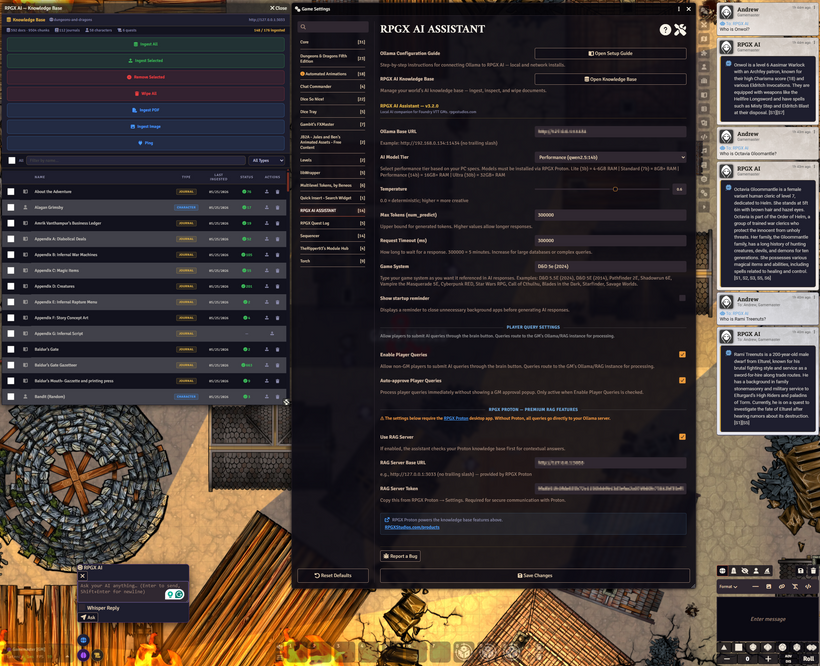
The RPGX AI Assistant brings a fully local, customizable AI into Foundry Virtual Tabletop. It connects directly to your locally hosted Ollama instance and any compatible large language model (LLM) — allowing Game Masters and players to integrate intelligent conversation, rule/lore checks, or creative narration directly into their tabletop sessions.
This module is designed to work independently (requiring only Foundry VTT and Ollama) or can be paired with the RPGX Proton application for easy RAG server integration and management to retain world-specific rules, lore, and other contextual data.
Overview
The RPGX AI Assistant provides seamless AI integration for Foundry, offering a responsive in-game assistant that can assist with story generation, NPC dialogue, rules clarifications, and scene narration all through a private, locally hosted model.
With your preferred LLM running via Ollama (such as Qwen 2.5, Llama 3, Mistral, or others), this module lets you:
-
💬 Chat directly with AI inside Foundry’s chat window
-
🧠 Generate story ideas, lore, NPC dialogue and reactions, and rules clarifications
-
⚙️ Customize your AI’s tone, temperature, and token limits
-
🔒 Run 100% locally — no API keys, no cloud services, no data leaks
-
🪶 Optionally connect to RPGX Proton for persistent, world-specific memory
Core Features
Local AI Integration via Ollama
-
Connects directly to your local Ollama instance (http://127.0.0.1:11434).
- Can connect to remote Ollama instances with manual network and CORS configuration.
-
Supports any installed model (Qwen, Llama, Mistral, Phi, etc).
-
No API keys or external servers required.
Foundry Chat Integration
-
Use a simple query window to communicate with your chosen model.
-
Responses appear natively in the Foundry chat log with Markdown formatting.
-
Can be set to GM-Only or full table access.
Customizable Model Settings
-
Set temperature, max tokens, timeout duration, and game system prompt.
-
Tune your AI for creativity, precision, or balance based on your game style.
Optional World Knowledge Support
- Can be pointed at a user-built and managed RAG server.
-
Pair with RPGX Proton for enhanced RAG functionality, world notes, integration, broadcasting, and AI functionality.
-
When paired, Proton can access your ingested journals and notes for lore-aware responses.
-
Runs perfectly fine without RPGX Proton application; this is an optional premium feature.
Example Prompts
-
“Describe a mysterious artifact discovered in the ruins beneath Elturel.”
-
“Write NPC dialogue for a suspicious merchant with a hidden agenda.”
-
“Summarize what happened in the last three sessions.”
-
“Create a D&D-style encounter in a fog-covered valley.”
Troubleshooting & FAQ
Q: The model runs too slowly or times out.
A: There should be no timeout due to streaming responses. If the model is "thinking" too long, you should make sure you are not using any extra background resources that aren't needed on your Ollama machine. You may also want to try a simpler language model. Consult the included guide to see what model will work best witho your setup.
Q: Do I need the Librarian module?
A: No — This module is obsolete and is no longer compatible with the latest version of RPGX AI Assistant.
Q: Can I connect to an online API model?
A: The Assistant is optimized for Ollama, but technically compatible with any local REST-based LLM endpoint. However, RPGX only supports Ollama, which comes packaged with RPGX Proton.
Q: My current setup works the way I want. Should I update?
A: The latest version of the assistant is not compatible with previous RAG models. If you have a custom RAG setup and it is working, back up your module setup into a separate folder before updating so you can roll back if needed. The module has been rebuilt from the ground up, and the structures are not the same. However, the newest version of this module is way more powerful and has been confirmed to work on earlier versions of FoundryVTT all the way back to v10.
Q: The AI doesn't seem to be finding world contextual answers.
A: First make sure "Use RAG" is checked in the module setting. If that doesn't solve the issue, make sure the information you are ingesting to your RAG is being ingested (shows a green check mark).
-
Works with any Foundry system (D&D 5e, Pathfinder, Starfinder, Cyberpunk RED, etc.)
-
System-agnostic — uses Foundry’s core chat API for communication.
License
Creative Commons Attribution-NonCommercial 4.0 International (CC BY-NC 4.0) License

