


| Latest version | 1.1.2 |
|---|---|
| Minimum Core | 14 |
| Compatible Core | 14 |
| Last updated | 2 months ago |
| Created | 2 months ago |
| Authors | |
| Languages |
|
| Systems |
Dnd5e |
| Project source | Project URL |
| Report bugs | Bug tracker URL |
| Read-me | Readme URL |
| Changelog | Changelog URL |
| License | License URL |
A Foundry VTT module for the D&D 5e system. Each player writes their own reminder text and chooses when it fires. When that moment arrives in play, the reminder posts to chat for the character they own. You write the text and pick the trigger, and the module shows it back to you at that point in play.
- Foundry VTT v13 or later (verified on v14)
- D&D 5e system v5.0.0 or later, verified on v5.3.3 (the roll and damage triggers read the activity-based system hook signatures stabilized in 5.x; the combat-flow triggers work without them)
Manifest URL:
https://github.com/miniaturepancake/foundryvtt-corns-combat-reminders/releases/latest/download/module.json
Each player opens Configure Settings, finds the Corn's Combat Reminders section, and clicks Configure Reminders. In the window, click Add Reminder to get a row, type the reminder text, and pick a trigger from the dropdown. Add as many as you want, then Save. Two rows can share a trigger.
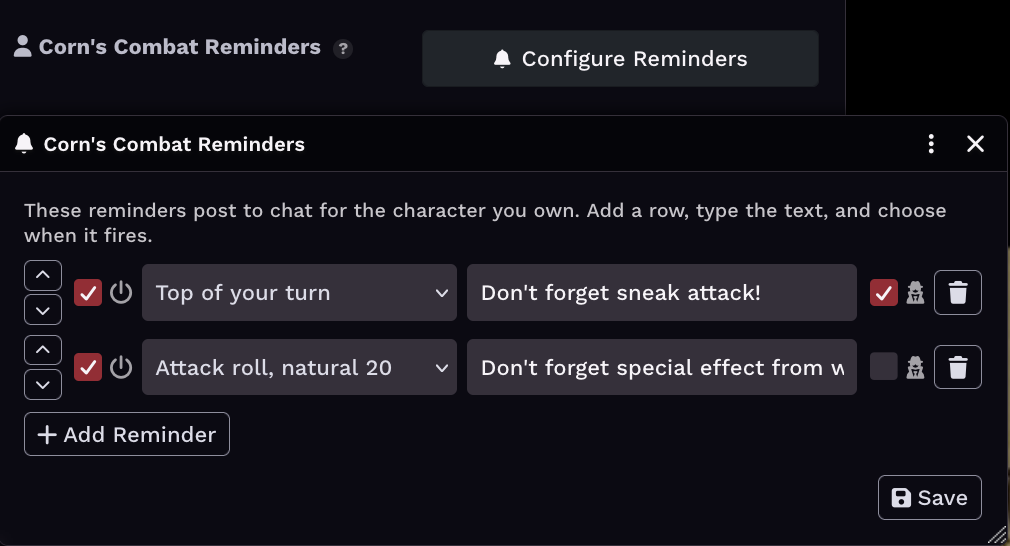
Each row has a few controls. The power toggle on the left silences a reminder without deleting it, so a saved-but-off reminder never posts. The secret-agent toggle on the right whispers that reminder privately to you instead of posting it to public chat. The up and down chevrons reorder rows. Pressing Enter in a text field saves and closes, the same as clicking Save.
Reminders are stored per browser for the logged-in user, so a player configures their own list and it does not affect anyone else.
Combat flow
- Start of combat
- Start of round
- Top of your turn
- End of your turn
- End of combat
Your rolls
- On your attack roll
- Attack roll, natural 20
- Attack roll, natural 1
- On your damage roll
- On a saving throw
- On an ability check
- On a skill check
- On a death save
- On rolling initiative
Happens to you
- When you are damaged
- When you drop to 0 HP
- When you fall below half HP
- When you are healed
Rest
- After a short rest
- After a long rest
- A reminder posts from one client only, so it fires once. The acting character's first active player owner posts. If no player owner is logged in (a GM-owned actor or NPC, or a solo GM session), the first active GM posts instead, using that GM's own reminder list.
- The list is tied to the user, not the character. A player running two characters gets the same reminders on both.
- "When you are damaged" keys off the system's HP-change hooks, so it covers damage applied through the system and direct HP changes alike. The natural 20, natural 1, dropped-to-0, and below-half variants are read straight from the die or the HP value, so they are reliable.
- Hit-or-miss against a target is intentionally not a trigger. Core 5e does not resolve that authoritatively without a heavy automation dependency, which this module avoids. "When you are damaged" covers most of that intent.
- If a GM rolls on behalf of a player's character, the reminder may not post, since the posting client is the player's, not the GM's.

