


| Latest version | 14.5.0 |
|---|---|
| Minimum Core | 14.367 |
| Compatible Core | 14.370 |
| Last updated | 2 days ago |
| Created | 1 month ago |
| Authors | |
| Languages |
|
| Systems |
Dnd5e |
| Project source | Project URL |
| Report bugs | Bug tracker URL |
| Read-me | Readme URL |
| Changelog | Changelog URL |
| License | License URL |
5e Activity Importer
A premium Bakshi’s Bazaar module for Foundry VTT.





Give your homebrew items working attacks, saves, healing and effects, checked before anything changes.
Preview · Quick Start · Features · Installation · Changelog · Compatibility · API · Free Modules · Roadmap · Community · AI Use · License
Feature Index
| Feature | What it does |
|---|---|
| Fill In a Template | A template for every activity type: attacks, saves, healing, spells, effects and conditions. Every setting has its own field, so nothing is guessed. |
| Hand the Templates to a Chatbot | Claude, ChatGPT or another chatbot can fill the templates in from an item's rules text. |
| Check Before It Lands | See every activity and effect first, test the import against your world, and undo it later in the session. |
| Complete Items | With the free Item Importer, import a whole Item with its mechanics in one go. |
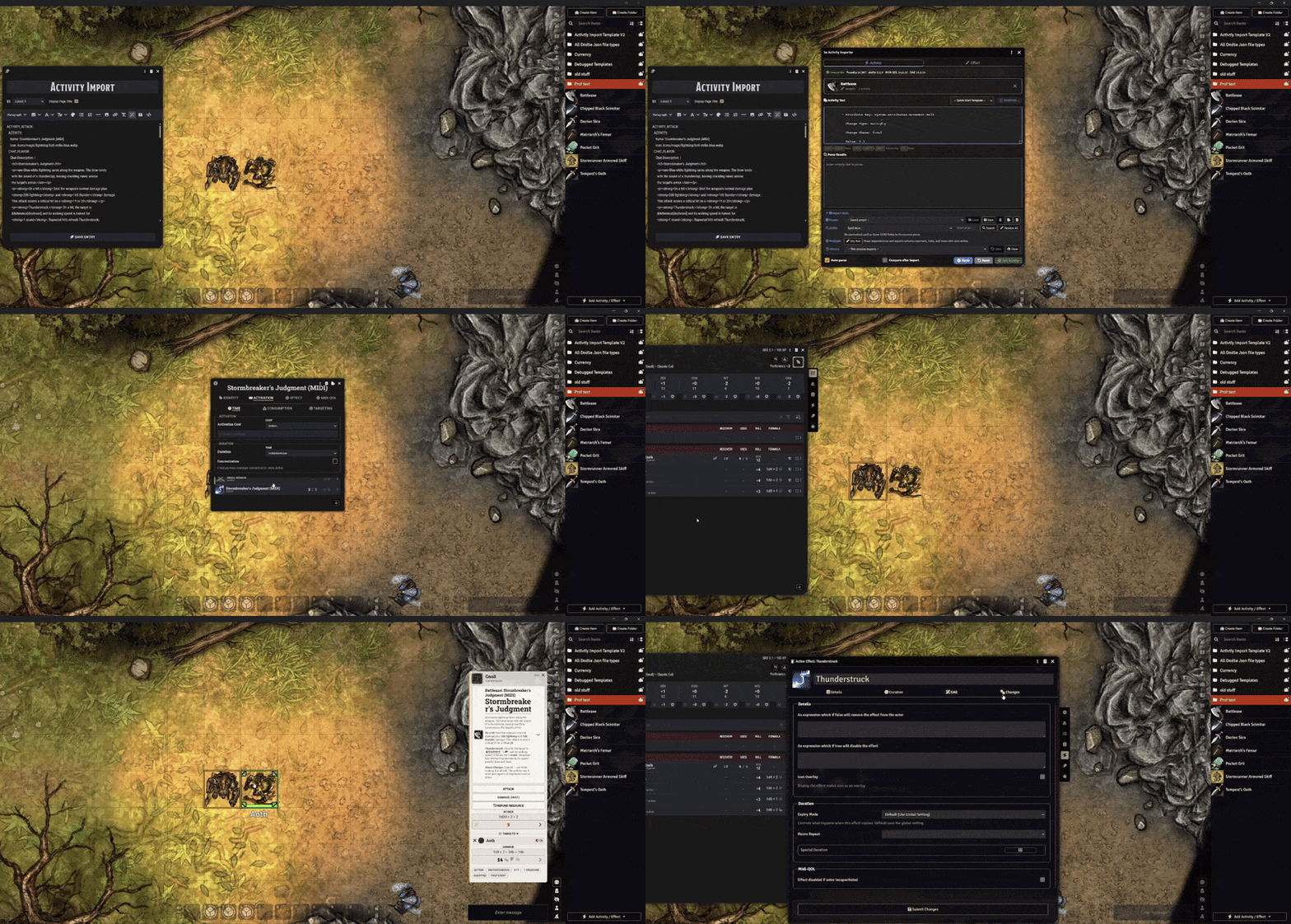
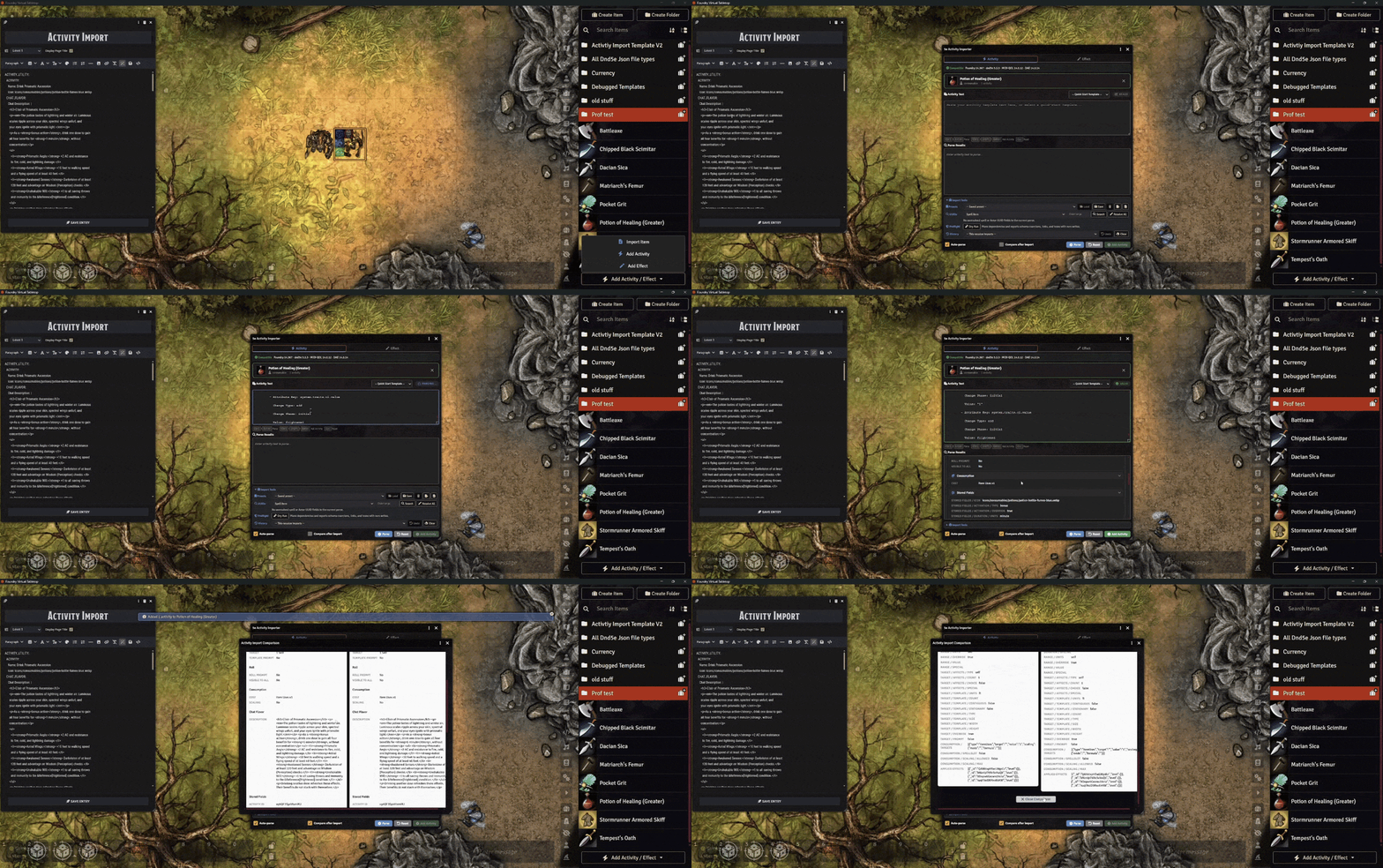
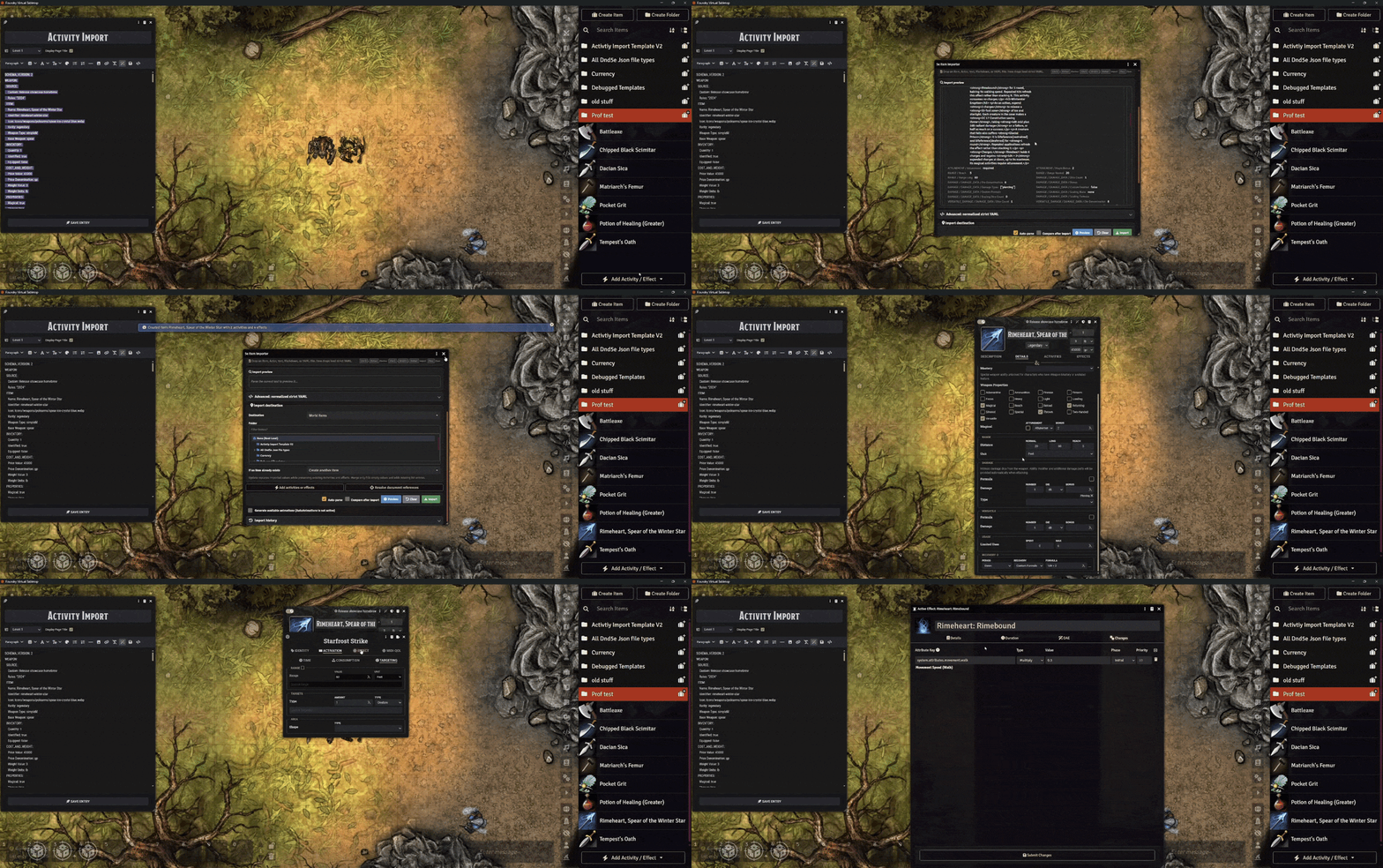
Pick a template or recipe and fill it in. Preview and Check import show exactly what will change before anything is written.
Preview
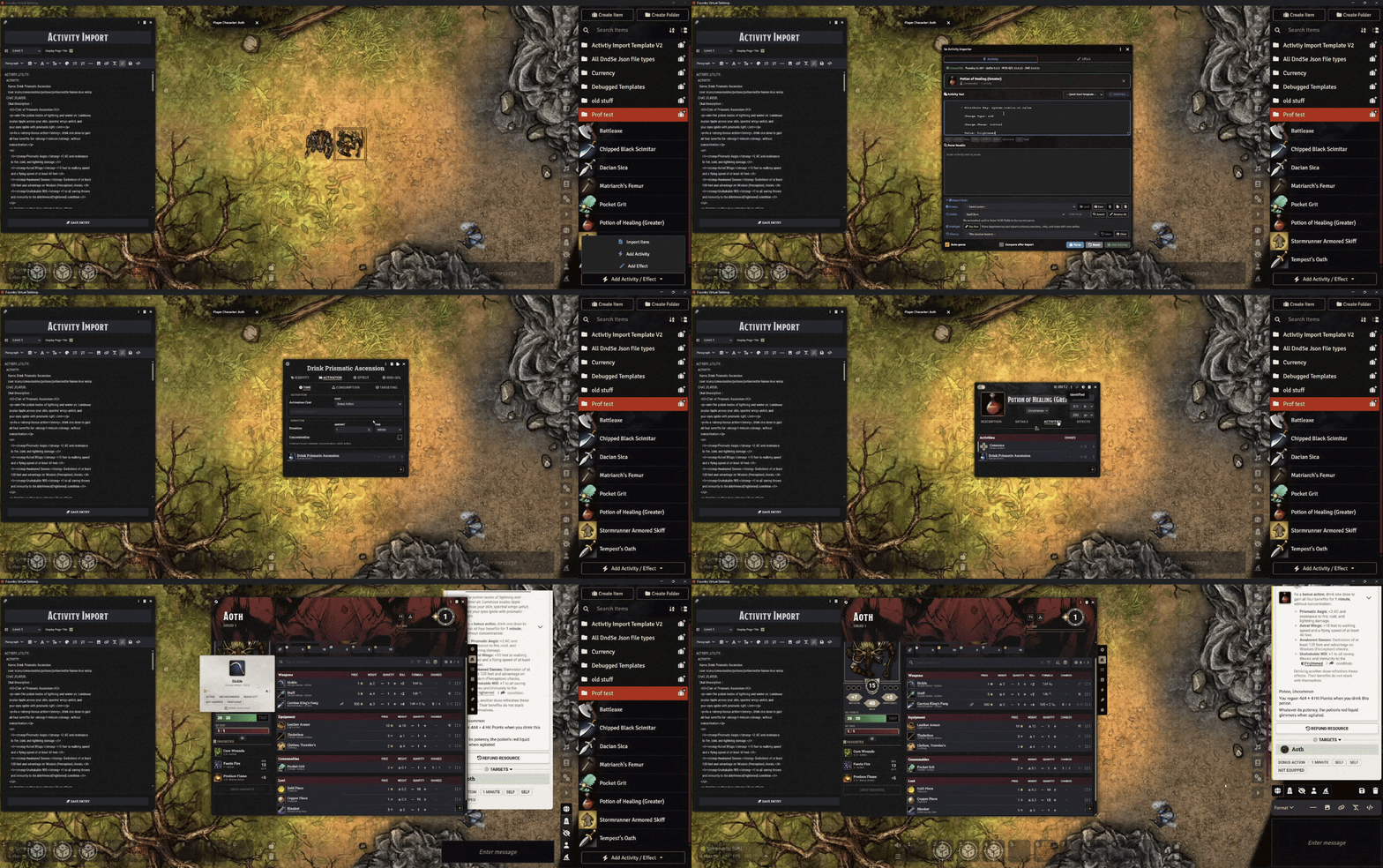
Quick Start
- Open the Items Directory dropdown and choose Add Activity or Add Effect.
- Drop the target Item into the window.
- Pick a quick-start template and fill it in, or paste your YAML.
- Click Preview and look over the cards. Link any spell or creature the preview asks for.
- Click Check import to test it without changing the Item, then Add Activity.
Ctrl+Enter previews and Ctrl+Shift+Enter adds. The import-window guide (docs/import-window.md in the installed module) covers presets, view options and resets.
Features
Fill In a Template
Choose Add Activity or Add Effect from the Items Directory menu, drop an Item into the window, and pick a template. There is one for every activity type, Attack, Save, Damage, Heal, Utility, Check, Cast, Enchant, Summon, Transform, Forward and Teleport, and for effects and conditions, such as a cursed ring that leaves its wearer poisoned. Every setting has its own field, so nothing is guessed, and every type has a plain template and a MIDI-QOL one.
Ready-made recipes cover common jobs, such as a roll bonus against one creature type, an AC formula, or one effect shared by several activities.
Hand the Templates to a Chatbot
Because every setting has its own field that must be filled exactly correct, chatbots like Claude and ChatGPT fill the templates in correctly and quickly, for single activities, complete Items, or batches of them. Give them the free Importer LLM Pack, which covers both importers and the optional MIDI-QOL settings. It forces the AI to only give you back info that Foundry can accept and in the right order. For best results:
- Create a chat or project in your chatbot, a Claude or ChatGPT Project works well, paste the pack's project instructions, and upload the files its README lists for your modules.
- Paste the rules text and ask for a complete Item along with what you want said item to do, or for the activities of an Item you already have.
- Paste the answer into Import Item or Add Activity and click Preview.
- If anything is flagged, Copy problems gives the chatbot exactly what to fix.
You use your own chatbot; the module never contacts one. Preview and Check import show exactly what will be added and flag anything the importer can't use before it reaches your world. The import window links the pack for your installed version.
Check Before It Lands
Preview shows each activity and effect as a card, and Check import tests the import against your world without changing the Item. A misspelled field is named with a suggestion, and the rest still imports. Copy problems copies whatever is flagged together with your YAML.
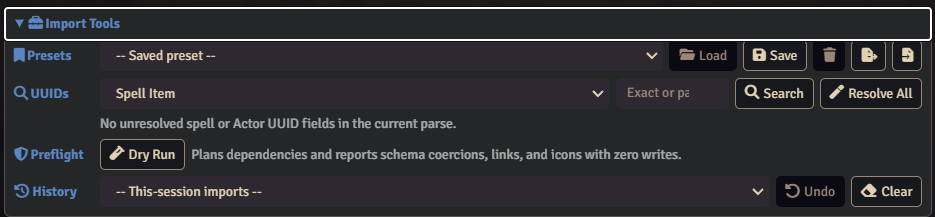
Cast, Summon and Transform need a spell or a creature: search for it, drag it in, or let Resolve All link names with one clear match. View options > Show Import History keeps this session's imports with Undo, and Compare after import shows what you wrote beside what was saved. The import-window guide (docs/import-window.md in the installed module) covers every control.
Complete Items
With the free 5e Item Importer (14.4.0 or later), one import creates the whole Item with its activities and effects, including feats and monster traits, and Copy Full Item YAML exports it the same way. Item Importer also reads stat blocks pasted from a book or PDF, so you can create the Item from its printed text and then add its mechanics here. Install it from Foundry's Add-on Modules browser. Activity Importer also works on its own, on Items you already have.
More Details
Writing the YAML
Each activity starts with a line such as ACTIVITY_ATTACK:, and an effect with EFFECT:. Put several in one paste with a --- line between them; a code fence around the YAML is fine. The template guide (templates/README.md in the installed module) shows which template fits which rule, the examples (docs/examples/README.md in the installed module) are ready to import, and the full references are in Base Activity Templates (templates/Base Activity Templates/ in the installed module) and Midi QOL Activity Templates (templates/Midi QOL Activity Templates/ in the installed module). For a chatbot, use the Importer LLM Pack instead of single templates.
Linked activities (Forward)
A Forward activity triggers another activity on the same Item. Name the activity it should trigger, and the importer links the two and creates them in the right order, even when both are in the same paste. A missing or ambiguous link, a loop, or a Forward that points at another Forward is reported before anything is written.
Limits
- dnd5e's Bastion Order activity is not supported.
- Loot and containers take passive effects but no activities.
- A Check activity uses one ability and DC for all its skills or tools; use separate activities for different DCs.
- Some MIDI-QOL fields are missing from previews and comparisons; check them on the activity or effect sheet.
- Export refuses an activity it can't write out completely, such as one carrying another module's data, instead of dropping part of it.
- Undo removes the activities and effects an import created; it is not a snapshot of the Item, so keep world backups. If an import fails partway, what it created is removed.
Settings & local storage
Open Configure Settings → 5e Activity Importer.
| Setting | Scope | Default / purpose |
|---|---|---|
| Debug Logging (Advanced) | Client | Off; detailed troubleshooting logs |
| Show Parse Results | Client | Off; log parsed activity/effect data |
| Show YAML Normalization Warnings | Client | Off; report input normalization |
| Auto-Parse on Input | Client | On; parse while typing |
| Auto-Parse Delay (ms) | Client | 1000; adjustable from 250 to 3000 |
Presets use a hidden client setting and stay with the current browser profile. Export them before moving to another browser. Import history is memory-only and clears on reload.
Troubleshooting
Confirm the world uses a supported dnd5e version and that Activity Importer is enabled, then reload. The Items Directory controls require Create Items permission; the target Item must also be editable. Locked compendia cannot be updated.
If parsing fails, check YAML indentation, replace reference placeholders, and separate repeated roots with ---. Review each error before importing. For unresolved Cast, Summon, or Transform links, search for or drag the actual document; Resolve All leaves a name unresolved if more than one document matches.
For more detail, enable Debug Logging (Advanced) and inspect the browser console. Test suspected integration conflicts in a separate test world with only the modules needed for the workflow.
The native catalog guide (docs/native-field-catalog.md in the installed module) and MIDI catalog guide (docs/midi-field-catalog.md in the installed module) list every field the importer knows, which helps when a value doesn't come through.
Installation
- Join Bazaar Patron.
- Link your Patreon account to your Foundry VTT account.
- Install 5e Activity Importer through Foundry Premium Content.
- Open your dnd5e world, enable 5e Activity Importer in Manage Modules, and reload connected clients.
Your Bazaar Patron membership includes:
- Every Bakshi’s Bazaar premium module while your membership is active, including ongoing updates and new modules as they're added.
- Patron-only channels in the Bakshi’s Bazaar Discord.
- Priority module support.
- A direct place to share feedback and feature suggestions. Suggestions are welcome and taken seriously, but development priorities remain at my discretion.
Updates install from Foundry's Add-on Modules screen like any other module. Release notes are in the changelog. Updates are also announced in the Bakshi’s Bazaar Discord.
Enable the free 5e Item Importer as well to create Items with activities and effects. MIDI-QOL and DAE are optional integrations for the templates and fields that use them.
| Requirement | Version |
|---|---|
| Foundry VTT | v14 only, build 14.367 or later; verified on 14.370 |
| dnd5e | 6.0.6 minimum; verified on 6.0.6 and 6.1.0 |
| Additional modules | None required for base activity/effect import |
| 5e Item Importer | Optional; 14.4.0 minimum |
Compatibility
Foundry VTT: v14 only, build 14.367 or later; verified on 14.370. Foundry 13 is not supported by this release line.
Game system: dnd5e 6.0.6 minimum; tested on 6.0.6 and 6.1.0.
Optional modules: 5e Item Importer 14.4.0 or later, for complete Items. MIDI-QOL and DAE for the MIDI templates, tested with MIDI-QOL 14.6.11 and DAE 14.6.9 on dnd5e 6.0.6.
Integration limits
MIDI-QOL 14.6.11 does not run on dnd5e 6.1, so worlds that rely on it stay on dnd5e 6.0.6 for now. Where MIDI-QOL is not active, YAML with MIDI-QOL settings still imports: the activities are created without those settings, and the preview lists what was left out.
MIDI-QOL and DAE settings import and export as written, including macro names, but the importer only checks the data, so test the automation in your own world. Export refuses settings it hasn't been checked against instead of dropping them; see the automation reference (docs/automation-schema-4.md in the installed module).
Complete Items need Item Importer 14.4.0 or later. With an older Item Importer those steps show an update message, while activities, effects and Items still import on their own. Other sheet replacements and module combinations haven't all been tested.
Developer API
The optional free 5e Item Importer is the supported companion for creating complete Items with activities and effects. The internal interfaces used by that integration are not offered as a supported public API for third-party modules or macros.
For other integration requests, describe the workflow you want to support on the Bakshi’s Bazaar Discord.
Free Modules
I also make free modules. Install them from Foundry's Add-on Modules browser.
| Module | What it adds |
|---|---|
| 5e Item Importer | Turns D&D 5e stat blocks or YAML into Items. See Item Importer Integration. |
| Show of Hands | Middle-mouse targeting, marquee selection, and custom shared cursors. |
| Squad Combat Initiative | Runs big dnd5e fights as squads with group initiative, captains, and morale. |
| The Sound of Silence | Internal loops, crossfades, silence gaps, and soundscapes for Foundry playlists. |
Roadmap
I plan updates around campaign needs, reported issues, and ideas I want to build. Share a feature request on Discord with an example of what you are importing and what you would like to do.
Suggestions are not promises or commissions.
Community
Support is handled through the Bakshi’s Bazaar Discord. Patrons receive priority support, without guaranteed response or resolution times.
- Report bugs — Report on Discord. Include your Foundry version, 5e Activity Importer version, game system and version, steps to reproduce, console logs, and screenshots or short clips when useful.
- Request features — tell me what you were trying to import and what you wish the module could do.
- Follow updates — check the Bakshi’s Bazaar Discord for changes and compatibility notes.
AI-Assisted Development
This module is developed and maintained with the help of AI-assisted tools for coding, debugging, and testing.
I care about the quality, behavior, performance, security, and long-term maintainability of this module, and I take full responsibility for what ships. AI assistance does not replace review, testing, debugging, or security and design judgment.
AI is used here as a tool under my direction to make Foundry better and allow for long term mod support while still having a life outside of building and maintaining my free and premium modules.
If you are uncomfortable using software developed with AI-assisted tools, this module is not for you.
⚖️ License & Permissions
Premium License
5e Activity Importer is a paid, premium module from Bakshi’s Bazaar. Refer to the shipped LICENSE.txt (LICENSE.txt in the installed module) for usage and redistribution permissions. Bundled js-yaml retains its MIT license in THIRD_PARTY_NOTICES.txt (THIRD_PARTY_NOTICES.txt in the installed module).
Commercial Licensing
For bundling, commercial integrations, or custom feature development, contact me to discuss licensing and permission.
Contact
For licensing inquiries or permission slips:
- Discord:
GnollStack(Preferred) - Email:
[email protected]
Author: GnollStack · Compatibility: Foundry VTT v14 / dnd5e 6.0.6 verified
