

| Latest version | 0.13.2 |
|---|---|
| Minimum Core | 14 |
| Compatible Core | 14.369 |
| Last updated | 4 hours ago |
| Created | 4 hours ago |
| Authors | |
| Languages |
English |
| Systems | All systems |
| Project source | Project URL |
| Report bugs | Bug tracker URL |
| License | License URL |

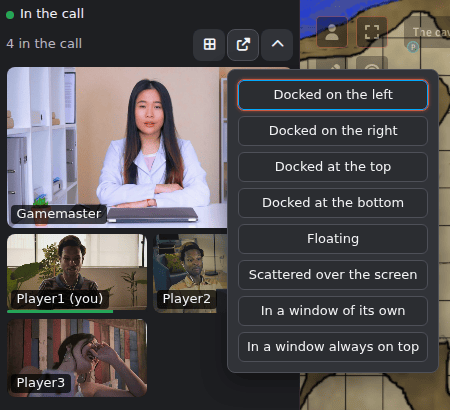
The camera dock for Modular A/V: a dock for everyone's cameras, a voice panel, a voice and video settings window, and badges in Foundry's player list. Requires Modular A/V (modular-av). Without the dock, Foundry's own camera dock shows the call.
Setting it up
- Install and enable it in your world along with Modular A/V and a service module (LiveKit, P2P or Jitsi).
- In Modular A/V's settings, choose the dock under Cameras shown by (for the world, and per player) and Voice and video settings window. Applying a plan that includes the dock in Plan your modules sets both for you.
What it does
- Where the cameras go: docked beside Foundry's sidebar or floating, as a grid or with one player in focus. It can also go in a window of its own, which you can drag to another monitor and make full screen, or in an always-on-top window (Picture-in-Picture, Chrome and Edge only).
- Scattered over the screen: each camera on its own, against a corner or an edge or wherever you drag it, and resized as you like, by mouse or keyboard. Foundry's sidebar, controls, hotbar and chat stay clear. A GM can save the arrangement as a scene's layout for everyone. A player who moves a camera there keeps their own arrangement, and can go back to the scene's.
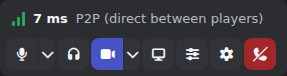
- Voice panel: mute, deafen, camera, screen sharing, your input level and sensitivity, and the effects other modules add (noise cancellation, camera background, the audio mixer).
- Shared screens: each one gets a tile of its own after that player's camera, shown whole. Double-click one to show it large.
- Players: shows who is speaking, muted, deafened or blocked. Each player has a volume of their own (up to 200%, through a limiter), and GMs get a menu to hide a player or block their voice or video.
- Themes: other modules add themes, such as Modular A/V: Vines theme. Each player picks one in Voice & Video Settings, under Appearance, or follows the world's. A theme only changes the look: mute, deafen, speaking, blocked and connection states always show.
- Works with a keyboard and a screen reader.
Good to know
- Requires Foundry v14 and Modular A/V. Tested in Chromium browsers.
- The dock never touches your microphone, camera or the call's service. It shows Modular A/V's state and passes your clicks on to it.
- Network: none. Storage: each player's layout and theme with their Foundry user (so it follows them across devices), the world's theme and a GM's scene layouts in world settings, and one choice about this device in the browser.
- Coming from LiveKit AVClient? Your layout comes along. See the migration guide below.
- License: MIT. It bundles no third-party code.
Links
Subscribe
Login
Please login to comment
0 Comments