

| Latest version | 1.0.0 |
|---|---|
| Minimum Core | 14 |
| Compatible Core | 14 |
| Last updated | 11 hours ago |
| Created | 11 hours ago |
| Authors | |
| Languages |
Deutsch English Español Français Italiano Português (Brasil) |
| Systems | All systems |
| Project source | Project URL |
| Report bugs | Bug tracker URL |
The English version is available below.
Evilbram Messenger
Des messages privés, sans interrompre la partie
Un joueur veut poser discrètement une question au MJ ? Transmettre une information à un seul personnage ? Préparer un coup en douce avec un autre joueur ?
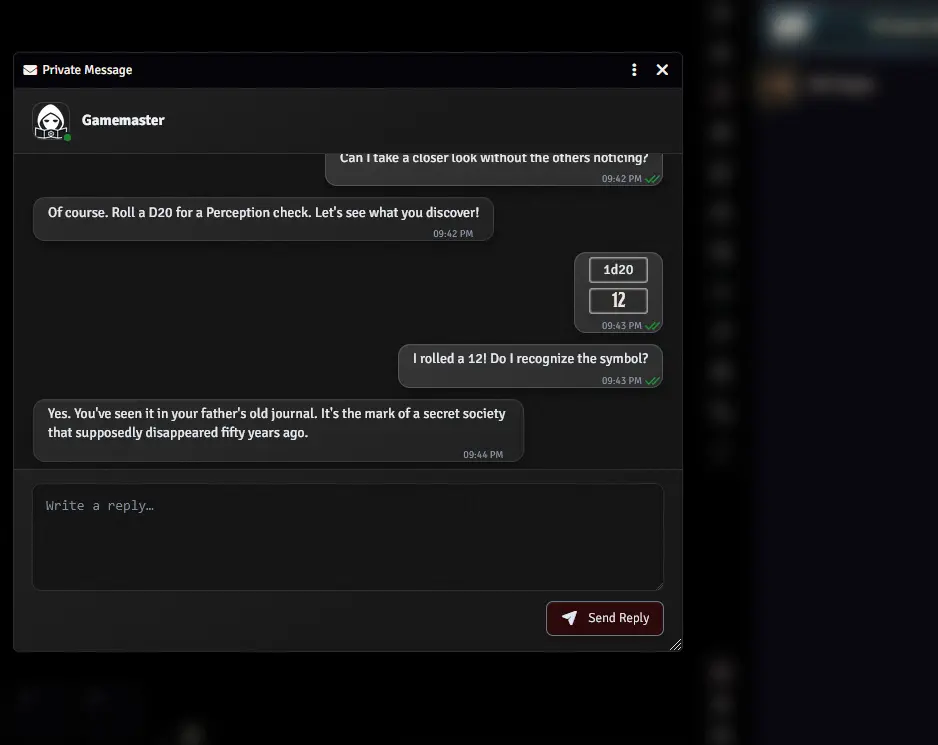
Evilbram Messenger ajoute à Foundry VTT une véritable fenêtre de messagerie privée, pensée pour les parties de jeu de rôle. Plus besoin de chercher ses échanges au milieu du chat général : chaque contact dispose de sa conversation et de son historique.
L'interface reste volontairement sobre pour s'intégrer aussi bien à une enquête contemporaine qu'à une aventure médiévale ou de science-fiction.
Ce que propose le module
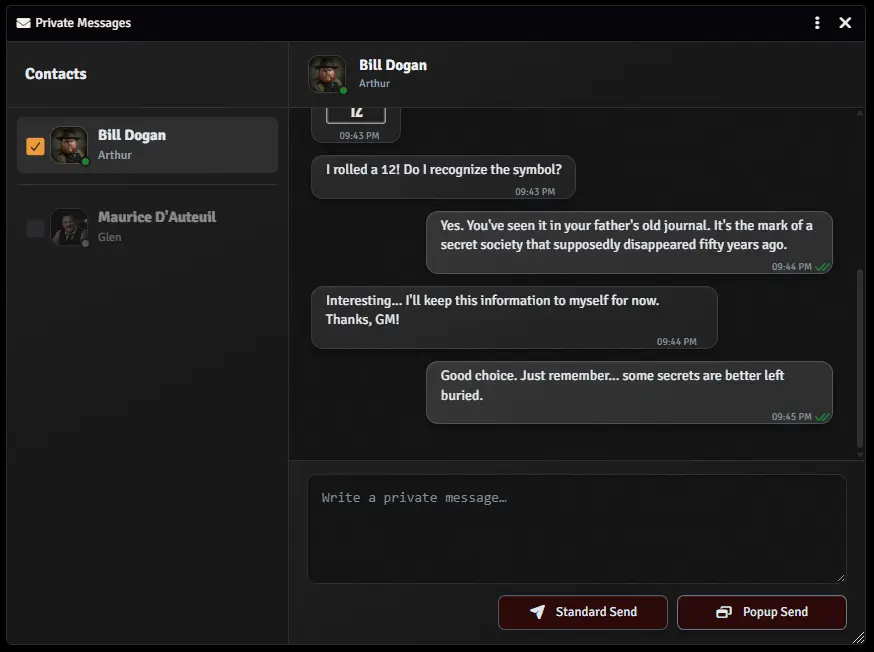
- Une messagerie dédiée : retrouvez les échanges privés avec chaque joueur ou MJ, dans une fenêtre claire et facile à utiliser.
- Deux façons d'envoyer un MP : un envoi classique ou un envoi en popup, qui ouvre une fenêtre de message chez le destinataire.
- Des contacts faciles à repérer : utilisateurs connectés en premier, contacts hors ligne grisés, portrait du personnage attribué au compte et icône dédiée au MJ.
- Un indicateur « Vu » : sachez quand le destinataire a ouvert votre conversation dans Evilbram Messenger.
- Un indicateur « écrit… » : trois petits points animés vous signalent qu'un interlocuteur prépare une réponse.
- Un historique par conversation : relisez vos précédents échanges sans parcourir le chat général.
- Des échanges avec plusieurs destinataires : cochez plusieurs contacts connectés pour envoyer votre message à chacun d'eux.
- Des jets de dés privés : utilisez les commandes
/ret/rolldirectement dans votre message.
Comment l'utiliser ?
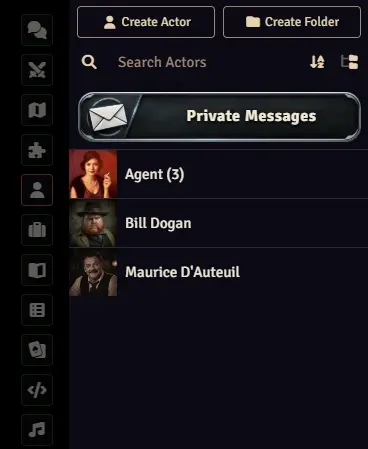
- Ouvrez l'onglet Personnages (Actors) dans la barre latérale de Foundry, puis cliquez sur le bouton Messages privés.
- Choisissez un contact dans la liste à gauche. Il est automatiquement sélectionné comme destinataire. Vous pouvez aussi cocher d'autres contacts pour un envoi multiple.
- Rédigez votre message, puis cliquez sur Envoi classique ou Envoi Popup.
- Poursuivez l'échange dans la conversation : les nouveaux messages, les accusés de lecture et l'indicateur de saisie s'y affichent directement.
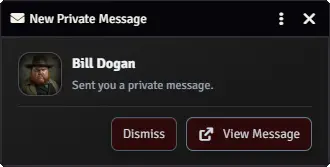
Le MJ peut également ouvrir le centre des MP depuis les contrôles de scène. Lorsqu'il reçoit un MP classique sans avoir le centre ouvert, une petite notification lui propose d'afficher le message.
Bon à savoir
- Le module fonctionne avec les messages privés natifs de Foundry : l'historique dépend donc des messages conservés dans le chat de votre monde. Un nettoyage de cet historique peut aussi supprimer d'anciens MP.
- Les destinataires doivent être connectés pour recevoir un nouvel envoi. Les conversations avec les contacts hors ligne restent consultables.
- Le statut « Vu » apparaît lorsque la conversation est ouverte dans Evilbram Messenger (fenêtre principale ou popup), et non simplement parce qu'un message a été affiché dans le chat classique.
- Evil Toolbox n'est pas nécessaire : Evilbram Messenger est un module autonome.
Compatibilité : Foundry VTT v14.
Langues : français, anglais, allemand, espagnol, italien et portugais brésilien. Le module suit la langue choisie dans Foundry ; l'anglais est utilisé si cette langue n'est pas proposée.
Projet et signalement de problèmes : GitHub — Evilbram Messenger · Signaler un problème
Private messages without interrupting the game
Need to ask the GM a discreet question? Share a clue with just one player? Secretly plan something with another character?
Evilbram Messenger adds a dedicated private messaging window to Foundry VTT, designed for tabletop role-playing sessions. Instead of searching through the main chat, you can keep each private conversation and its history in one convenient place.
Its understated design fits a wide range of settings, from fantasy adventures and modern investigations to science fiction.
Features
- A dedicated messenger: access private conversations with each player or GM through a clear, easy-to-use window.
- Two ways to send a message: choose Standard Send or Popup Send, which opens a message window for the recipient.
- Clear contact list: online users appear first, offline contacts are dimmed, assigned character portraits are displayed, and GMs have their own icon.
- Read receipts: a Seen indicator appears when the recipient opens your conversation in Evilbram Messenger.
- Typing indicator: three animated dots let you know when someone is composing a reply.
- Conversation history: revisit earlier private messages without digging through the main chat.
- Multiple recipients: select several online contacts to send each of them a private message.
- Private dice rolls: enter
/ror/rollcommands directly in a message.
Getting started
- Open the Actors tab in Foundry's sidebar and click the Private Messages button.
- Choose a contact from the list on the left. That contact is automatically selected as the recipient. You can also tick additional contacts to send to multiple people.
- Write your message, then choose Standard Send or Popup Send.
- Continue the conversation: new messages, read receipts, and typing indicators appear directly in the conversation window.
GMs can also open the messenger from the scene controls. When a classic private message arrives while the messenger is closed, a small notification lets the GM open it.
Good to know
- The module uses Foundry's native private chat messages, so conversation history depends on the messages kept in your world. Clearing chat history may also remove older private messages.
- Recipients must be online to receive a new message. You can still review conversations with offline contacts.
- A message is marked Seen when its conversation is opened in Evilbram Messenger (main window or popup), not just when it appears in Foundry's regular chat.
- Evil Toolbox is not required: Evilbram Messenger works as a standalone module.
Compatibility: Foundry VTT v14.
Languages: English, French, German, Spanish, Italian, and Brazilian Portuguese. The module follows Foundry's selected language and falls back to English when that language is not supported.
Project and bug reports: GitHub — Evilbram Messenger · Report an issue