


| Latest version | 1.3.0 |
|---|---|
| Minimum Core | 14 |
| Compatible Core | 14 |
| Last updated | 7 hours ago |
| Created | 7 hours ago |
| Authors | |
| Languages |
English |
| Systems | All systems |
| Project source | Project URL |
| Read-me | Readme URL |
| License | License URL |
Glimpse: Map Note Previews
Hover a place on the map. See what it looks like, hear what it sounds like, learn what it is. Smelling locations is not yet supported though.
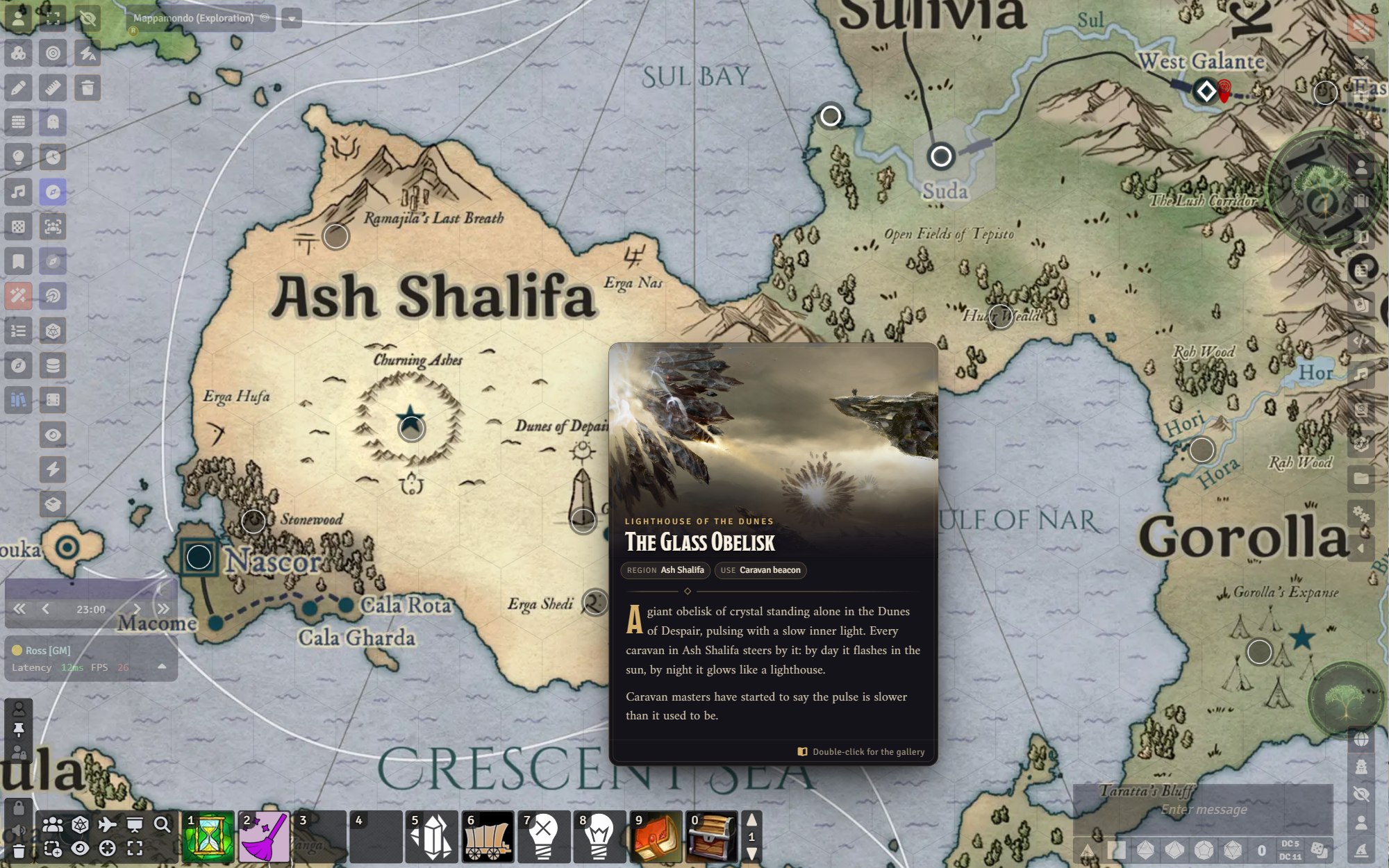
Glimpse is a system-agnostic module for Foundry VTT that turns the map notes of your world into location cards. Your players hover a pin on the map and get the mood of the place at a glance: its landscape, name, a few facts and the opening lines from your journal, without opening another window. Double-clicking opens a full-screen gallery and a longer description, which you can push to every player's screen when introducing a location or a specific spot in your map.
Glimpse's original purpose was to help me showcase the setting to my players easily through images and text, but you might find some other creative uses for it. It works with the journals you already have, and is permission-aware, so the "secret" GM notes you add to them are not shown to the players (but are still easily accessible by the GM).
So far I've mostly used it for my world map but you can use it to setup easily accessible notes on a dungeon map, city maps, landing pages, or vistas.
Requires Foundry VTT v14.
Installation
In Foundry's Add-on Modules tab, choose Install Module and paste this manifest URL:
https://github.com/reactiveoxygenspecies/glimpse-map-notes/releases/latest/download/module.jsonThen enable Glimpse: Map Note Previews in your world.
Setting up a location
Glimpse works with the journals you already have: hover any map note and it builds a card from the linked journal. To fully populate the cards:
- Give the journal entry one or more image pages to set the mood, and a text page for the description. Images pasted inside text pages are picked up too. Importantly, only the first text page is shown in the glimpse, so if the entry has several, drag them into a different order in the journal to change which one the card uses. Each viewer gets the first text page they are allowed to see, so if a GM-only page is on top, you see it while players see the next one.
- Link a map note to the journal entry. Link it to a single page to show just that page.
- Give players at least Limited permission to see images, or Observer to also read the text. Text paragraphs can be set as "secret" and will not be displayed to players.
Every note's configuration gets a Glimpse Preview section to fine-tune the card, with a live preview of your unsaved changes:
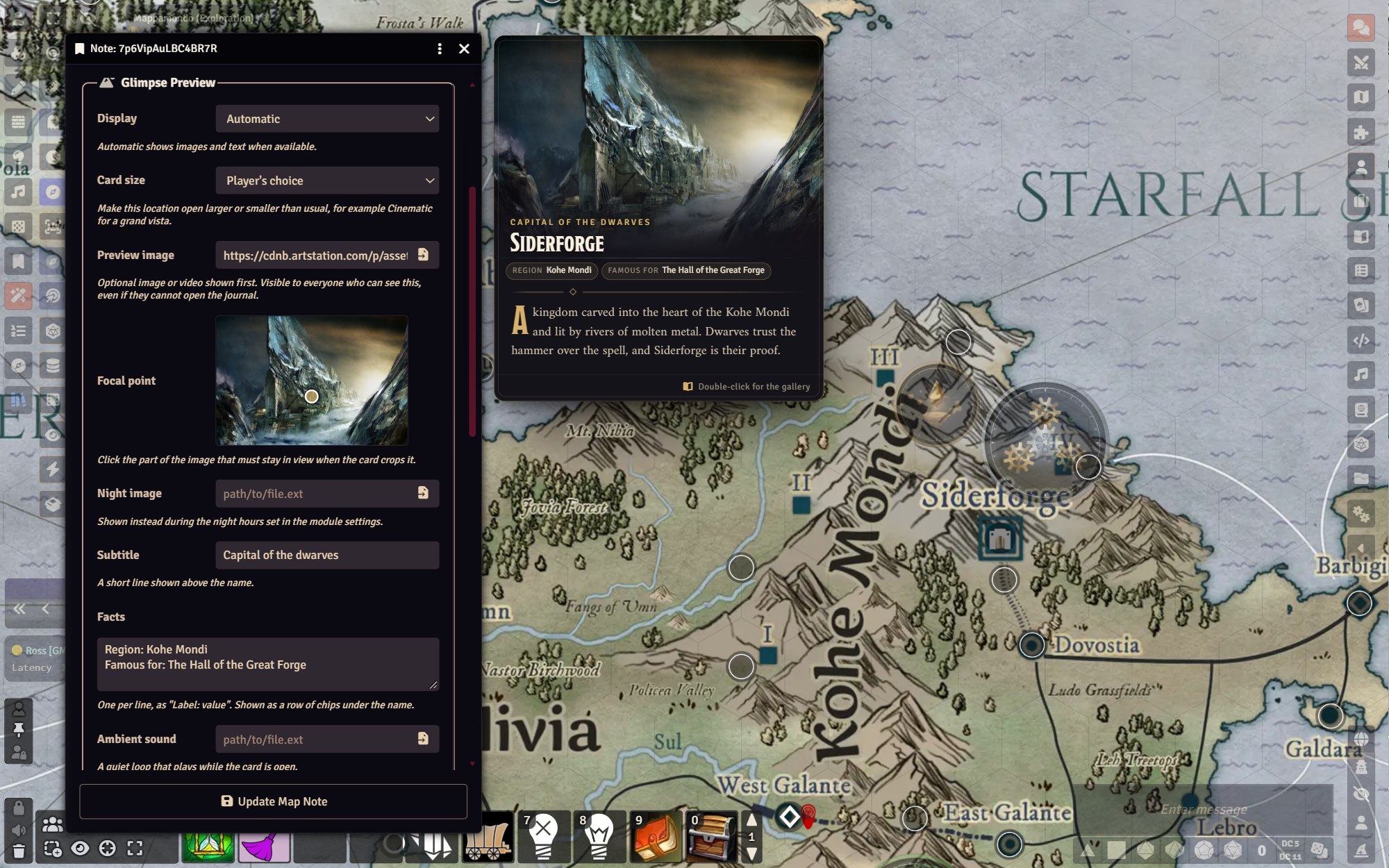
| Field | What it does |
|---|---|
| Display | Automatic, image and text, image only, text only, or no preview |
| Card size | Use the player's preferred size, or force small, medium, large or cinematic for this place |
| Preview image | An image or video shown first. Works even when the note has no journal |
| Focal point | Click the part of the image that must never be cropped away |
| Night image | Replaces the preview image during the night hours you set |
| Subtitle | A short line above the name, such as The Dark City |
| Facts | One Label: value per line, shown as chips under the name |
| Ambient sound | A quiet loop that plays while the card is open |
| Discovery | Known to everyone, rumoured until you mark it discovered, or rumoured until explored |
Image pages also get a focal point and an alternative night image when you edit them.
Features
Location cards
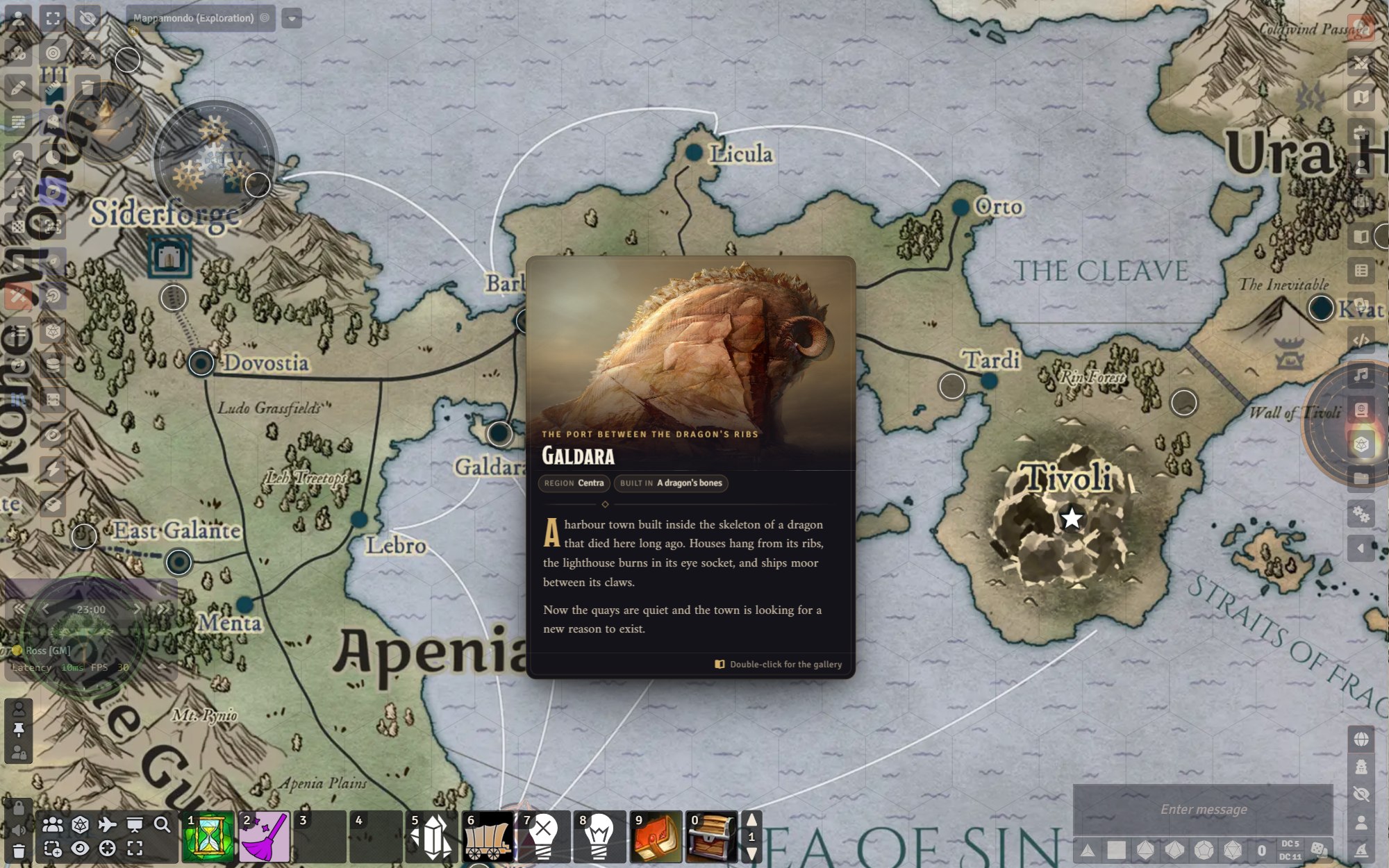 |
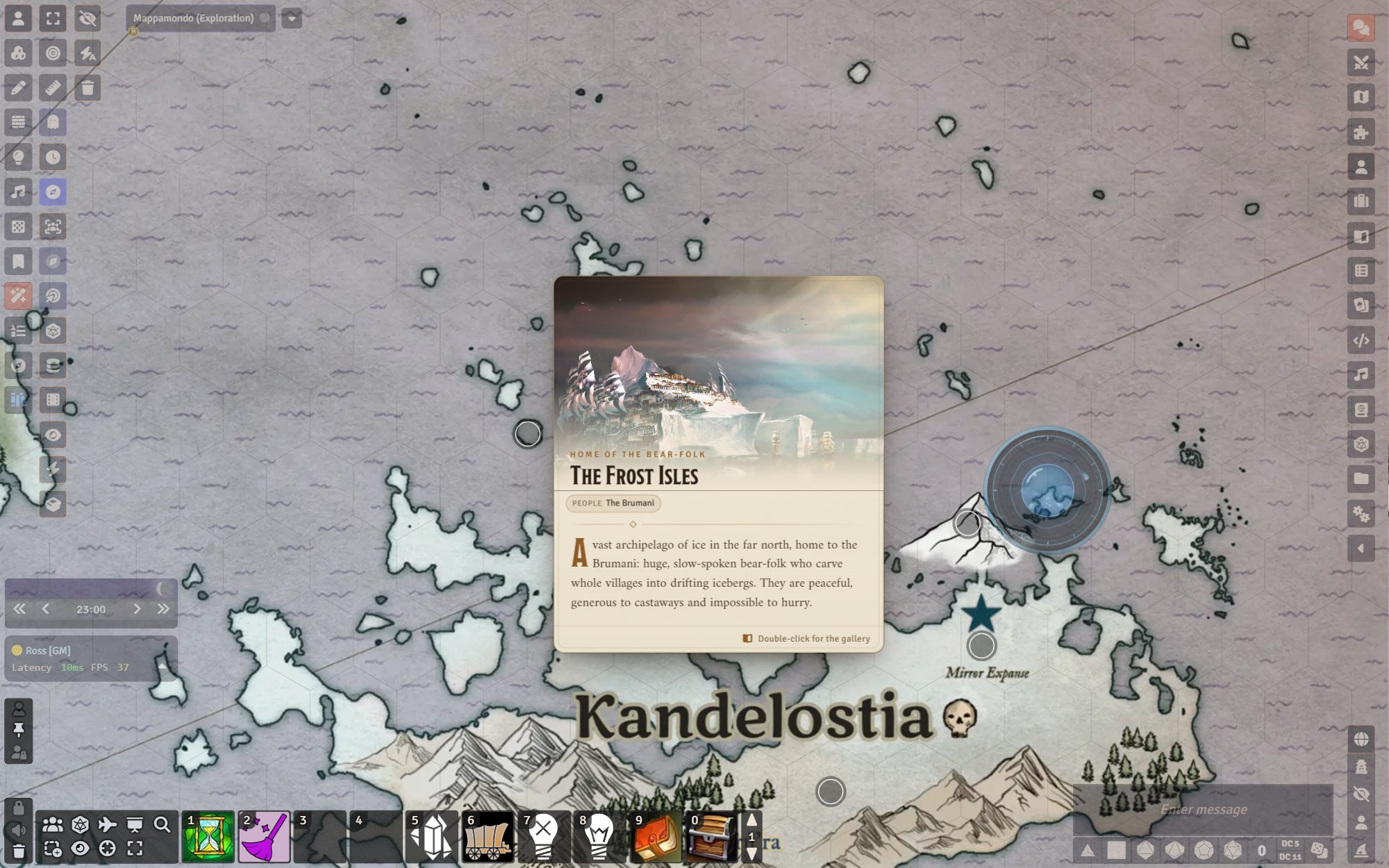 |
| Dusk style | Parchment style |
- Images first, then the name, a subtitle, facts and an excerpt from the journal, with a drop cap and captions.
- Several images cross-fade slowly into one another while the card is open.
- Cards follow the map as you pan and zoom, flip to whichever side has room, and never leave the screen.
- Hovering a note in the v14 Notes sidebar list shows its card beside the list.
Besides the default Dusk and Parchment styles, alternatives are available to better fit popular systems or your homebrew. If you like the whole interface to look consistent, a plain Foundry style is available where cards, region banners and the gallery are drawn like Foundry's own windows, with its fonts and colours, and switch with your light or dark theme.
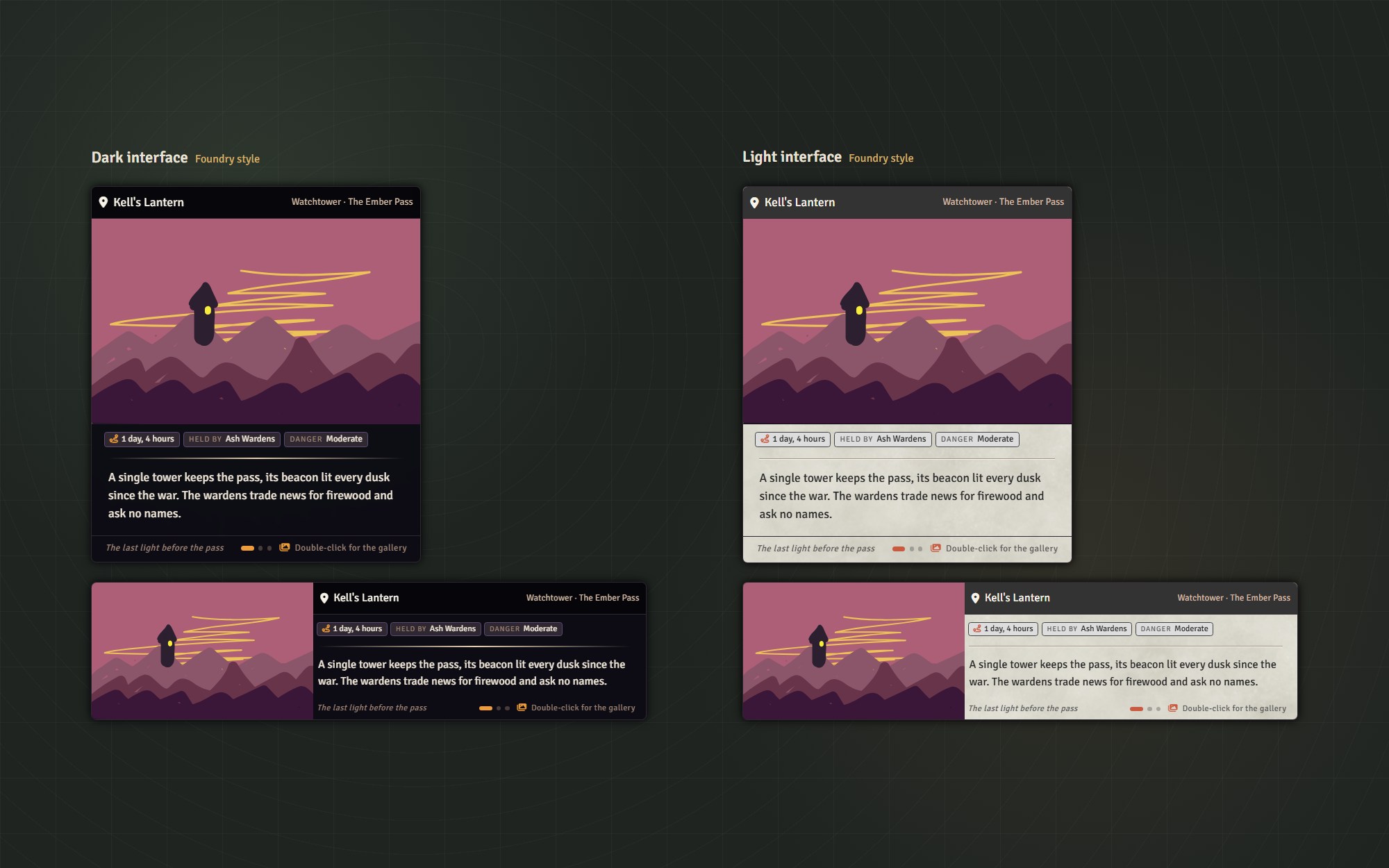
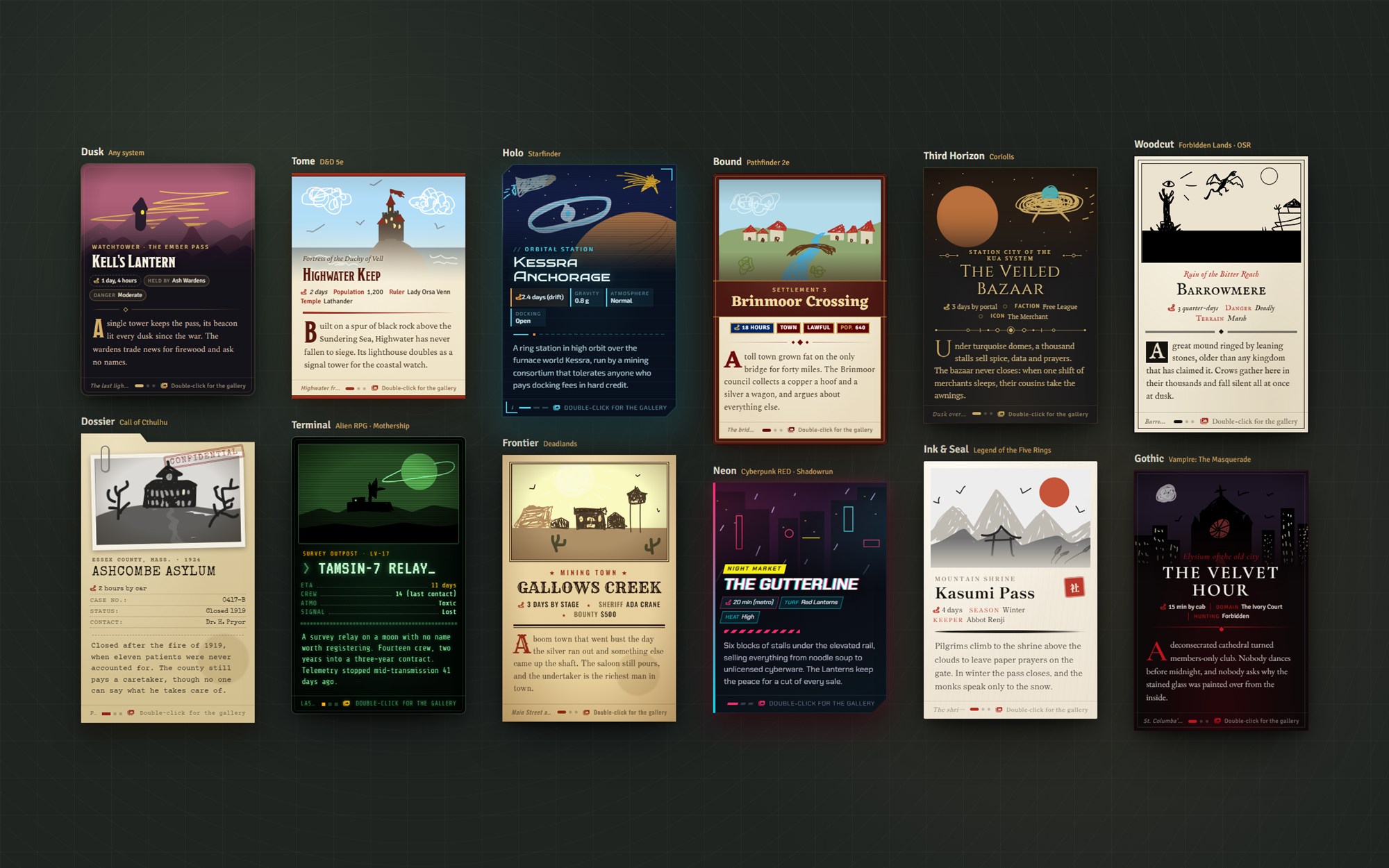
All the art in the showcase is handmade, and extremely detailed.
| Style | Made for | Look |
|---|---|---|
| Foundry | Any system | No styling of its own: a plain Foundry window that follows your light or dark theme |
| Tome | D&D 5e, classic fantasy | Cream page, crimson headings |
| Bound | Pathfinder 2e | A parchment page in an oxblood cover, facts styled as trait tags |
| Holo | Starfinder, space opera | A cut-corner glass panel with HUD brackets and readouts |
| Third Horizon | Coriolis | Following the beautiful gold on dark styling in the Great Dark manuals |
| Third Horizon, cream page | Coriolis | Same as above but light version: black fonts and ornaments on warm paper |
| Dossier | Call of Cthulhu, investigative horror, Twilight:2000 | A manila case file with a clipped photograph and a rubber stamp |
| Terminal | Alien RPG, Mothership | A green phosphor screen with scanlines and typed readouts |
| Neon | Cyberpunk RED, Shadowrun | Hard cut corner, chromatic title, hazard stripes |
| Woodcut | Forbidden Lands, Shadowdark, One Ring, OSR | Black ink on rough paper with a boxed initial |
| Gothic | Vampire: The Masquerade, World of Darkness | Near-black and bone white, blood red, a drop hanging from the rule |
| Frontier | Deadlands, the Weird West | A wanted poster with a sepia photograph and a wood-type headline |
| Ink & Seal | Legend of the Five Rings | Rice paper, a brush-stroke rule and a red seal beside the name |
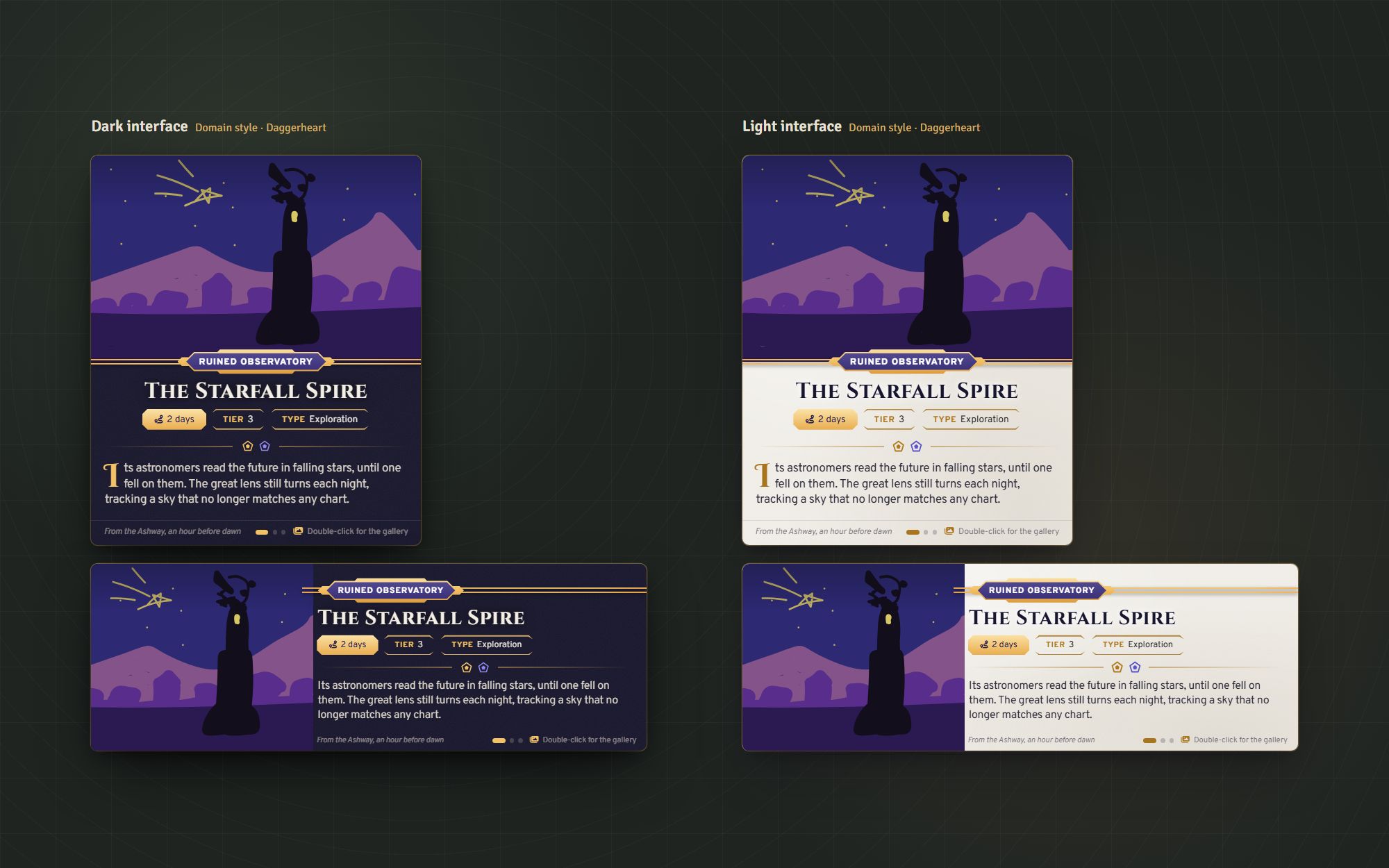
| Domain | Daggerheart | After the system's sheets and the rulebook: dark-blue glass (plaster parchment in the light theme), the subtitle in a gold header plate on a double rule, octagon fact boxes, and the Hope and Fear dice as the rule |
In Ink & Seal, the seal follows the note's map icon: a city gets 都, a castle 城, a temple 寺, a danger 危, and so on, or 所 ("place") when the icon has no match. Pick a different seal, or none, under Seal in the note's Glimpse settings.
Domain, made for Daggerheart, follows your light or dark theme like the Foundry style does.
The gallery
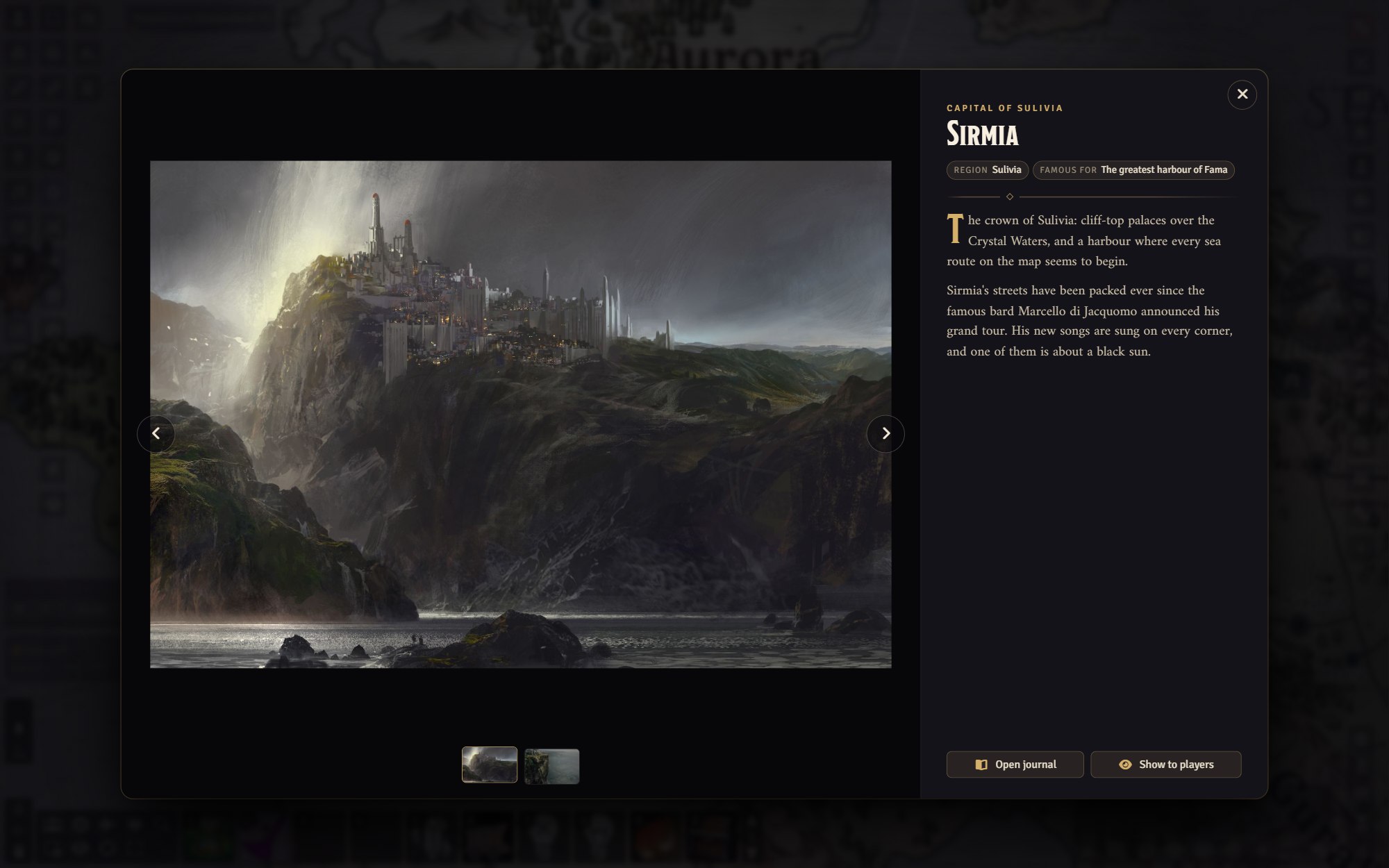
Double-click a note to see its images full screen, with thumbnails, the full description and a button to open the journal.
Show to players
The GM can push a location to every connected player as a full-screen reveal: from the gallery, from the right-click menu in the Notes sidebar, or with a keybinding while hovering a note. Showing a rumoured place marks it as discovered.
Region banners
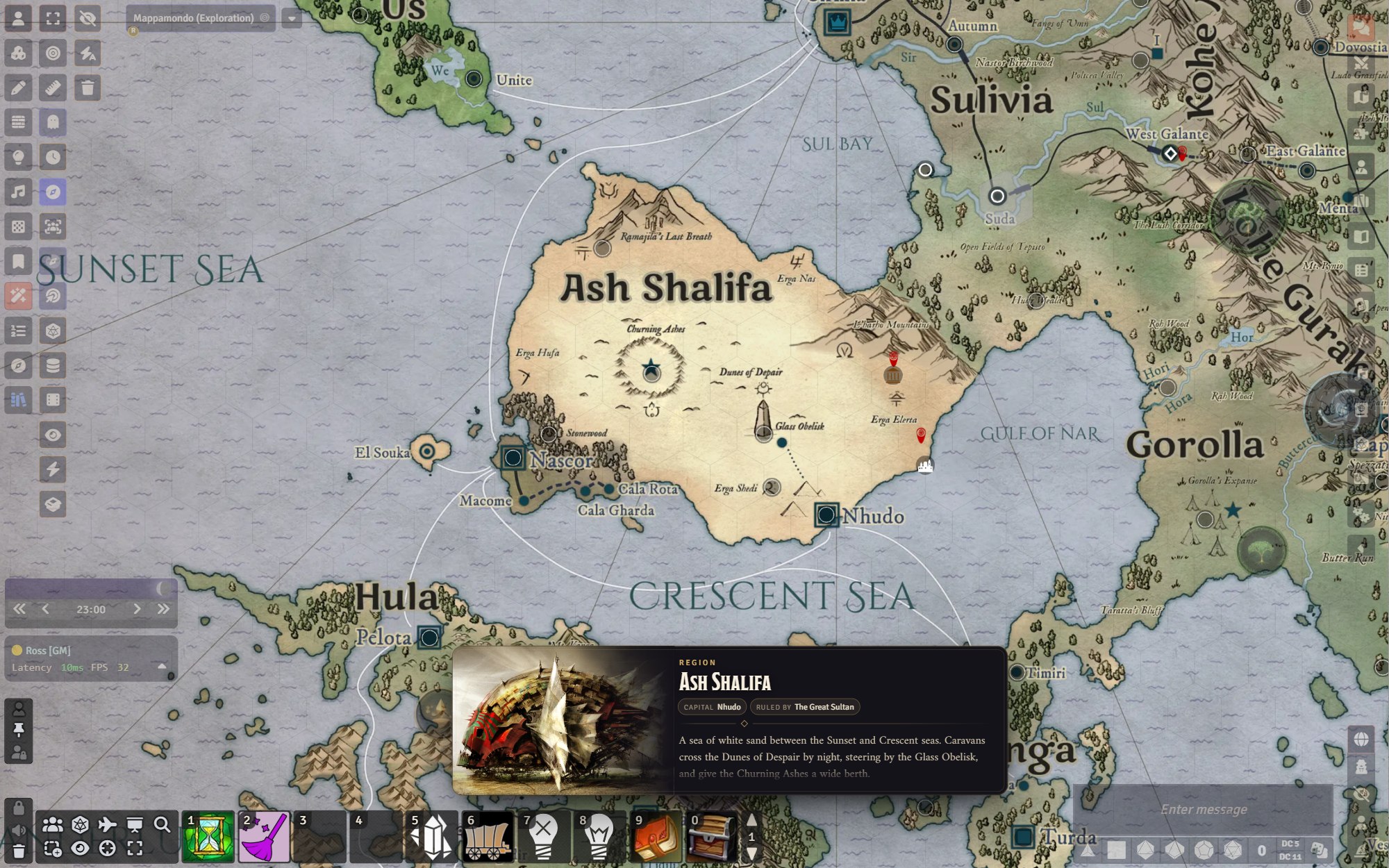
Give a v14 Region its own Glimpse from the new tab in its configuration. When a player's pointer rests inside the region, a wide banner appears above the hotbar that you can give some basic information on a forest, region, kingdom, etc.
To show the banner without hovering, add the Show Glimpse Banner behavior to the region. It puts the banner up for a few seconds when a token walks in, or when a token starts its turn or a new round begins inside it. For example, mark difficult terrain on a battlemap with a title and a fact like Movement: half speed, and players get a reminder as they step into it during combat. Choose who sees it (GM, the token's owners, or everyone who can see the token), how long it stays, and whether it fires only once.
Rumours and discovery
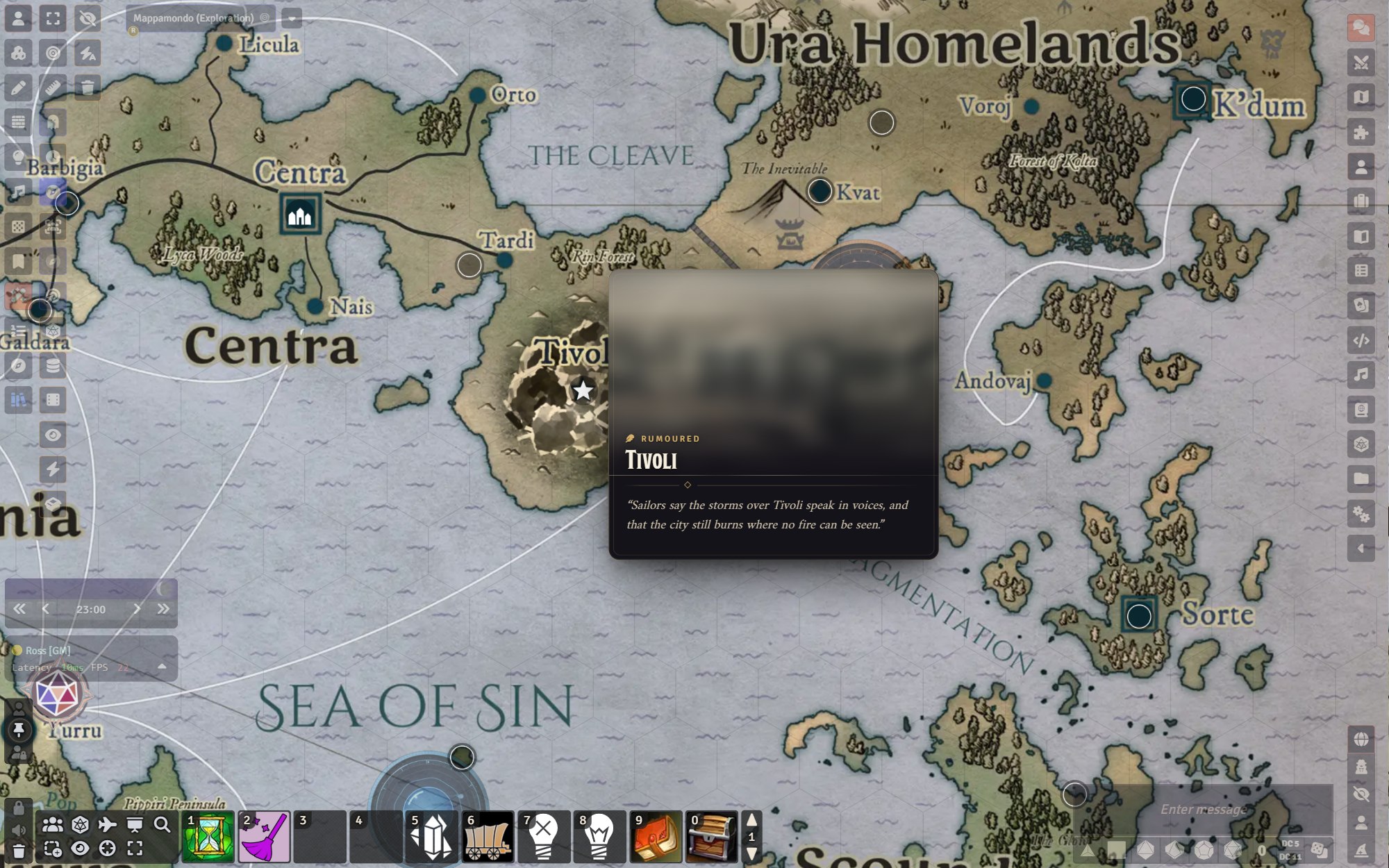
Mark a place as rumoured and players see only a veiled image and the rumour you wrote. The location gets revealed when you mark it discovered, when you show it to the players, or you have the option of having it uncovered when the party explores it through fog of war. The GM always sees the full card, with a small reminder of what players see to avoid small panic attacks XD
A rumoured place stays on the map even when players can't see its journal, so you can keep the journal private (permission None) and nobody can read ahead in the Journal sidebar. When the place is discovered, Glimpse shares the journal with the players at the level set in Share journals when discovered (Observer by default). A place found by exploring is shared only with the player who explored it. Permissions are never lowered, and pages you set to None stay private.
To keep part of a description from the players, format it with the Secret text style in the journal editor. Players never see secret passages on cards, in the gallery or when a place is shown to them, so GM notes can sit right beside the text players read (see Permissions below).
Map icons
Choose Glimpse icons in a note's Entry Icon dropdown, or click the preview beside it to open a visual picker with 79 map symbols (settlements, fortifications, sacred sites, nature, water, danger, markers and simple shapes) plus Foundry's own icons. A preview shows how it will look on the map, with the note's tint and your icon background style, on a light or dark backdrop. The general module settings can also replace the translucent square behind note icons with a circle, a soft outline, or nothing, depending on how you want it to look.
Places overview (GM)
The Glimpse Places button in the Notes controls opens a list of every map note and Glimpse region on the scene. For each place it shows whether it is known, rumoured or discovered, what players can do with its journal, how many images it has and whether it has text. It also flags the things that are easy to miss: no image, no text, no journal, a pin players can't see because its journal isn't shared, or a rumoured place whose journal players can already read in the sidebar. Filter by rumoured places or the ones that need attention, pan to a place, open its settings or gallery, or show it to the players. Tick several places to mark them discovered (which shares their journals, as set in the settings) or undiscovered in one go.
Export JSON saves the scene's notes as a file with each place's name, position, pin, Glimpse settings, image pages and description. Import JSON reads such a file back, shows what it will create or update, and applies it after you confirm. Use it to copy places to another scene or world, keep a backup, or bring in places written elsewhere, for example in a lore repository. Places are matched by their id, so importing the same file again updates them instead of making copies. Regions are listed in the overview but are not part of the file, I still need to figure out if it's possible to also export/import those.
The file format
{
  "locations": [
    {
      "id": "west-galante",
      "name": "West Galante",
      "subtitle": "The Canal City",
      "facts": ["Population: 12,000", "Ruler: The Doge"],
      "text": "A Markdown description. Or use `html` instead.",
      "images": [{"src": "worlds/fama/glimpse/west-galante.webp", "caption": "The Grand Canal", "focusX": 40}],
      "position": {"x": 3120, "y": 1840},
      "discovery": "rumour",
      "rumour": "Sailors speak of a city built on water."
    }
  ]
}
Only id and name are required, and a new pin needs a position. A bare array of locations works too. Other fields: label (pin text), textTitle, cardImage, cardNightImage, focusX/focusY, sound, seal, mode, size, visited, ownership (none, limited, observer), icon, iconSize, fontSize, textColor, and keepJournal: true to link a journal without rewriting it. Each image can have name, caption, focusX/focusY and night. A field given as "" clears it; a field left out keeps its current value. New rumoured places get a private journal (None), shared when they are discovered; known places get Observer.
Atmosphere
- Day and night images swap automatically with the world clock.
- Ambient sound plays a quiet loop while a card or the gallery is open, at each player's chosen volume.
- Travel distance shows how far the place is from your selected token, and roughly how many hours/days/whatever away.
- Focal points help to keep the important parts of the image in frame when they get cropped.
Permissions
Glimpse never shows more than opening a note would. Text needs Observer permission on the page; image pages need Limited, the same as core Foundry. Secret blocks are hidden, even from owners, unless the GM turns on Show secrets to owners. Fields stored on the note or region itself (preview image, subtitle, facts) are visible to anyone who can see it. When the GM shows a location to players, they still don't see the hidden secrets.
Settings
Per player
| Setting | Default |
|---|---|
| Show location previews | On |
| Card style (one of sixteen styles, match the game system, or match the interface) | Dusk |
| Image effects: the colour treatment some styles give pictures (Terminal, Woodcut, Dossier, Frontier, Gothic) | On |
| Scanlines on the Holo and Terminal styles | On |
| Card size (small, medium, large, cinematic) | Medium |
| Text excerpt (none, short, medium, long) | Medium |
| Text size, hover delay | 100%, 200 ms |
| Region banners (on hover, while holding G, never) | On hover |
| Cycle through images | On |
| Slow pan on images | Off |
| Ambient sound volume | 40% |
| Show travel distance, hide the note's label while previewing | On |
| Show secrets to owners | Off |
World (GM only): what double-clicking a note opens (gallery or journal), which permission players get on a journal when its place is discovered (off, Limited or Observer), travel distance per day, the in-game hours when night begins and ends, and how note icons look on the map: a background (Foundry's translucent square, a circle, a soft outline traced around the symbol, or nothing), whether the frame shows always, only on hover or never, and whether icons grow slightly when hovered. The defaults match Foundry's own look.
Keybindings: toggle previews, show the hovered location to players (GM), and peek at regions (G).
For system and module developers
game.modules.get("glimpse-map-notes").api is available once the glimpseReady hook fires:
| Member | Purpose |
|---|---|
show(note), hide(), refresh() |
Control the hover card |
openGallery(doc) |
Open the gallery for a note or region |
reveal(doc) |
Show a note or region to every player (GM only) |
toggle(value) |
Turn previews on or off for this client |
overview() |
Open the Glimpse Places window (GM) |
locations.export(scene) |
The scene's notes in the JSON format above |
locations.plan(locations, {scene, folder}) |
What an import would do, without changing anything |
locations.apply(locations, {scene, folder}) |
Import locations (GM only) |
registerPageReader(type, reader) |
Teach Glimpse to read your own page type |
A page reader receives a JournalEntryPage and returns what to show:
Hooks.once("glimpseReady", api => {
  api.registerPageReader("mysystem.location", page => ({
    html: page.system.description,      // Player-facing HTML
    image: page.system.artwork,         // Image or video path
    caption: page.system.artworkCaption
  }));
});
AI Use
Glimpse was built using coding assistance from Claude Opus 5.5. No AI art is used or distributed by the module.
Credits
Glimpse was inspired by Map Note Hover Display by FriendlyLambda, which in turn built on Pin Cushion by Death Save Development.
Screenshots show the world of Fama, my homebrew campaign setting. Its map and text are not part of the module. The location art in the screenshots comes from Guild Wars concept art by Daniel Dociu and ArenaNet, it is not part of the module and remains the property of its owners. The card style showcase uses amazing, mind-blowing, "masterpiece" handmade illustrations.
The card styles bundle Chakra Petch, Cinzel, Cinzel Decorative, Cormorant Garamond, Courier Prime, Crimson Pro, EB Garamond, Eczar, Exo 2, IM Fell English (and its SC cut), Old Standard TT, Oswald, Overpass, PT Sans, PT Serif, Rye, Share Tech Mono, Shippori Mincho, Spectral and VT323 under the SIL Open Font License, and Special Elite under the Apache License 2.0. Each font's licence is in its folder under fonts/.
Glimpse is released under the MIT License.