


| Latest version | 0.3.2 |
|---|---|
| Minimum Core | 11 |
| Compatible Core | 14 |
| File size | 4.21 KB |
| Last updated | 1 month ago |
| Created | 2 years ago |
| Authors | |
| Languages |
|
| Systems | All systems |
| Project source | Project URL |
| Report bugs | Bug tracker URL |
This module adds a collection of useful keybinds and QoL features.
Quick switches
With this module, you can press and hold the hotkey to switch to the corresponding UI view, e.g. lighting, sounds,
notes, drawings etc. Releasing the key lets you switch back to the view you came from. Especially useful to quickly
toggle lights.
Tapping quickly three times the same key pins the corresponding view.
Manual rolls
Additionally, this module adds a key to toggle manual rolling mode
Accessibility features
This module also adds some accessibility features like highlighting collapsed apps or locking foundry in selection or
targeting mode.
- Target-lock mode: If target-mode is enabled, the user can click one token after another to make them a target.
Clicking an already targeted actor will de-target it - Selection-lock mode: Same as target-lock mode, but for selecting tokens.
Configuration
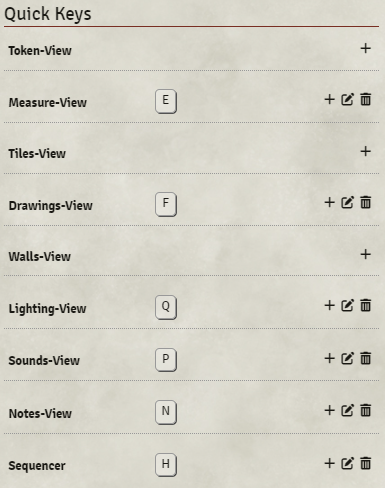
You can customize the keys in "Configure Controls"
Settings
You can set the delay for the 3-tap pinning in the setting. Default is 500.
API
You can register your module with quick-keys. Quick keys uses the data-control attribute. To add a quick key for your module, use the following
game.modules.get("quick-keys").api.registerKey("data-control", "Name that gets displayed in Configure Controls", "The Key");
Here's we use sequencer as an example. The data-control attribute within the DOM is "sequencer" and we register the "H" key. It is important, that the call has to be made in the 'init' phase.
We awkwardly leverage a timer, in case quick-keys has not yet been initialized. If anyone knows of a better way, please let me know!
Hooks.once('init', () => {
    if (game.modules.has('quick-keys')) {
        // **** Change these ****
        let dataControl = "sequencer";
        let name = "Sequencer";
        let key = "KeyH";
        // **********************

        let count = 0;
        let checkApiInterval = setInterval(() => {
            let api = game.modules.get('quick-keys').api;

            if (api) {
                api.registerKey(dataControl, name, key);
                console.info(`${name} (${dataControl}) registered key '${key}' successfully with quick-keys`);
                clearInterval(checkApiInterval);
            } else if (count >= 500) {
                console.error("Cancel waiting for quick-keys initialization");
                clearInterval(checkApiInterval);
            } else {
                count++;
            }
        }, 1);
    }
});
Support
If you like to support my work find me on Patreon.

