


| Latest version | 1.0.13 |
|---|---|
| Minimum Core | 14.360 |
| Compatible Core | 14.368 |
| Last updated | 1 month ago |
| Created | 1 month ago |
| Authors | |
| Languages |
English Français |
| Systems | All systems |
| Project source | Project URL |
| Report bugs | Bug tracker URL |
| Read-me | Readme URL |
| Changelog | Changelog URL |
| License | License URL |
Physical Play Dice
Physical Play Dice (pp-dice), is built for in-person tabletop gaming sessions using Foundry VTT.
When playing around a physical table with a shared screen, TV, or projector displaying the map to players, players roll their real physical dice while the GM operates Foundry on their behalf.
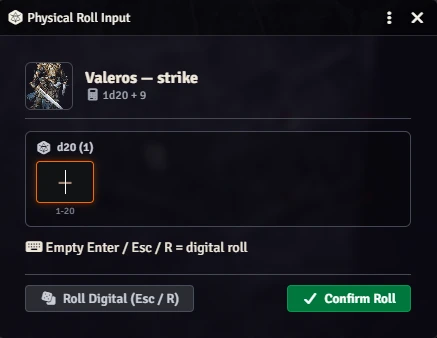
pp-dice seamlessly intercepts public player rolls to prompt the GM for the raw physical dice results, allowing Foundry to automatically calculate all system modifiers, multiple attack penalties, critical hits, and degrees of success!
Physical Tabletop Play
When playing tabletop RPGs around a physical table, many groups enjoy:
- The tactile sensation of rolling physical dice.
- Looking at a shared TV, monitor, or projector showing the battlemap without player HUDs or clutter (e.g. using Monk's Common Display).
- Letting the GM operate Foundry VTT on a secondary screen to run encounters, measure distances, and track conditions.
Normally, clicking an attack or spell in Foundry triggers its digital random dice roller. Manually modifying numbers or typing raw chat formulas breaks game flow and loses system automation.
pp-dice bridges the table and the virtual tabletop: Players roll their physical dice at the table. When the GM triggers an action (attack, save, skill, damage) in Foundry, a lightweight popup asks for the dice results. Foundry and Pathfinder 2e then calculate all modifiers, multiple attack penalties, criticals, and degrees of success automatically.
Requirements
- Foundry VTT: Version 14 (Build 14.360+).
- Game System: System-agnostic (supports core Foundry d20 rolls across any system; primarily tested and deeply optimized for Pathfinder 2e).
- Required Module:
lib-wrapper(Foundry will automatically prompt to install/enable it).
Recommended In-Person Setup
For the best in-person setup:
| Module | Purpose |
|---|---|
| Monk's Common Display | Broadcasts a clean player view (no sidebar, no macros, no GM tools) to a shared TV or projector. |
| Dice So Nice! | Simulates 3D physics dice on screen that land directly on the numbers rolled at the physical table. |
How It Works
Player Character Detection
The module automatically identifies who is rolling:
- Pathfinder 2e: Any character placed in the active Party sheet or allied with the party is treated as a player.
- Other systems: Any actor owned by a player is recognized as a player character.
- Monsters & NPCs: Never intercepted. Enemy rolls evaluate digitally without interruption.
Selective Interception Rules
- Initiative Interception: Intercepts player character initiative rolls from the Combat Tracker ("Roll All", "Roll PCs", or combatant d20) and character sheets. Prompts for player physical rolls sequentially, while letting NPC monsters roll instantly via digital RNG without GM interruption.
- Public Player Rolls (Attacks, Saves, Skills, Perception, Damage) → Intercepted. The GM dialog pops up immediately to enter physical dice.
- Secret / Blind Rolls (Recall Knowledge, Stealth, Secret Perception, Sense Motive) → Digital Roll. Evaluated with standard digital RNG so neither the GM nor players accidentally reveal secret information.
- NPC & Monster Rolls → Digital Roll. Enemy turns remain instant and automated.
Using the Dice Input Dialog
When a roll is intercepted, the input dialog opens instantly:
- Immediate Focus: The cursor is automatically placed in the primary die box. No mouse click needed.
- Keyboard Controls:
Enter: Submit the entered physical values and complete the roll.- Press
Enteron an empty box,Escape, orRfor instantaneous fallback to digital RNG. Tab: Jump to the next die when multiple dice are rolled (e.g. 2d6 damage).
- Multi-Die Rolls: Spells and damage rolls with multiple dice provide individual input fields for each die.
- Safety Validation: Inputs only accept valid numbers for that die type (e.g. 1–20 for a d20, 1–6 for a d6).
Fortune & Misfortune (Advantage / Disadvantage)
If a roll has the Fortune or Misfortune trait (or advantage / disadvantage):
- The dialog displays a badge:
Fortune — Keep HighestorMisfortune — Keep Lowest. - Two d20 fields are provided for the player's two physical dice.
- The system automatically keeps the appropriate die and calculates the outcome.
Area of Effect (AoE) Spells & Sequential Rolls
When a fireball hits 4 party members, 4 saving throws trigger in sequence:
pp-dicequeues each roll in order.- As soon as you confirm Player 1's roll, the dialog seamlessly moves to Player 2, then Player 3, etc.
- No overlapping popups or dropped rolls.
Chat Log Badge
When a roll is completed using physical dice, a discrete Physical Roll badge appears on the chat card, confirming the roll came from the physical table.
Controls & Hotkeys
Alt+P: Global shortcut to toggle physical interception on or off anytime.- Token Controls Toolbar: A dice tool button in the left controls bar allows one-click toggling with clear visual state.
Troubleshooting & FAQ
The dialog does not open when a player rolls?
- Verify that Physical Play Dice is enabled in Manage Modules.
- Press
Alt+Por check the toolbar icon to ensure interception is Active. - In Pathfinder 2e, make sure the player character is added to the active Party sheet.
- Check if the roll was secret or blind (secret rolls deliberately bypass the dialog to avoid spoiling results).

