


| Latest version | 1.1.6 |
|---|---|
| Minimum Core | 14 |
| Compatible Core | 14 |
| Last updated | 1 hour ago |
| Created | 1 hour ago |
| Authors | |
| Languages |
English |
| Systems |
Pf2e Sf2e |
| Project source | Project URL |
| Report bugs | Bug tracker URL |
| Read-me | Readme URL |
| Changelog | Changelog URL |
| License | License URL |
A light-weight combat-only module for PF2e/SF2e in FoundryVTT that manages token-to-token hidden and undetected conditions, as well as initiative and action-related stealth checks during combat using chat cards. It dynamically changes the rendering of tokens based on the specific stealth relationship between the controlled token(s) and any tokens on the canvas that have the module's custom Stealth effect applied. It is a replacement of and extension to PF2e Avoid Notice.
Module Tenets
PF2e Stealthy is not and will not be a general vision solution. It is likely that there many edge cases between stealth-based hidden and other sources of hidden or undetected - most of these will be considered out-of-scope.
For brevity, I'll define Stealthy to be the module's generated effect and a Stealthy token or actor as one which has the Stealthy effect.
PF2e Stealthy:
- is a light-weight and predictable combat-only stealth manager.
- is for tactical combat stealth only; exploration stealth is out-of-scope.
- uses chat cards as its primary interface.
- uses the Stealthy effect which controls the hidden and undetected conditions based on the results of stealth or perception checks. These are straightforward effects plainly visible to the GM and use standard REs.
- requires no prep on non-stealthy tokens.
- does not police actions or states for cover or validity and simply does the mechanics as the GM is free to adjust results before they are applied.
Combat Mode
Cover calculations, Darkness, Concealment, etc are not taken into account when granting stealth. It is up to the GM to police or tweak any results accordingly on the chat cards.
This module basically tracks which tokens should be granted an exception to the hidden or undetected conditions carried by stealthy actors. It assumes that if a stealthy actor has achieved the hidden or undetected condition, it is hidden to all other tokens except for those who are on its specific exception list for its conditions. No cover calculations are done (this is out-of-scope), but if one day there is a standard way to calculate cover I'll likely use it to add the bonus to the sneak checks. The cover condition is used if present, but nothing token-to-token
The Stealthy effect uses a badge to track the baseline stealth of the actor, and grants the hidden and undetected conditions based on the level of the badge. It uses signature predicates to conditionally disable the condition roll options it grants depending on the target of the roll. If the vision hack is enabled, stealthy tokens will show on the GM canvas as with a thick cyan border if no tokens are controlled or if the stealthy token is undetected to all controlled tokens. Once an actor is stealthy, the module's context menu will offer a choice to edit and present a new chat card where the GM can tweak stealth settings as needed.
An 'End stealth' button will be generated on any detected action chat card created by a stealthy actor other than Hide, Sneak, or Step allowing the GM to easily delete the effect before or after the action. The button will say 'End stealth before action' unless it detects a strike, in which case it will say 'End stealth after action' as a reminder. If the character is undetected, it will offer an additional option to just drop stealth to hidden instead.
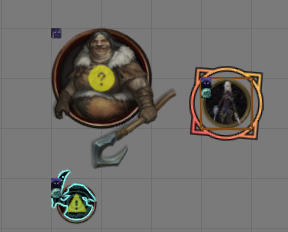
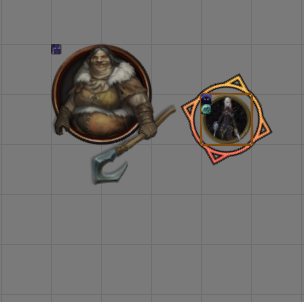
These images show the GM view and player view when controlling a stealthy Merisiel. She is undetected as a baseline and can see an Ogre but not the goblin who is undetected by her, indicated to the GM by the cyan outline borders. The goblin had a critical success when seeking and Merisiel is now observed to it, indicated by the triangle exclamation. The goblin has also pointed out Merisiel to the Ogre, so Merisiel is now only hidden to the Ogre, indicated by the circle question mark. Merisiel is still undetected to any other tokens on the canvas.
Actions
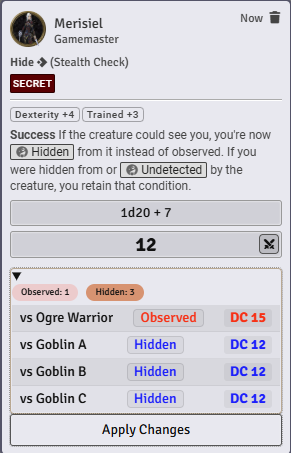
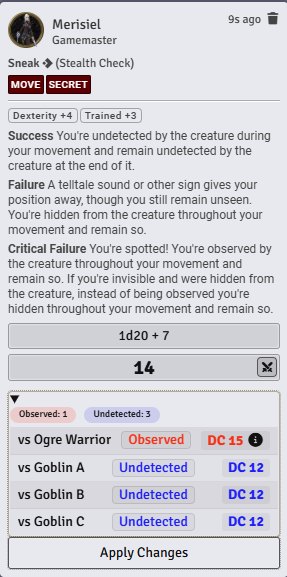
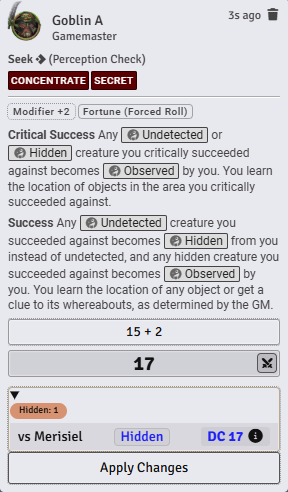
When a creature takes a Hide or Sneak action, PF2e Stealthy will append a target list (visible only to GM) to the roll chat card listing each observing token, dc, and resulting stealth status for that observer. The GM can click on any results to change specific ones for whatever reason like missing cover or whatever, and the clicks the Apply Effects button to store that info into the stealthy effect. Seek checks work similarly, allowing the GM to modify the seek results prior to accepting the changes.
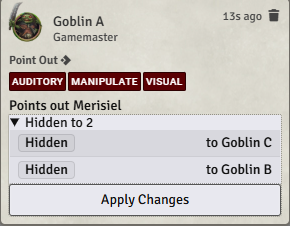
The Point Out action is a little tricky to detect, as it isn't a standard action with roll elements like the others as far as PF2e Foundry is concerned. This module looks for a targeted token to match up with the pointing-out token, records the targeted token on the chat card, then uses that to populate a list of allies on the card that can benefit from that token's Point Out action for the GM to accept.
Context Menu
A context menu is triggered by a keybind (defaults to '=', there is probably a better way to do it but this keeps it out of the way for now). When pressed, it will list some relevant options based on what tokens were controlled/targeted/or both. If there are only controlled tokens or targeted tokens, the menu options will list the same and apply the actions accordingly - no need to switch which way you might be designating something. When both controlled and targeted tokens are present, the menus will present mirrored choices; you might want to clear stealth on the attacking token, or you might need to clear out a forgotten state on the targeted token.
The following is a list of the menu options that can appear when pressing the menu context key. In practice you will find some variations on some of the entries, but the core of them are here.
| Menu option | Prerequisites | Details |
|---|---|---|
| Avoidance Check | Selected or targeted tokens | Sends a chat message with the avoidance check details to the GM |
| Clear Ambush | Out of combat, selected or targeted non-party tokens using stealth for initiative | Set initiative statistic to 'perception' for any actors using 'stealth' |
| De-clump Initiative | In combat, no tokens controlled or targeted | Spreads out the initiative value of all combatants, resulting in a gap of 3 between each |
| Edit Stealth | Single stealthy token selected or targeted | Sends a chat card to the GM where they can edit the stealth values vs that token's potential observers |
| Prepare Ambush | Out of combat, selected or targeted non-party tokens not using stealth for initiative | Sets the actors' initiative statistics to 'stealth', and ghosts the tokens (sets Foundry hidden) |
| Refresh all | None | Sends a refresh perception signal to all clients |
| Remove stealth | group of controlled or targeted tokens | Removes all stealth effects from the selected stealthy actors |
| Reveal controlled token | Set of controlled and set of targeted tokens | Adds exceptions for the targeted tokens to the stealth conditions of any stealthy controlled actors |
| Undo controlled reveals | Set of controlled and set of targeted tokens | Removes any exceptions for the targeted tokens from the stealth conditions of the stealthy controlled actors |
Exploration Mode
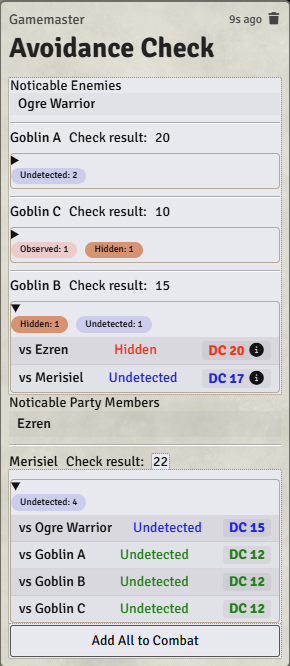
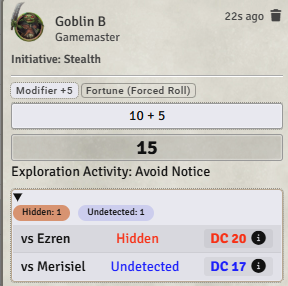
This module assumes that the party token is the primary token during exploration mode in PF2e; party members of course can be on the map, but the assumption is that things are being done in 10-minute chunks and positions/states are essentially theatre-of-the-mind. An 'Avoidance Check' is available in PF2e Stealthy's context menu that manages having any selected party, character, and monster tokens do Avoid Notice rolls so the GM can determine whether or not there is to be an encounter. Selected Party tokens will generate stealth roll requests for any PCs using Avoid Notice even if they aren't on the map yet, and if the GM determines there will be an encounter based on the results, PCs can be deposited from the party token, positioned on the map in some way that makes sense to everyone as play shifts into the tactical encounter/combat mode, and then stealthy characters will use the Avoidance Check results as their initiative rolls.

