


| Latest version | 14.3.5 |
|---|---|
| Minimum Core | 14 |
| Compatible Core | 14.367 |
| Last updated | 1 week ago |
| Created | 1 month ago |
| Authors | |
| Languages |
|
| Systems | All systems |
| Project source | Project URL |
| Report bugs | Bug tracker URL |
| Read-me | Readme URL |
| Changelog | Changelog URL |
| License | License URL |
FileSmith
A premium Bakshi’s Bazaar module for Foundry VTT.



Give your Foundry folders a little color and your campaign prep a lot less clicking.
Preview · Quick Start · Features · Installation · Compatibility · API · Free Modules · Roadmap · Community · AI Use · License
Feature Index
| Feature | What it does |
|---|---|
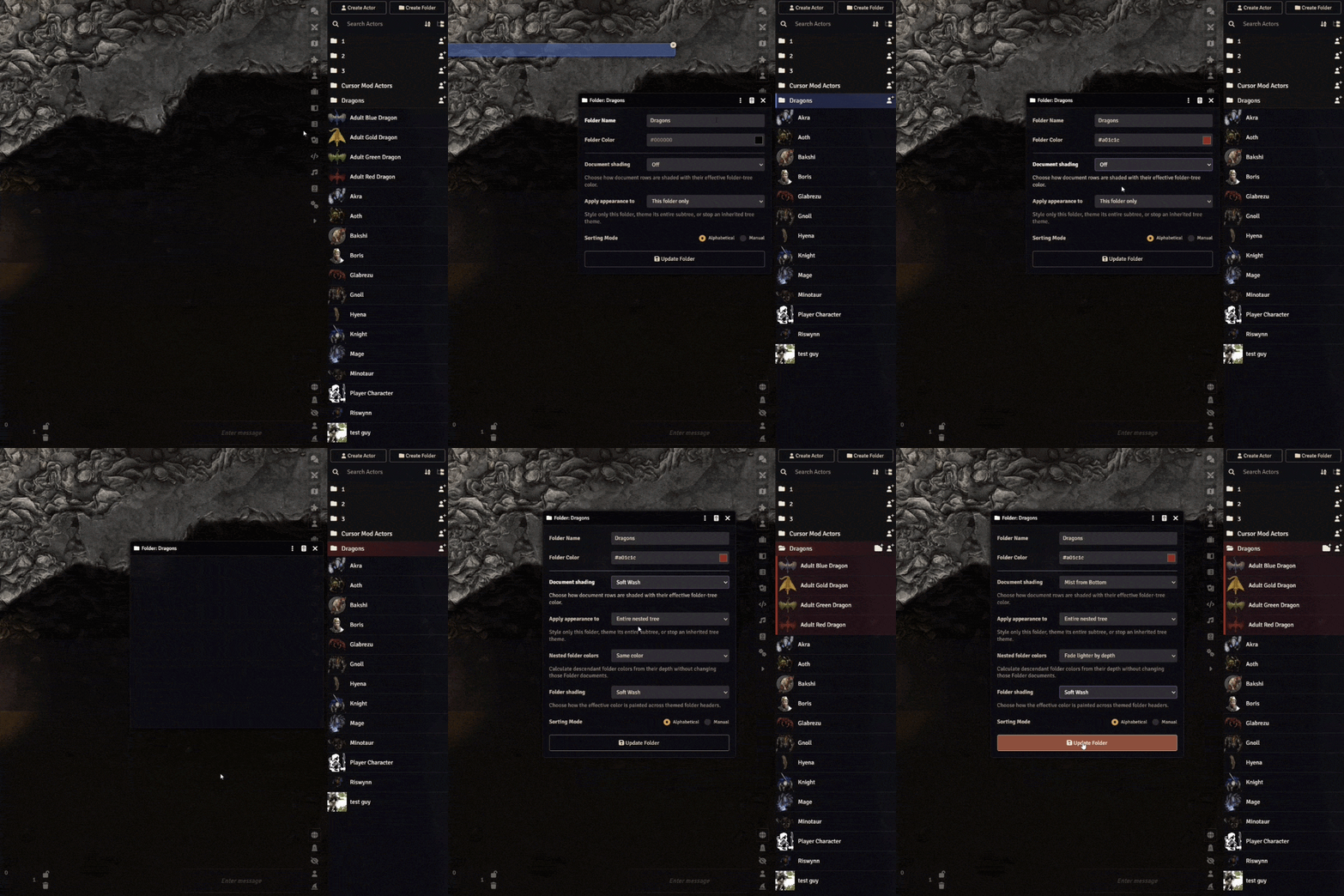
| Folder Appearance | Give factions, locations, and adventure chapters their own colors and shading. |
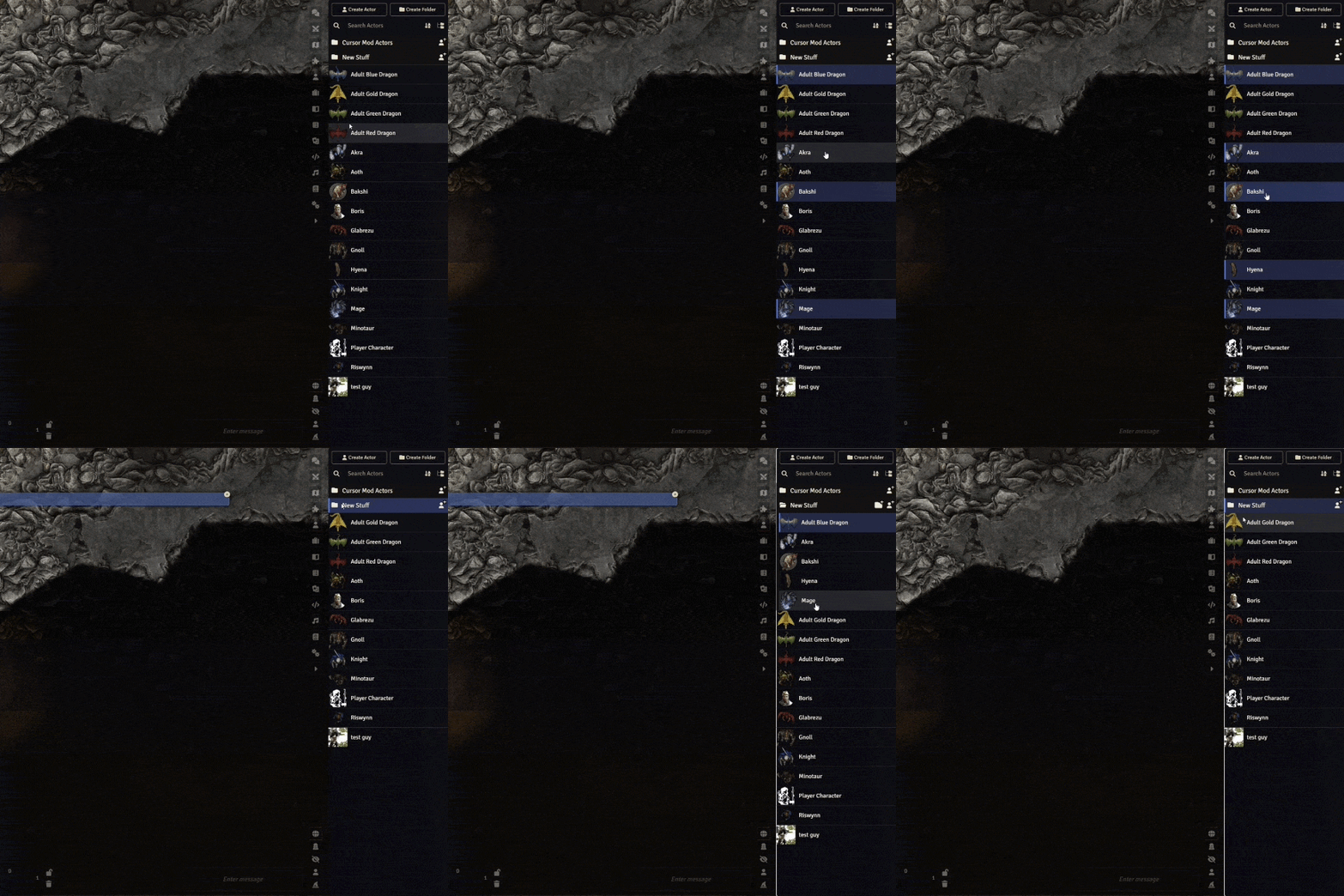
| Multi-Selection | Select a handful of entries or a whole range and organize them together. |
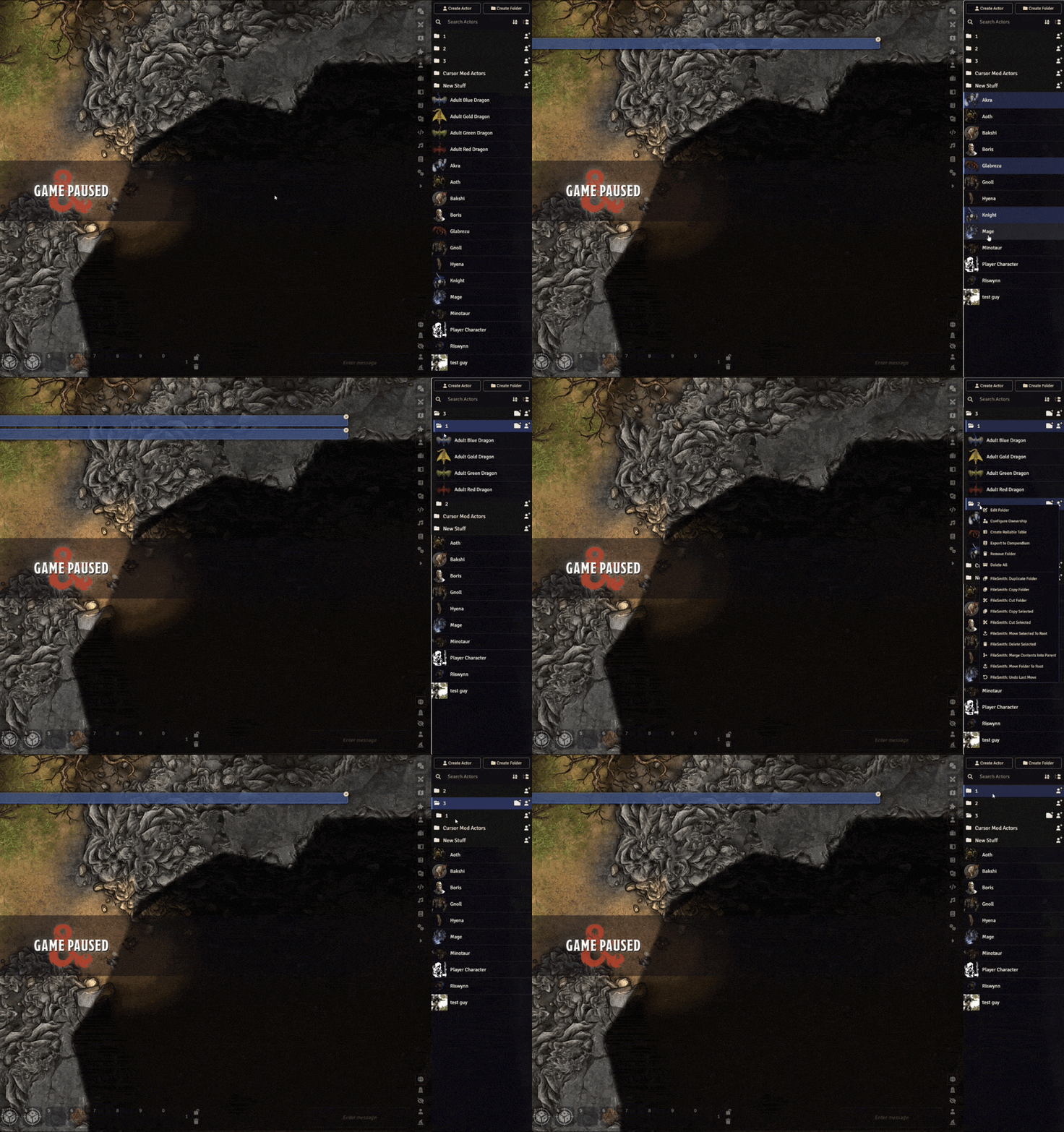
| Folder Drag-and-Drop | Move a complete folder tree while keeping everything nested inside it, much like moving folders in Windows. |
| Clipboard & Organization | Copy, cut, paste, duplicate, and tidy up through familiar right-click menus. |
| Move Undo | Put the last FileSmith move back where it started. |
FileSmith helps you organize Actors, Items, Journal Entries, Playlists, and other world content directly in Foundry's sidebar. Uploaded image and audio files stay in Foundry's FilePicker. GMs organize the content; players see folder styling on folders they already have permission to view.
Preview
Quick Start
- Enable FileSmith and libWrapper in your world, then reload.
- In a sidebar directory, Ctrl/Cmd-click or Shift-click to select several folders and documents.
- Drag a selected row to move the whole selection, or right-click for the FileSmith: copy, cut, and paste actions.
- Open a folder's Edit Folder window to set its color, shading, and nested-folder theme.
- Press Ctrl+Z / Cmd+Z in that directory to undo the last move.
By default, single-click selects and double-click opens. You can switch any directory back to Foundry's normal single-click behavior in the settings.
Features
Folder Appearance
Start with Foundry's folder color, then add a soft wash or mist to document rows. Carry a theme through nested folders and their documents, fade lighter or darker with depth, or blend toward a second color. Folder headers and document rows have independent shading patterns.
Multi-Selection
Organize a whole encounter's worth of entries in one pass.
Select folders and documents together with familiar click, Ctrl/Cmd-click, and Shift-click gestures, then move or delete them at once. Drag an already-selected row to move the group, or use Copy Selected, Cut Selected, and Move Selected To Root from its context menu.
Selection is GM-only and stays within one directory at a time, including entries in different folders. Each directory has its own double-click setting, so you can keep click-to-select where you want it and restore Foundry's normal one-click behavior elsewhere if needed.
Folder Drag-and-Drop
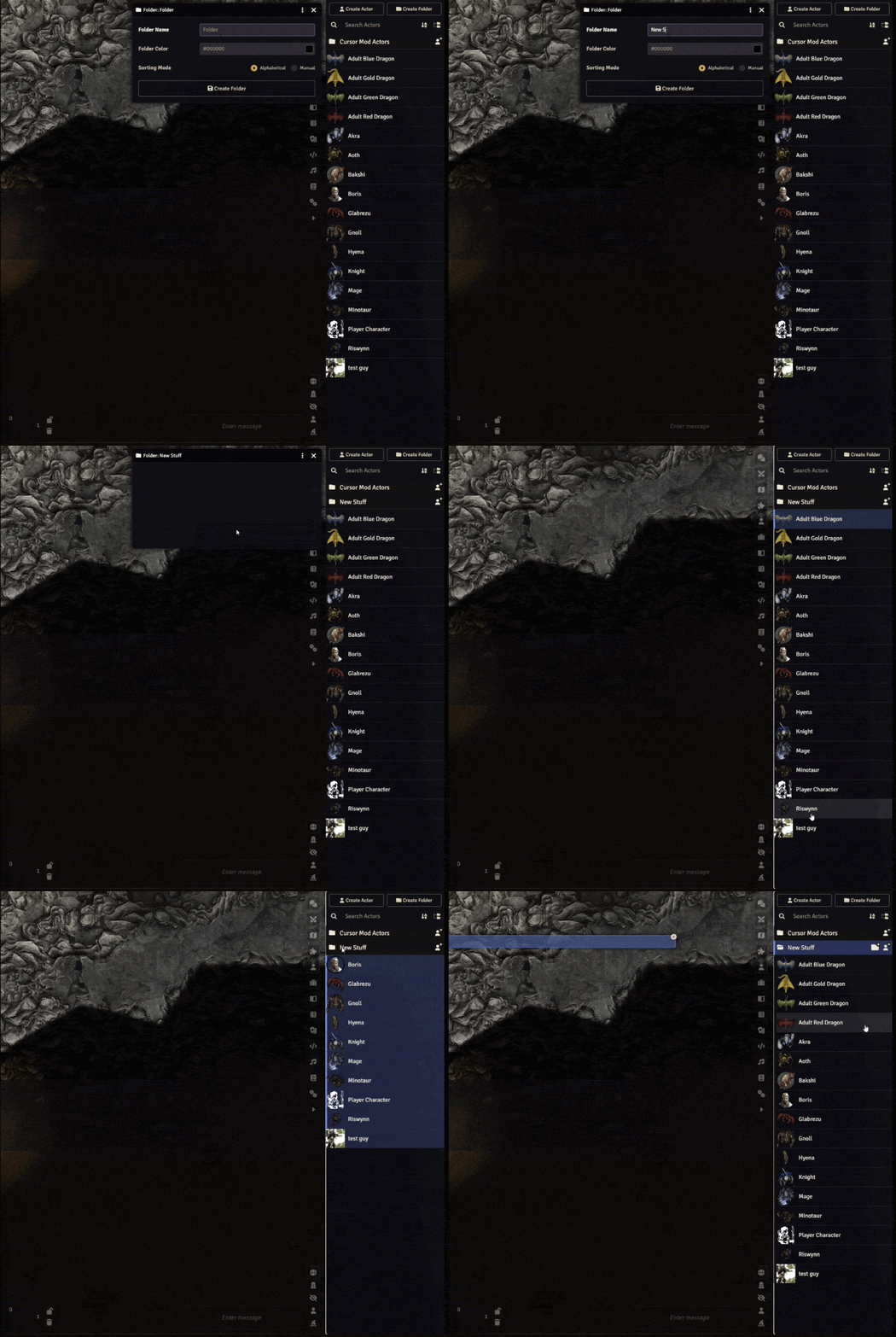
Drop a folder onto another folder to nest it there, onto a document to use that document's folder, or onto the directory background to move it to root. Selected child entries stay inside their selected parent folders during bulk moves.
FileSmith checks for missing entries, incompatible directory types, circular moves, and Foundry's nesting limit before applying a move.
Clipboard & Organization
Copy or cut a folder, document, or selected group, then paste into another folder of the same document type. Duplicate Folder copies a complete folder tree, including its contents and explicit appearance settings.
You can also Merge Contents Into Parent, which moves a folder's direct contents up one level and removes the emptied folder, while keeping its child folders intact. Move Folder To Root brings a nested folder back to the top.
With dnd5e 5.3.3, copying an Item container also copies its nested contents and preserves their relationships in the new copy.
Move Undo
Choose FileSmith: Undo Last Move, or press Ctrl+Z / Cmd+Z while the matching directory is focused. FileSmith checks that the entries are still where that move left them before restoring their earlier locations.
Undo remembers one successful FileSmith move across the client. A newer move replaces it, and reloading clears it. Copies and permanent deletion cannot be undone.
More Details
Folder appearance options
- Document shading: Off, Soft Wash, Mist from Bottom, Mist from Top, Mist from Left, Mist from Right, or Center Mist.
- Apply appearance to: This folder only, Entire nested tree, or Exclude inherited tree.
- Nested folder colors: Same color, Fade lighter by depth, Fade darker by depth, or Blend toward another color.
- Folder shading: Solid Color or one of the wash/mist patterns, independently of document shading.
- Branch control: an explicit folder appearance or exclusion stops the inherited theme for that branch; a deeper tree theme can start a new one.
- Shared appearance: only GMs configure it; users see the result on folders already visible to them.
- Automatic inheritance: colors are calculated when the directory renders, without overwriting descendants' saved folder colors.
Selection & shortcuts
| Gesture | What it does |
|---|---|
| Click | Select one row in a directory with double-click mode enabled. |
| Double-click | Open a document or expand/collapse a folder in double-click mode. |
| Ctrl-click / Cmd-click | Toggle individual rows in the selection. |
| Shift-click | Select a visible range. |
| Escape | Clear the selection. |
| Drag a selected row | Move the selected set together. |
| Drag an unselected row | Use the normal single-row behavior. |
| Ctrl+Z / Cmd+Z | Undo the latest FileSmith move while its matching directory is focused. |
| Delete / Backspace | Open the selected-delete confirmation, when enabled in settings. |
Ctrl/Cmd-click and Shift-click selection also work when a directory's double-click setting is off. Search fields, buttons, and other native controls retain their own interaction behavior.
Clipboard & context menus
All added actions use the FileSmith: prefix. Available actions depend on the row, selection, clipboard, and undo state.
- Folders: Duplicate Folder, Copy Folder, Cut Folder, Merge Contents Into Parent, and Move Folder To Root.
- Documents: Copy Document and Cut Document.
- Selected sets: Copy Selected, Cut Selected, Move Selected To Root, and Delete Selected.
- Destinations: Paste Here and Paste To Root. On a document row, Paste Here uses that document's current folder.
- History: Undo Last Move when a matching FileSmith move is available.
Clipboard operations use the context menu. The clipboard belongs to the current client session, clears on reload, and pastes only within the same document type. For example, Actors can be pasted into Actor folders, and Items into Item folders.
Deletion, recovery & limits
Delete Selected always asks for confirmation, defaults to No, and shows the recursive folder/document count. Deleting a selected folder also deletes its contents. With supported dnd5e containers, the count includes nested Items.
Confirmed deletion is permanent and cannot be undone.
FileSmith verifies operation results and reports blocked or incomplete changes. If part of a bulk operation fails, it attempts to recover changes where safe and reports anything that needs inspection. Recovery is best-effort and undo only covers the last move, so keep world backups.
FileSmith organizes world folders and documents. Compendia, imports from other sources, and physical files in the FilePicker continue to use Foundry's core behavior.
Settings
Open Configure Settings → FileSmith. Settings are grouped into Opening Behavior, Selection & Shortcuts (including Selection Feedback), and Troubleshooting. All preferences are saved for the current browser or client.
Opening Behavior has one checkbox per available directory and a shared explanation. Checked means single-click selects and double-click opens or expands; unchecked restores Foundry's normal single-click behavior. Ctrl/Cmd-click and Shift-click selection work either way. Organization settings appear only for GMs, and unavailable directory choices are hidden.
| Setting | Default |
|---|---|
| Double-click to open, independently for each supported directory | On |
| Clear selection when clicking away | On |
| Select entries on right-click | Off |
| Show selection count notifications | Off |
| Enable Delete / Backspace shortcut | Off |
| Enable debug logging | Off |
Right-click selection replaces the current selection when you right-click an unselected entry, and preserves the group when you right-click an already selected entry. The Delete / Backspace shortcut opens a confirmation; it never deletes immediately.
Folder appearance is saved with the folder and shared with users who can see it; it is separate from these client preferences. Debug logging remains available to all users under Troubleshooting.
Troubleshooting
Confirm that libWrapper and FileSmith are enabled, then reload the client. If drag-and-drop enhancements are unavailable, check that libWrapper loaded successfully.
For more detail, enable FileSmith → Enable debug logging and inspect the browser console for messages prefixed with [FileSmith]. Warnings and errors are logged even with debug logging off.
If another module replaces directory rendering, drag-and-drop, or context menus, reproduce the issue with only FileSmith and libWrapper enabled in a test world.
Installation
- Join Bazaar Patron.
- Link your Patreon account to your Foundry VTT account.
- Install FileSmith through Foundry Premium Content.
- Install libWrapper through Add-on Modules → Install Module if it is not already installed.
- Open your world, enable both modules in Manage Modules, and reload connected clients.
Your Bazaar Patron membership includes:
- Every Bakshi’s Bazaar premium module while your membership is active, including ongoing updates and new modules as they're added.
- Patron-only channels in the Bakshi’s Bazaar Discord.
- Priority module support.
- A direct place to share feedback and feature suggestions. Suggestions are welcome and taken seriously, but development priorities remain at my discretion.
Updates install from Foundry's Add-on Modules screen like any other module. Release notes are posted in the Bakshi’s Bazaar Discord.
For a manual installation, extract the package so its manifest is at Data/modules/filesmith/module.json, then restart Foundry before enabling the module.
| Requirement | Version |
|---|---|
| Foundry VTT | v14 required; verified on 14.367 |
| libWrapper | Required; tested with 1.13.5.1 |
Compatibility
Foundry VTT: v14 required; verified on 14.367.
Game systems: folder and document organization works in any system. Container-aware copy and deletion are tested with dnd5e 5.3.3 only.
Directories: Actors, Items, Journal Entries, Scenes, Roll Tables, and Playlists. Cards and Macros are included when their world collections exist and support folders.
Permissions: selection, organization actions, and appearance configuration are GM-only. Players retain Foundry's normal interactions and see static appearance on folders they already have permission to view.
Playlists, compendia & other sidebar modules
- Playlists: FileSmith organizes playlist folders and Playlist entries. Nested PlaylistSound rows keep their native clicks, context menus, playback controls, and drag-and-drop behavior.
- Compendia: FileSmith does not apply its world-directory tools to compendium contents or replace Foundry's import behavior.
- Physical assets: image, audio, and other files in the FilePicker are outside FileSmith's scope.
- Other sidebar modules: modules that replace directory rendering, drag-and-drop, or context menus may bypass FileSmith.
Developer API
FileSmith currently provides its tools through Foundry's native directories, context menus, and Edit Folder form. It does not expose a public game.filesmith API or a supported macro interface.
For integration requests, describe the workflow you want to support in the filesmith channel under behind the counter - patron only on Discord.
Free Modules
I also make free modules. Install them from Foundry's Add-on Modules browser.
| Module | What it adds |
|---|---|
| 5e Item Importer | Turns D&D 5e stat blocks or YAML into Items. |
| Show of Hands | Middle-mouse targeting, marquee selection, and custom shared cursors. |
| Squad Combat Initiative | Runs big dnd5e fights as squads with group initiative, captains, and morale. |
| The Sound of Silence | Internal loops, crossfades, silence gaps, and soundscapes for Foundry playlists. |
Roadmap
Future priorities will be shaped by real campaign workflows and reported issues along with any that I feel would be appropriate but Share a feature request on the Discord! with an example of what you are organizing and where the current tools get in your way.
Community
Support is handled through the Bakshi’s Bazaar Discord. Patrons receive priority support, without guaranteed response or resolution times.
- Report bugs — Report on Discord in filesmith, under behind the counter - patron only. Include your Foundry version, FileSmith version, game system and version, steps to reproduce, console logs, and screenshots or short clips when useful.
- Request features — tell me what you were trying to organize and what you wish the module could do.
- Follow updates — check the Bakshi’s Bazaar Discord for changes and compatibility notes.
AI-Assisted Development
This module is developed and maintained with the help of AI-assisted tools for coding, debugging, and testing.
I care about the quality, behavior, performance, security, and long-term maintainability of this module, and I take full responsibility for what ships. AI assistance does not replace review, testing, debugging, or security and design judgment.
AI is used here as a tool under my direction to make Foundry better and allow for long term mod support while still having a life outside of building and maintaining my free and premium modules.
If you are uncomfortable using software developed with AI-assisted tools, this module is not for you.
⚖️ License & Permissions
Premium License
FileSmith is a paid, premium module. Refer to the license terms supplied with your purchase for usage and redistribution permissions.
Commercial Licensing
For bundling, commercial integrations, or custom feature development, contact me to discuss licensing and permission.
Contact
For licensing inquiries or permission slips:
- Discord:
GnollStack(Preferred) - Email:
[email protected] - Please use Discord or email for commercial licensing discussions rather than GitHub Issues.
Author: GnollStack · Compatibility: Foundry VTT v14
