


| Latest version | 1.0.1 |
|---|---|
| Minimum Core | 14 |
| Compatible Core | 14 |
| Last updated | 1 week ago |
| Created | 2 months ago |
| Authors | |
| Languages |
English |
| Systems |
Dnd5e |
| Project source | Project URL |
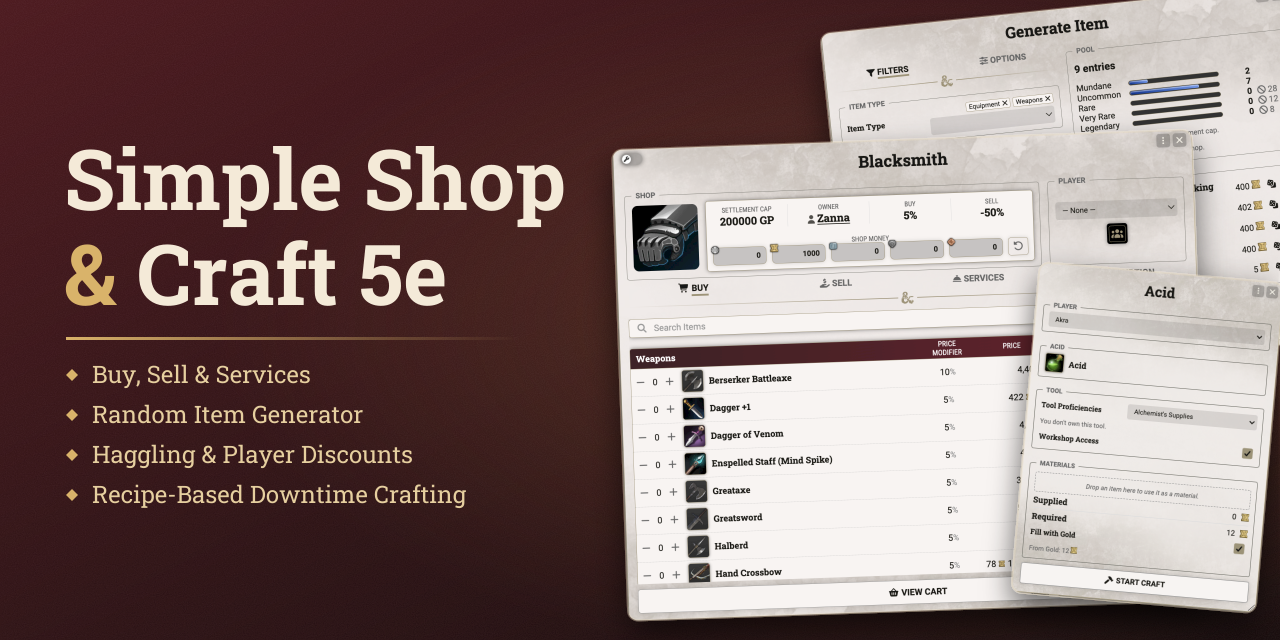



Simple Shop & Craft 5e adds shops and downtime crafting to the dnd5e system.
The GM sets up shops with their own stock, prices, and opening hours. Shops restock on their own as days pass in the world calendar. Players buy and sell, haggle with the shopkeeper, and craft items from recipes the GM provides.
Every purchase, sale, and craft order goes to the GM as a chat card and only takes effect once approved.
Getting Started
Open the Shop & Craft window with its button at the top of the Items sidebar. The GM builds shops and recipes here, and players come here to browse the shops and recipes available to them.
A new shop needs only a name. Pick a Starter Pack to fill its shelves right away with the stock of a Blacksmith, Alchemist, Tavern, General Store, Magic Shop, or Blackmarket. Starter Packs take their items from the Player's Handbook if it is active, otherwise from the SRD (SRD 5.1 for the 2014 rules). Every new shop starts out Inactive and stays hidden from players until the GM opens it for business.
Shops
Shop Manager
The Shops tab lists every shop with its owner, opening hours, Settlement Cap, and status.
- Active and Inactive. Shops sit in separate groups, and players only ever see the Active ones.
- Shop actions. Right-click a shop to toggle it Active, open its Vendor Settings, duplicate it, or delete it.
- Show to All Players. Opens the shop on every connected screen at once, for the moment the party steps through the door.
Shop Manager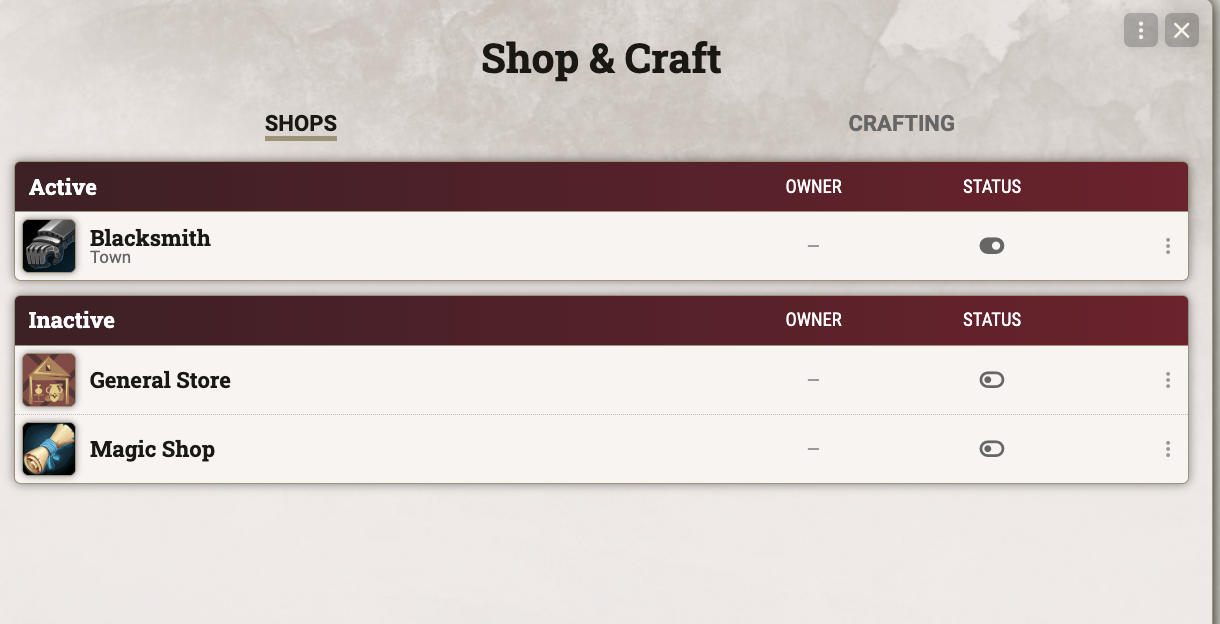 |
Shop Sheet
Each shop opens in its own sheet with four tabs. The header shows the shop's owner, Settlement Cap, Buy and Sell modifiers, and the coin in its till.
- Buy. The GM adds items from the Compendium Browser, by UUID, or by dragging them in. Fill from Table draws stock from a RollTable, and Generate Item rolls up new wares (see Random Item Generator).
- Sell. Lists the items of the buying character that the shop accepts (see Stock & Restock). Items bought as a bundle, such as arrows, are sold back one piece at a time.
- Services. Holds Lodging and Hirelings, along with any Buy item marked as a Service. A service costs coin but hands over no item.
- Description. The shop's location, opening hours, restock days, and a description of the place. Outside its opening hours players can't enter the shop, unless the GM forces it open.
- Who buys. Players shop with their own character or with the Party actor.
- Checkout. Purchases and sales gather in a cart. On confirmation the order goes to the GM as a chat card, and items and coin change hands once the GM accepts.
- Stacking. An item of the same type and identifier that the character already owns gains quantity instead of arriving as a copy. Containers never stack, and neither do items that still have the default identifier, which is the item type such as "weapon". The Buy tab shows the GM a warning icon for these items, for copies sharing an identifier, and for duplicate entries.
Buy tab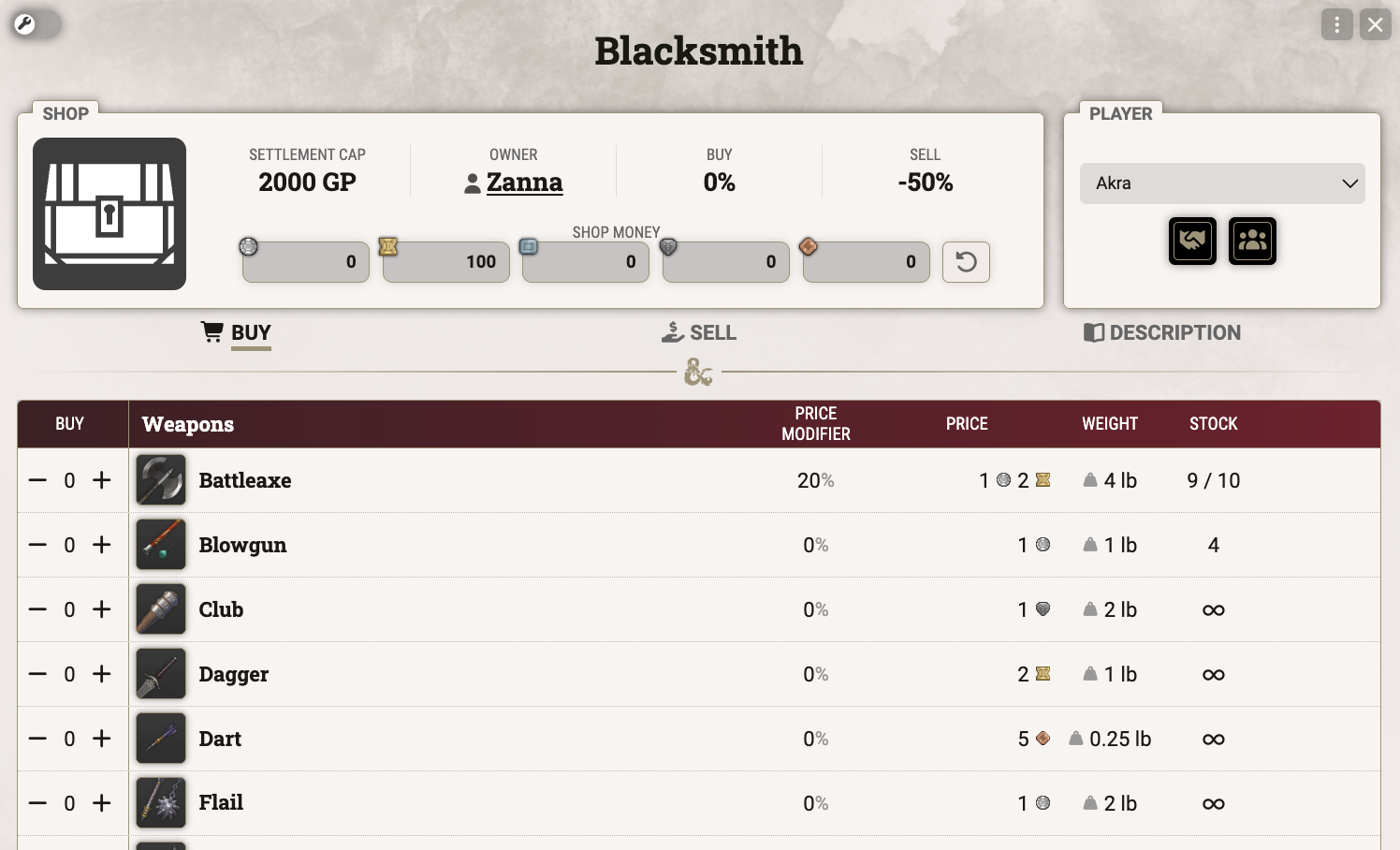 |
Cart and GM confirmation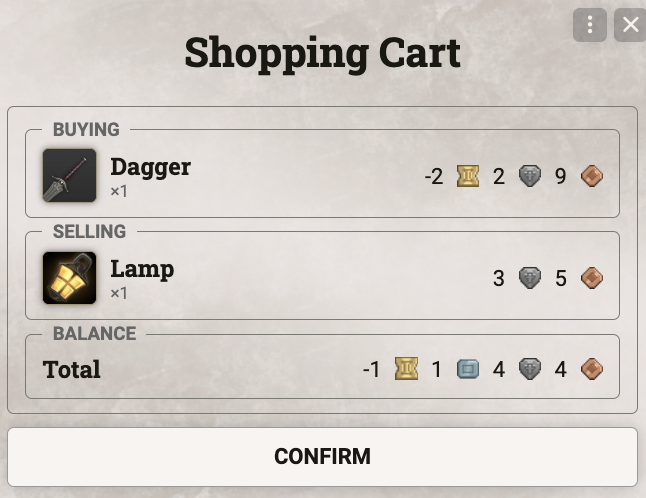 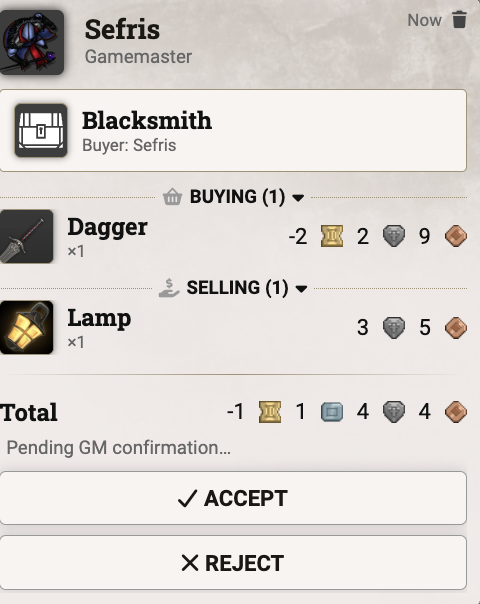 |
Services tab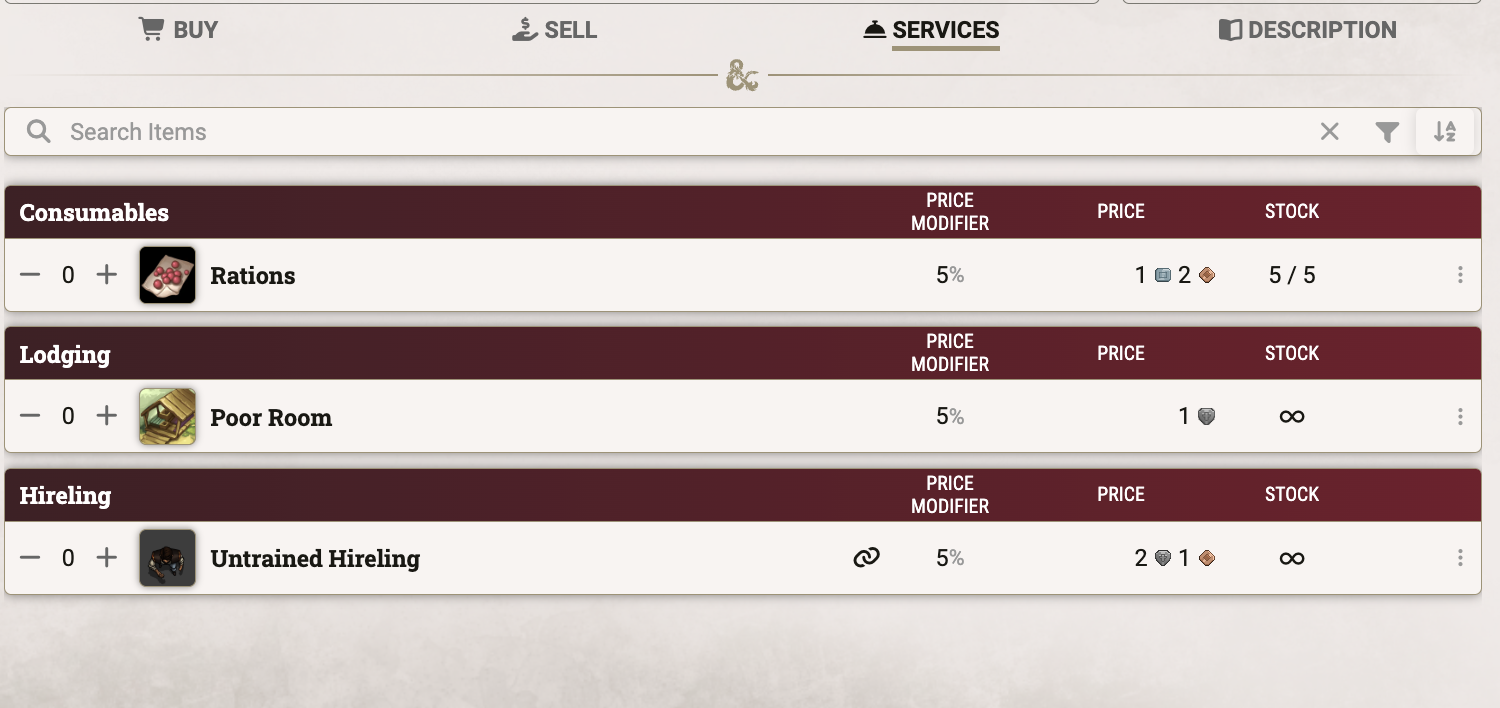 |
Description tab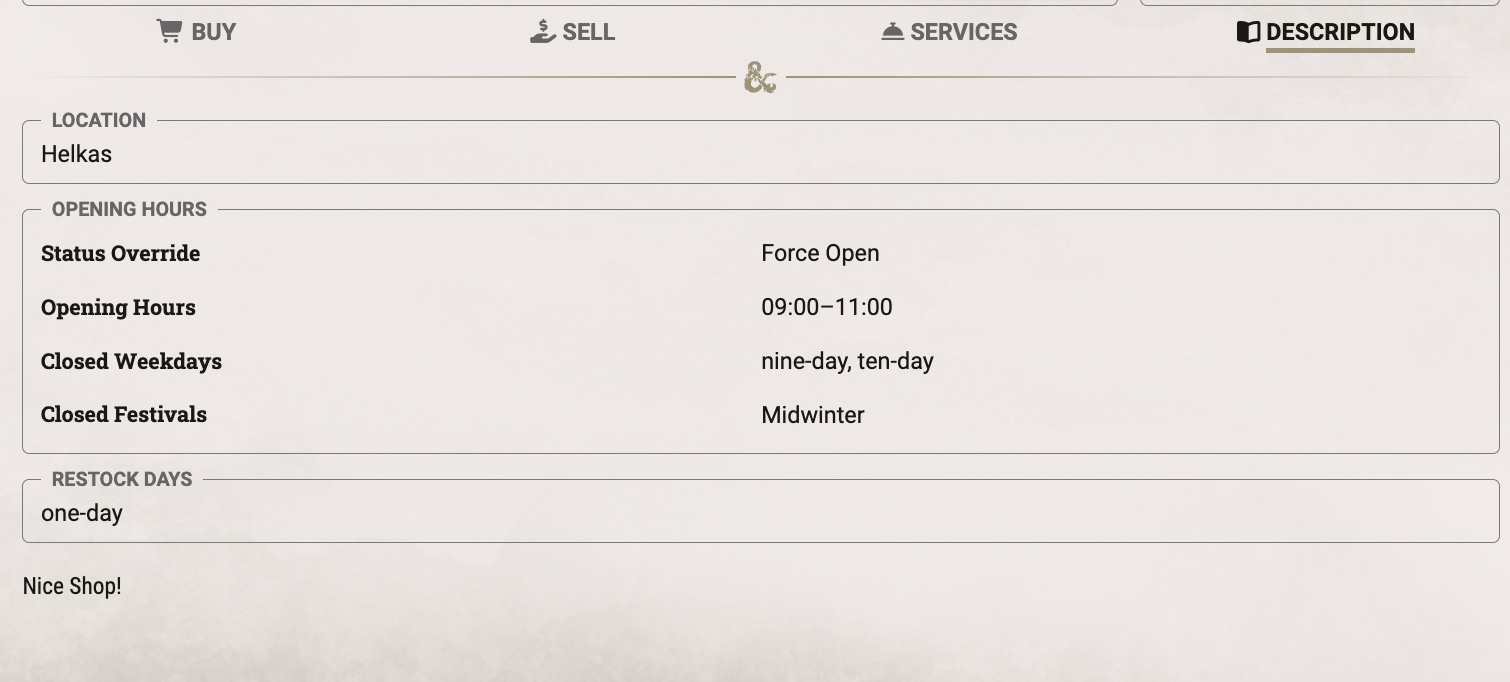 |
Stock & Restock
Vendor Settings hold the shop's name, its money, the item types it buys, and the default stock for new items.
- Stock modes. Each item has Normal Stock, Unlimited Stock, or Exclude from Stock. Excluded items keep their count but never restock, for the one-of-a-kind piece.
- Default stock. New items start with a max stock set per item type. The Magical Items rule decides which magic items skip that default and start excluded instead. Any item can still set its own stock.
- Shop money. The till has a Current and a Max amount, or is Unlimited. Purchases by players can push Current past Max. With Purchase Only, the shop buys nothing from players.
- Accepted Item Types. Limits which item types, and optionally subtypes, the shop buys from players. The Sell tab then lists only matching items. Left empty, the shop buys anything. Not available with Purchase Only.
- Restock. Reset Stock & Shop Money refills every Normal item and returns the till to Max. On the chosen Restock Days this happens on its own at the next in-game day change, which also lifts failed haggling locks. This needs a calendar source (see Settings).
Vendor Settings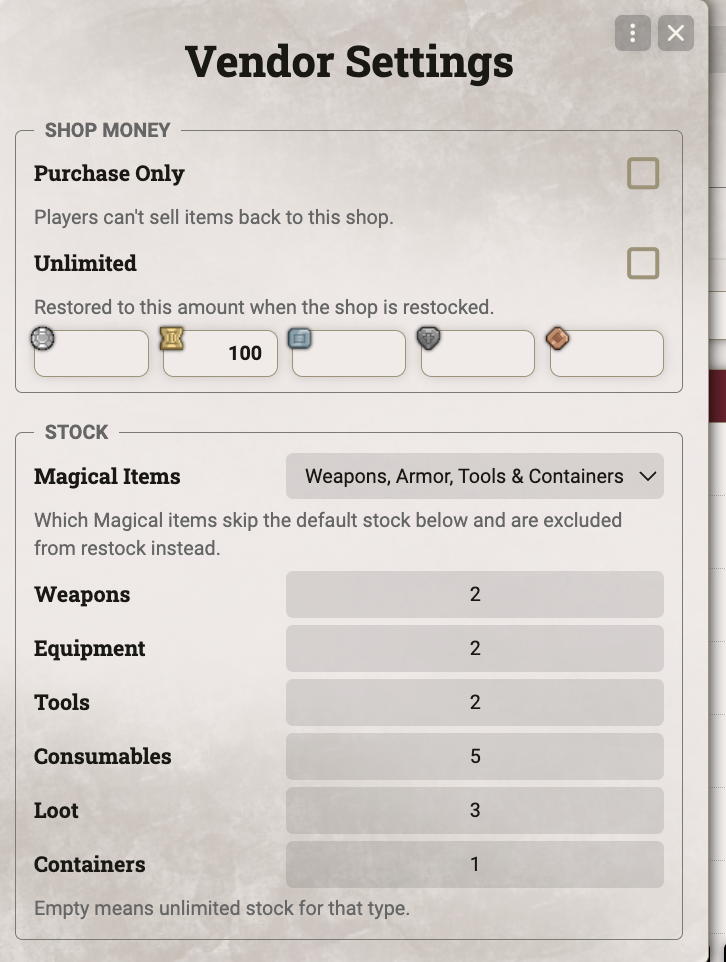 |
Transaction Log
Every purchase and sale the GM accepts is written to the log.
- Opening. Open a shop's log with the button in its Vendor Settings. The module settings open the log of all shops (see Settings).
- Entries. Each line shows the time, the character, the items bought and sold, and the net amount, which is negative when the shop paid the character. The search field narrows the list.
- Sharing. Export a shop's log to JSON and import it into a shop's log, in this or another world. Entries the log already holds are skipped.
- Clearing. Clear Log deletes the entries shown in the window. Deleting a shop deletes its log too.
- Limit. Once the log is full, the oldest entries drop out. Logging is on by default, and it and the limit are set in the module settings.
Transaction Log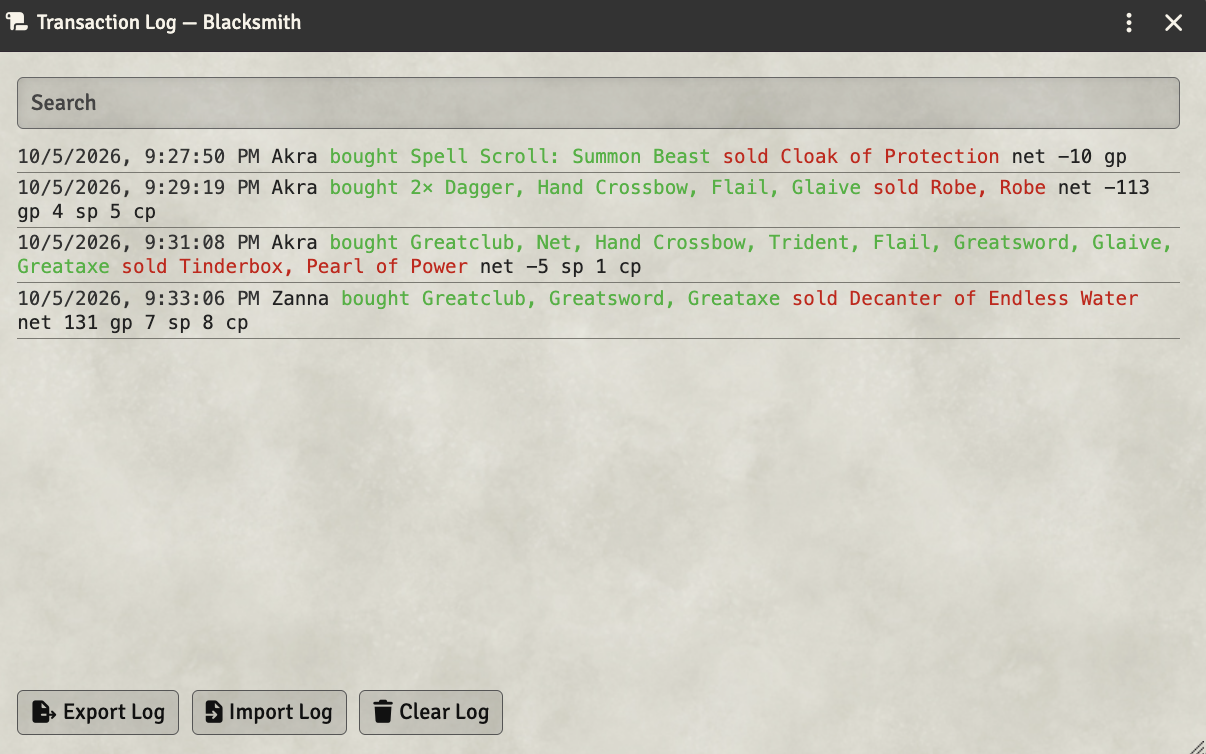 |
Prices & Haggling
Price Modifiers
Every price starts from the item's own value and passes through the shop's modifiers. A tooltip on each price shows which modifiers applied.
- Shop modifiers. A Buy and a Sell modifier apply to every trade, by default +0% and −50%.
- Item overrides. The GM can give a single item its own price, or its own modifier in place of the shop's.
- Fixed-Value items. Gemstones and art objects keep their full value, bought or sold. The list of loot types is set per shop.
- Crafter. With the 2024 rules, a character with the Crafter feat pays 20% less for nonmagical items, but not for services.
- Settlement Cap. A village, town, or city only deals in items up to 20, 2,000, or 200,000 GP, or up to a custom cap. Pricier items stay hidden from players, and the cap can apply to selling as well.
Price modifier breakdown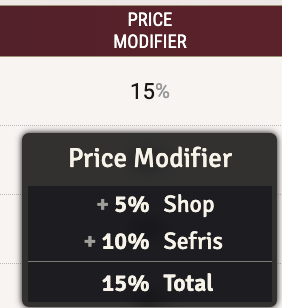 |
Player Discounts & Haggling
The GM can grant single players their own deal, and players can try to haggle the price down.
- Player discounts. Drop an actor into the Players dialog and give it its own Buy and Sell modifier. It adds to the shop's modifier.
- Haggling. The player rolls a Charisma skill against a DC equal to the shopkeeper's Intelligence score, minimum 15. A Friendly shopkeeper grants Advantage, a Hostile one Disadvantage.
- Result. The roll sets no discount on its own. The GM decides what a success is worth and enters it as a player discount.
- Cooldown. After a failed roll, that skill can't be tried again at this shop for 24 hours. The lock lifts at the next in-game day change, or the GM resets it in the Players dialog.
Haggle dialog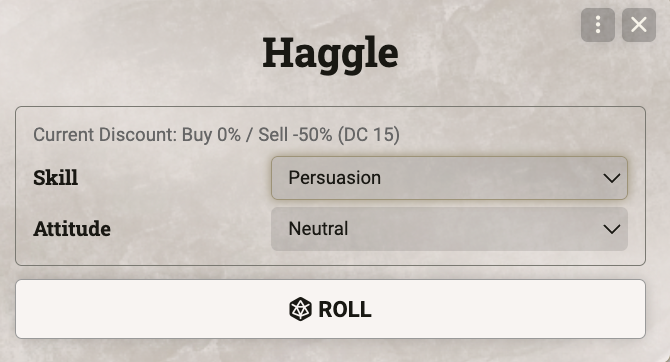 |
Player discounts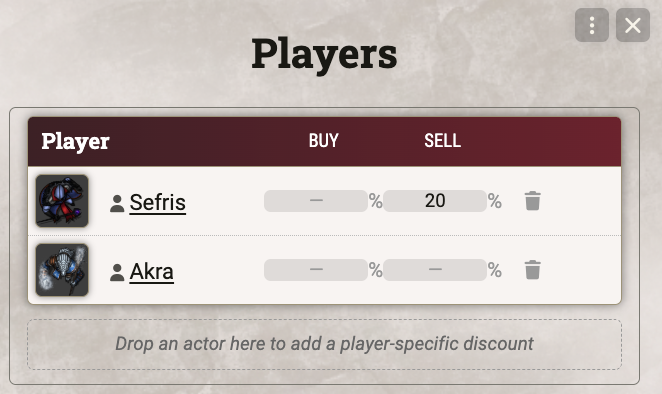 |
Random Item Generator
Generate Item rolls up new stock for a shop. The GM reviews every result before it goes on the shelf.
- Filters. Combine item types, each with its own subtypes and base items, and narrow the roll by rarity and magic.
- Genuine magic items. Enchantment templates become the real thing, so a "+1 Weapon" rolled for a Dagger arrives as a true +1 Dagger.
- Spell Scrolls. Each scroll carries a real spell, filtered by school, class, level, or rituals.
- Enspelled Items. Enspelled Staffs, Weapons, and Armor come bound to a random spell of the level their rarity allows.
- Weighting. Sets how often enchanted items come up: per Combination, Variant, or Template.
- Pool. Shows how many entries each rarity holds, and how many the Settlement Cap or the shop's current stock leave out.
- Results. Up to ten items per roll. Reroll or remove single results, then add the rest to the shop.
Generate Item dialog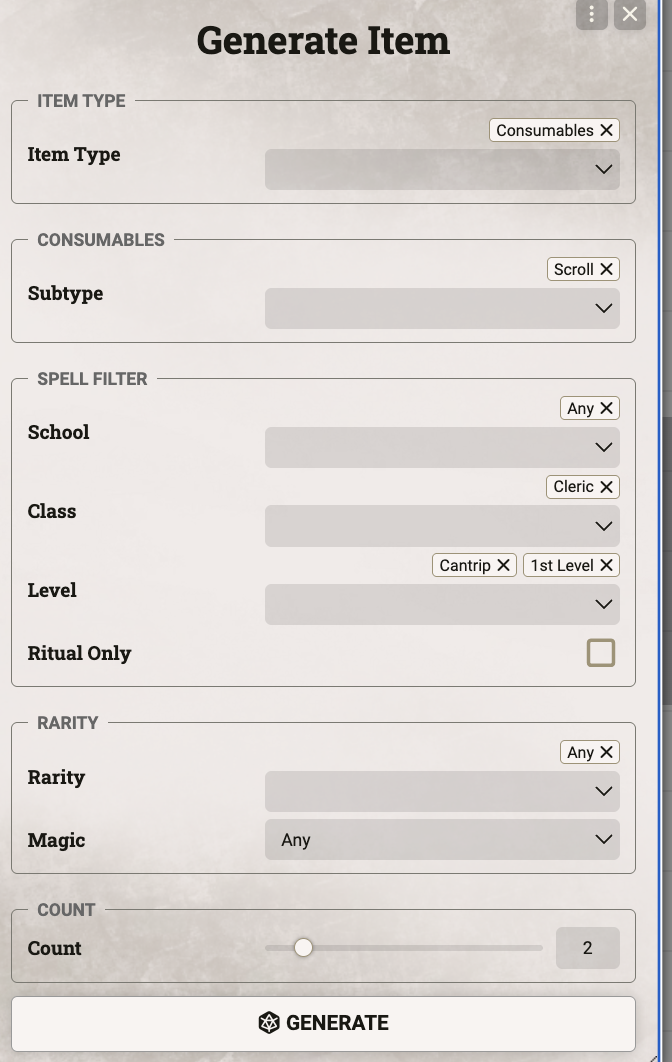 |
Crafting
Recipes
The Craft tab lists every recipe by the type of item it makes, with its material value, duration, and required proficiencies. Click a recipe to start crafting it. The GM writes recipes in the Recipe Editor, where clicking the name of a target item or material opens it.
- Target item. The item a recipe makes and how many per craft. Cost and duration follow the item's crafting value, or the GM sets a custom duration. A recipe can also skip the crafting value and rely on its materials alone.
- Materials. Each material is a fixed item or a rule, such as any gemstone worth 50 GP. The materials only need to reach the recipe's total value, unless the GM marks one as Required. With Freeform Materials, players may offer any item of enough value.
- Recognition. A character's items count as a fixed material by identifier and item type. An item with the default identifier doesn't count, unless the material uses Change Identifier to name the identifier to look for.
- Proficiencies. Tools and skills combine by Proficiency Mode: Tool & Skill, Tool or Skill, or Every Listed Tool & Skill. With Workshop Override, a character can work in a proper workshop instead of owning the tool.
- Unlock. A recipe is open to listed actors only, to everyone, or to every character proficient with its tool.
- Spell Scrolls. With a Spell Scroll as its target, the crafter picks a spell of the recipe's level, from their prepared or known spells or from any compendium.
- Sharing. Export recipes to JSON and import them into another world.
Recipe editor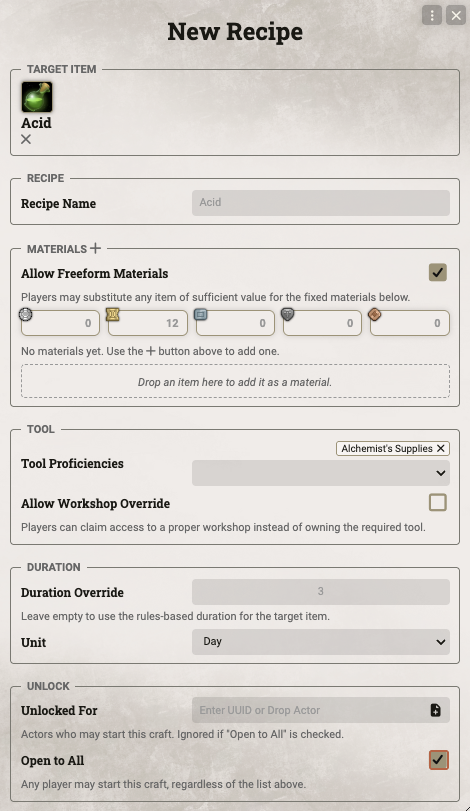 |
Recipe list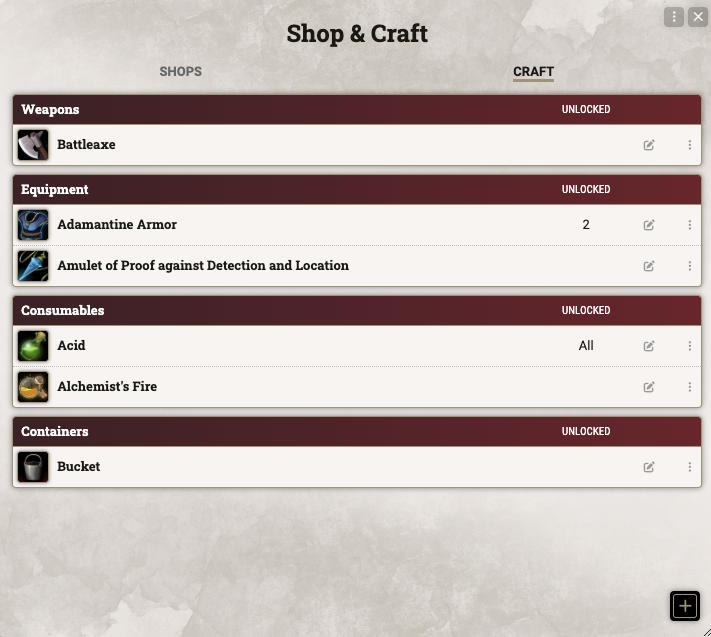 |
Crafting an Item
A player starts a craft from the Craft tab. Once the GM approves, the work goes on through the character's downtime.
- Start Craft. Choose the character and tool, then add owned materials. Any value still missing can be paid in gold. For a Spell Scroll, pick the spell and set its save DC and attack bonus, which default to the crafter's own.
- Quantity. Craft the recipe several times in a row. Materials and cost multiply, and each run takes its own crafting time. Quantity isn't offered for containers.
- Approval. The order goes to the GM as a chat card. On acceptance, materials and gold are spent and an in-progress item appears in the character's inventory.
- Working. Use the Progress Craft activity of the in-progress item and enter the hours to work. A character works up to 8 hours a day by default, and the count resets on a Long Rest. Each session posts its progress to chat.
- Calendar time. With a calendar source active, a session runs as in-game time passes. It completes on its own once the planned hours are done, or the GM ends it early and credits the time spent.
- Completion. When a run's work is done, the finished items go into the character's inventory and stack onto a matching item the character already owns. The in-progress item is removed after the last run.
Start Craft dialog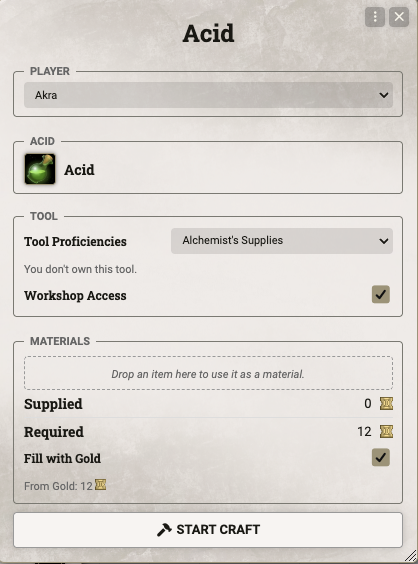 |
Craft confirmation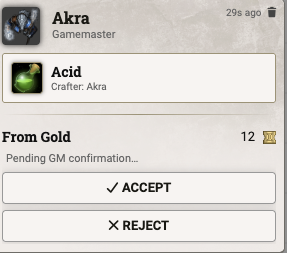 |
Crafting progress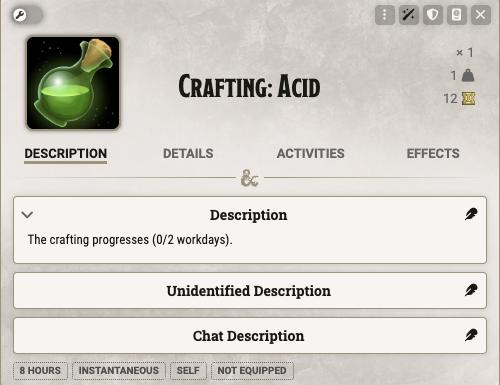 |
|
Settings
Three menus and two settings in the module settings hold world-wide options.
- Configure Defaults. The Buy and Sell modifiers, shop money, Magical Items rule, and default stock per item type that every new shop starts with.
- Configure Homebrew. Max Hours per Workday for crafting, 8 by default, and the Calendar Mode.
- Calendar Mode. Restock days, haggling cooldowns, and crafting sessions can follow Foundry's world calendar. Calendar Mode turns on by itself when a world clearly keeps its calendar in use: Calendaria or Ember is active, or dnd5e's Daily Recovery Mode is set to Calendar Recovery. Set it to Always On or Always Off to decide by hand.
- Transaction Log. Opens the log of all shops. Log Transactions turns logging on or off, and Maximum Log Entries sets how many transactions the log keeps, 1,000 by default and between 100 and 5,000.
Credits & License
- License. Released under the MIT License.
- Font. The banner uses Roboto Slab under the Apache License 2.0.

