


| Latest version | 0.2.3 |
|---|---|
| Minimum Core | 11 |
| Compatible Core | 13 |
| File size | 14.25 KB |
| Last updated | 1 year ago |
| Created | 1 year ago |
| Authors | |
| Languages |
|
| Systems | All systems |
| Project source | Project URL |
| Read-me | Readme URL |
| Changelog | Changelog URL |
Vaesen – Apply Damage
🇬🇧 English
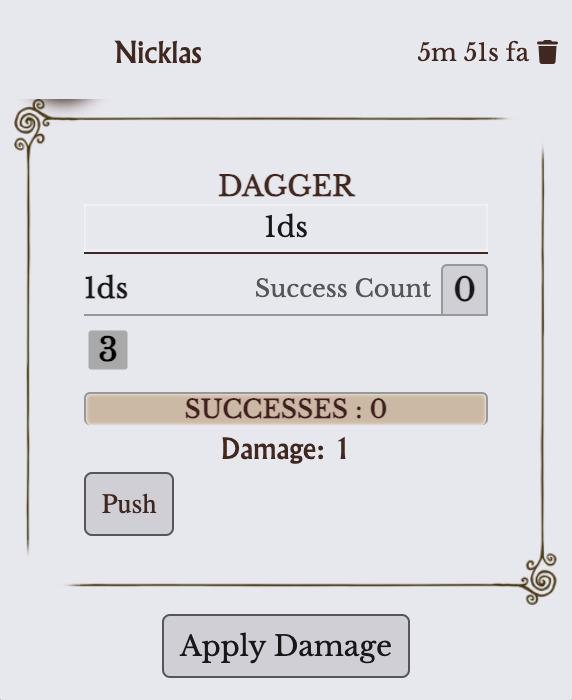
Small add-on module for that adds an “Apply Damage” button to Vaesen chat cards, with a dialog to apply damage as Physical or Mental.
It supports both Player Characters (condition boxes + Broken) and NPCs / Vaesen (condition Items or numeric tracks).
Includes English and Italian localization.
Features
- Player Characters
- Ticks system.condition.physical.states and system.condition.mental.states.
- Automatically sets isBroken when all boxes are filled.
- NPC / Vaesen
- Activates condition Items (system.active), just like manually checking the sheet.
- If no conditions remain, reduces configured numeric fields (e.g. system.health.value).
- Last fallback: stores counters in module flags (non-intrusive).
- Chat integration
- Adds an “Apply Damage” button under roll chat cards.
- Dialog lets you set base damage, convert extra successes, and mark as Mental.
Installation
Manifest URL: https://raw.githubusercontent.com/tommasopaitowsky/vaesen-action-damage-helper/main/module.json
Usage
- Roll an attack or damage in chat.
- Click Apply Damage (under Push).
- Enter base damage and extra successes; check Mental if needed.
- Select target tokens on the canvas.
- Click Apply → PCs tick boxes, NPCs activate conditions or reduce tracks.
🇮🇹 Italiano
Piccolo modulo aggiuntivo per che aggiunge un pulsante “Applica Danno” alle carte chat di Vaesen, con una finestra di dialogo per applicare danni Fisici o Mentali.
Supporta sia i Personaggi Giocanti (caselle di condizione + Broken) sia i Vaesen/PNG (Condizioni come Item o tracciati numerici).
Include la localizzazione in inglese e italiano.
Funzionalità
- Personaggi Giocanti
- Spunta system.condition.physical.states e system.condition.mental.states.
- Imposta automaticamente isBroken quando tutte le caselle sono piene.
- PNG / Vaesen
- Attiva le condizioni come Item (system.active), esattamente come spuntarle nella scheda.
- Se non restano condizioni inattive, riduce i campi numerici configurati (es. system.health.value).
- Ultimo fallback: registra i conteggi nei flags del modulo (non invasivo).
- Integrazione con la chat
- Aggiunge il pulsante “Applica Danno” sotto ai riquadri chat dei tiri di attacco.
- La finestra di dialogo permette di impostare danno base, successi extra e di segnarlo come Mentale.
Installazione
Manifest URL: https://raw.githubusercontent.com/tommasopaitowsky/vaesen-action-damage-helper/main/module.json
Utilizzo
- Effettua un tiro di attacco o danno in chat.
- Clicca Applica Danno (sotto Push).
- Inserisci danno base e successi extra; spunta Mentale se necessario.
- Seleziona i token bersaglio sulla mappa.
- Premi Applica → i PG spuntano caselle, i Vaesen attivano condizioni o riducono i tracciati.
Subscribe
Login
Please login to comment
0 Comments

