


| Latest version | 14.15.5 |
|---|---|
| Minimum Core | |
| Compatible Core | |
| Last updated | 1 week ago |
| Created | 1 year ago |
| Authors | |
| Languages |
|
| Systems | All systems |
| Project source | Project URL |
| Report bugs | Bug tracker URL |
| Read-me | Readme URL |
| Changelog | Changelog URL |
| License | License URL |
The Sound of Silence
Loop your music, fade between tracks, and build ambience for your Foundry games.







For GMs who want music to help tell a story.
Preview · Quick Start · Features · Use It For · Installation · Compatibility · API · Bakshi's Bazaar · Roadmap · Community · Contributing · AI Use · Support · License
Feature Index
| Feature | What it does |
|---|---|
| Internal Loops | Keep the best part of a track running until the scene changes. |
| Crossfading | Blend one track into the next. |
| Silence Gaps | Leave a little space between songs. |
| Soundscape | Mix background ambience with occasional sounds, such as birds or thunder. |
SoS works on Foundry's own playlists. The GM sets up loops, fades, and soundscapes, and connected players hear the same playback.
Preview
Quick Start
- Install and enable The Sound of Silence in your world.
- Open the Playlists sidebar and expand any playlist.
- Use the buttons beside the playlist name to turn silence gaps or crossfading on and off, or to choose a playback mode.
- Right-click a playlist or sound and choose Configure to set up loops, fades, and Soundscape options.
Features
Internal Loop Sequencer
Let the intro play, repeat the part you want, then move on when you're ready.
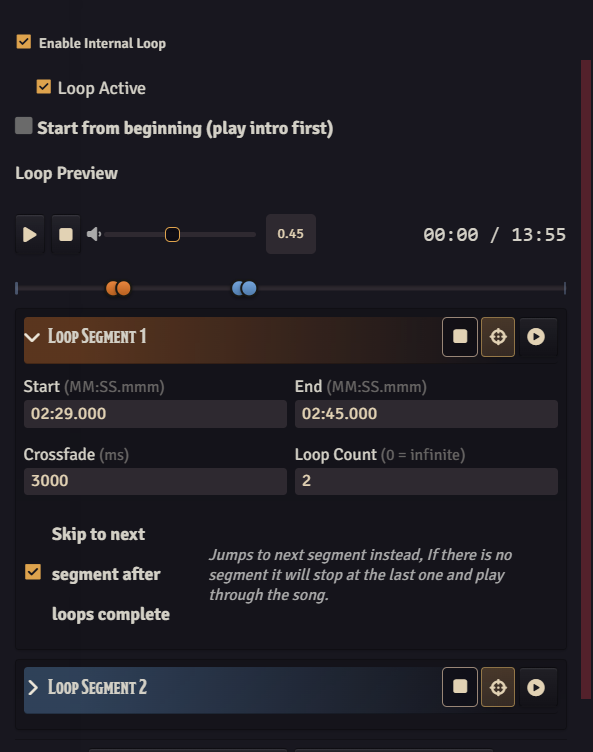
Choose up to 16 loop sections in one track without editing the audio file. Drag the handles to set each section, preview how the joins sound, and use the playback controls to break out of a loop during the game.
Auto Crossfade
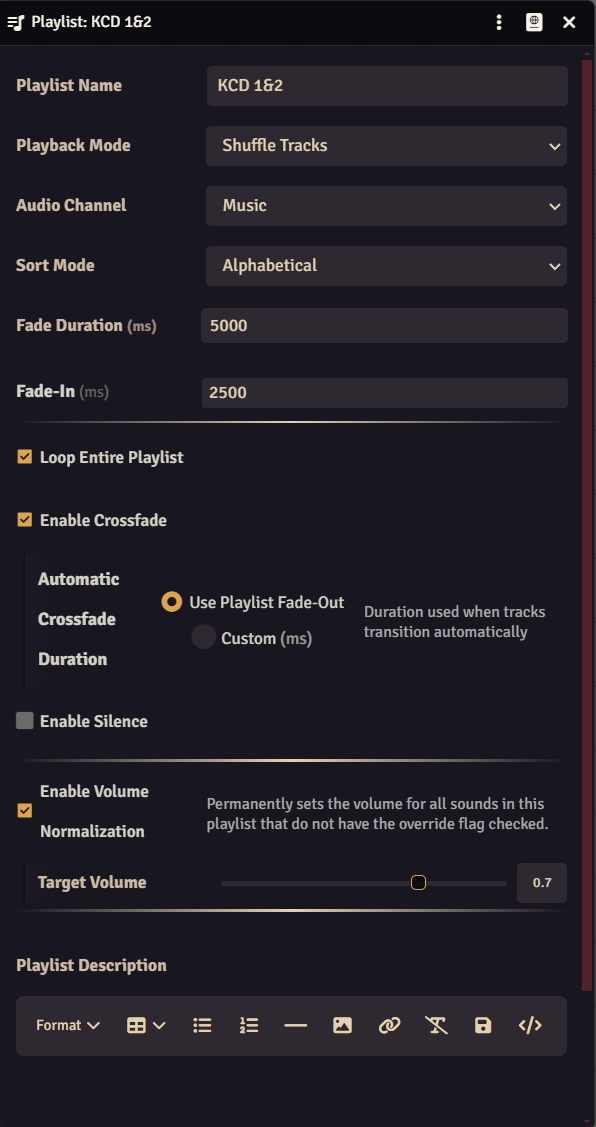
SoS uses equal-power crossfades to help keep the volume steady while one track fades out and the next fades in. Use the playlist's fade-out time or choose a separate crossfade duration.
If you pause during a crossfade, playback resumes on the incoming track. For longer fades, SoS starts loading the next track early so it has time to get ready.
Silence Gaps
Set a fixed pause between tracks, or a minimum and maximum length and let SoS choose each time. Silence gaps work in Sequential, Shuffle, and Simultaneous modes.
Soundscape Mode
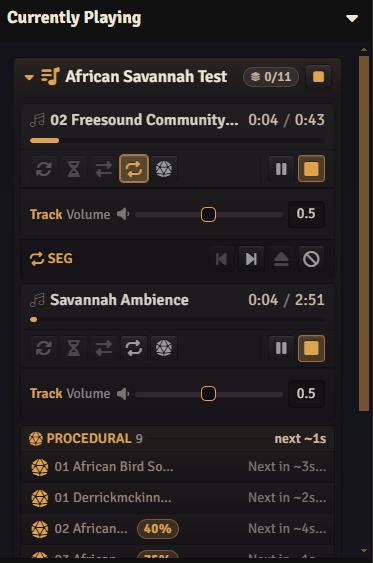
Loop a steady background, such as rain, then add sounds that play now and then, such as thunder or a creaking branch. Choose how often they play, where they sit between the left and right speakers, and how many can overlap. By default, the GM controls these sounds and players hear the same events.
More Details
More about internal loops
- Add up to 16 sections, each with its own start, end, crossfade time, and repeat count.
- Choose what happens after a section: skip to the next, keep playing, or fade out.
- Skip the intro and fade straight into the first loop section.
- Adjust sections on a color-coded timeline and see where crossfades overlap.
- Preview a whole loop or just the join. The preview starts at the sound's saved volume.
- Use Currently Playing to break a loop, jump to the previous or next section, or turn loops off.
- Section controls still work between loops and after you press Break.
- Finished loops are cleared so they no longer appear as active in the API.
More about crossfading
- Equal-power blending helps keep the change in volume smooth.
- Use the playlist's fade-out time or set a separate duration.
- Fade curves control how the volume rises and falls.
- Crossfades work when tracks advance on their own or you skip manually, and stay in sync for connected players.
More about silence gaps
- Static: use the same pause every time.
- Random: choose a pause between your minimum and maximum.
- Available in Sequential, Shuffle, and Simultaneous playback.
More about Soundscape
Choose Soundscape from the playlist's playback-mode picker. It appears alongside Soundboard, Sequential, Shuffle, and Simultaneous.
- Background tracks (beds): loop continuously. Start them together with Play All or individually.
- Occasional sounds (procedurals): use Uniform Random, Fixed Cadence, or Natural timing. Natural timing favors delays near the middle of your range.
- First sound: wait for the normal timing, stagger the first sounds, or play them immediately.
- Overlapping sounds: set a limit, called the polyphony cap. Independent, Linear, and Soft options control how play chances respond as the mix gets busier.
- Groups: give related sounds a shared limit and a cooldown after a sound finishes.
- Player sync: players hear the GM's chosen sounds with the same timing, stereo position, variations, and fades. Players can switch to their own random timing; background tracks and playlist controls still stay synced.
- Preview: listen to the full mix from the playlist or try one sound from its configuration sheet. Only you hear previews, and they don't change live playback.
- Individual controls: play or stop any sound. The playlist stops when its last sound ends.
- Procedural Roster: see each sound's timing, first-play behavior, play chance, and stereo position in one table.
- Fire Now: the GM can click the lightning-bolt button to trigger a sound. During live playback, players hear it too. It skips the group cooldown for testing but still respects overlap limits.
Currently Playing controls
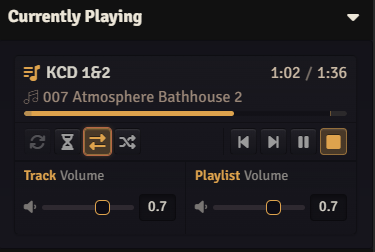
- See the playlist name and current track together.
- Control repeat, silence, crossfade, loops, playback mode, previous/next, pause/resume, and Stop.
- Adjust track and playlist volume with separate sliders.
- See fade-in and fade-out sections marked in gray on the progress bar.
- Keep loop controls available between sections and after Break.
- Expand Soundscape groups, see how many sounds are playing, or stop a whole group.
- Scroll within the panel while keeping the playlist list within reach.
- Keep your place in the playlist list when a track changes.
Shuffle, fades, and volume
- Shuffle: choose Foundry Default, Exhaustive, Weighted Random, or Round-Robin.
- Fade-in: choose Logarithmic, Linear, S-Curve, or Steep in the world settings.
- Fade-out: control how the volume falls as a sound ends.
- Volume normalization: set a target for each playlist and exclude individual sounds when needed.
- Playlist looping: repeat the playlist with silence gaps or crossfades still in place.
Playback controller and co-DMs
Open Configure Settings > The Sound of Silence > Configure Playback Controller as a full GM.
- Automatic — prefer full GM gives connected full GMs priority over assistants. Accounts with the same role use a stable selection order.
- Choose a Preferred Playback Controller to delegate automatic playback to a particular GM or assistant. Offline accounts remain available in the list.
- Use Excluded Playback Controllers to keep bridge or automation accounts from running SoS automation. An account cannot be preferred and excluded at the same time.
Changes apply during playback without a reload. If the preferred account is unavailable, another eligible full GM takes over, followed by an assistant. The preferred account takes over again when it returns. With no eligible controller, local playback continues and SoS waits to author new automatic transitions.
These settings do not change anyone's manual playback permissions. Controller selection and handoff details appear only when Enable Debug Logging is on.
Troubleshooting
If you're tracking down a playback problem, Trace Currently Playing Timers adds timing details to the logs across clients.
GMs can compare what's happening on their own client and connected players' clients:
game.modules.get('the-sound-of-silence').api.requestClientDiagnostics()
After about three seconds, a dialog shows volume, fades, audio readiness, and playback timing for each client. Red highlights possible problems; amber marks active fades.
To update old loop setups, open Configure Settings → The Sound of Silence → Migrate Legacy Internal Loops. This permanently converts older loop settings to the current segment format after you confirm. Back up your world first and stop all playlists. Existing segment-based loops are left alone.
Warning: If the GM controls playback, setting Music Volume to exactly
0and switching away from the tab can stall the audio clock. Keep it at0.01, or mute the browser tab or app instead.
Diagnostics (MCP Bridge)
For the Foundry MCP Bridge, turn on Enable Debug Logging and Enable MCP Diagnostics, then use its module action tool. These tools are for GM troubleshooting and testing; leave MCP Diagnostics off during normal play. For example:
call-module-debug-action({
  moduleId: "the-sound-of-silence",
  action: "getStatus",
  args: {}
})
The built-in inspection tools check settings, assets, playback, and connected clients. They are GM-only, off by default, and do not create world documents. The available actions under api.diagnostics.actions are getStatus, validateSettings, validateAssets, collectClientDiagnostics, runSmokeTests, openWindow, parseText, validateText, and refreshClient.
- Status:
getStatusshows which permissions and settings are enabled, along with audio readiness. Click inside each game client to unlock audio before testing playback. - Client reports: use
collectClientDiagnosticsto compare clients. AddplaylistIdsto focus on particular playlists. - Refresh:
refreshClientneedsconfirmRefresh: true. Usescope: "client"for the current client orscope: "world"for all connected clients. World refresh also requires permission to change world settings. The bridge'sreload-foundry-clienttool is also available for a full reload.
Automated playback tests belong in a dedicated test world. They require Enable MCP Diagnostics and confirmMutation: true, and use short test tones to check fades, shuffle, loops, silence, soundscapes, and player sync.
- Use
runAutomationandcleanupFixtures, or the specific actionscontrolPlayback,runPlaybackAutomation,runClientSyncAutomation, andcleanupPlaybackFixtures. - Multiplayer tests normally need at least one connected player. Missing client responses or missing playback on an audio-ready client fail the check. Locked audio makes playback checks inconclusive.
- Cleanup removes only marked SoS test documents whose names start with
SoS MCP Test -. SupplyrunIdto limit cleanup to one test run.
Use It For
| At the table | Try this |
|---|---|
| Boss battles | Give each phase its own loop, then press Break when the fight changes. |
| Atmosphere | Keep rain, wind, wildlife, or tavern sounds going while you run the game. |
| Quiet moments | Leave a pause between songs or gently fade into the next track. |
| Favorite tracks | Loop the parts you want to hear again. |
Example: music for a boss fight
Segment 1  00:00–01:30   Intro      loop 1×, skip to next
Segment 2  01:30–03:00   Phase 1    loop ∞
Segment 3  03:00–04:45   Phase 2    loop ∞
Segment 4  04:45–06:00   Victory    loop 1×, play through
The intro plays once, then Phase 1 loops. Press Break when the boss enters Phase 2. Press it again when the boss falls, and the victory section plays once before the track ends.
Example: a rainy forest
| Track | Type | Settings |
|---|---|---|
| Forest Bed | Background | Repeat on |
| Wind Gust | Occasional sound | Uniform Random, 10–25 seconds, random stereo position |
| Bird Call | Occasional sound | Natural, 6–18 seconds, 70% play chance |
| Branch Creak | Occasional sound | Every 30 seconds, stagger the first sound |
Installation
- From Foundry's setup screen, open Add-on Modules → Install Module.
- Search for "Sound of Silence" or paste this manifest URL:
https://github.com/GnollStack/The-Sound-of-Silence/releases/latest/download/module.json
- Install libWrapper if needed, then enable both modules in your world.
| Requirement | Version |
|---|---|
| Foundry VTT | v13–v14; verified on 14.367 |
| libWrapper | Required; 1.13.3.0 or newer, tested with 1.13.5.1 |
Compatibility
Foundry VTT: v13–v14; verified on 14.367. Earlier releases were tested on v13.351, and v13 hasn't been retested for this update.
Game systems: works in any system; tested in dnd5e 5.3.3.
Browsers: Chrome/Chromium and Firefox. The latest tests used Chrome 153; earlier releases were also tested with Opera GX and Firefox. Click inside the game on each client to unlock audio before playing.
Tip: For the simplest setup, use SoS on its own for playlists and audio. Keep Monks Sound Enhancements or Playlist Enchantment only if you need their other features, such as actor sounds, audio uploads, or previews.
Monks Sound Enhancements
Module ID: monks-sound-enhancements · Can be used alongside SoS, with some overlap.
SoS takes over: the Currently Playing panel, playlist settings, and sound-effect volume slider.
Features you can keep: actor and token sounds, @Sound[] links, combat-turn sounds, dragging sounds between playlists, hotbar macros, playlist tooltips, and hiding names or playlists.
Playlist Enchantment
Module ID: playlistenchantment · Can be used alongside SoS, with some overlap.
SoS takes over: the Currently Playing panel, volume normalization, fades, playlist looping, and the controls to play, stop, or skip all playlists.
Features you can keep: dragging files in to upload audio, prehear previews, hotbar macros, and the hotbar hover popup.
Warning: Turn off Enchantment's
alwaysFadesetting to avoid conflicting fades. SoS includes a guard for it, but disabling it is the simplest way to avoid overlap.
Notes for other module authors
SoS replaces PARTS.playing during the ready hook. It uses sos-sound-partial.hbs and sos-soundscape-group.hbs to display sound rows.
Foundry's selectors (.sound[data-sound-uuid], .current, .duration, .pause) remain available through hidden elements for compatibility. SoS styles use the --sos-* prefix, and buttons use data-sos-action. Scrolling over a volume control adjusts that control without scrolling the panel.
Developer API
For macros and other modules, start with:
const api = game.modules.get("the-sound-of-silence").api;
Playback control
api.crossfadeToNext(playlist, fromSound)
api.startLoop(sound) / stopLoop(sound, options) / breakLoop(sound)
api.playSoundWithFadeIn(sound, overrideFadeInMs)
api.stopSoundWithFadeOut(sound, overrideFadeOutMs)
api.fade(sound, targetVolume, durationMs)
api.crossfade(soundOut, soundIn, durationMs)
Settings and playback status
api.getPlaylistConfig(playlist) / updatePlaylistConfig(playlist, updates)
api.getLoopConfig(sound)         / updateLoopConfig(sound, loopConfig)
api.getPlaybackMode(playlist)

api.isLooping(sound)
api.isCrossfadeScheduled(playlist)
api.isSilenceActive(playlist)
api.getCurrentLoopSegment(sound)
api.getAllLoopingSounds()
api.getActivePlaylists()

api.enableFeature(playlist, feature)  / disableFeature(playlist, feature)
Troubleshooting and helpers
api.requestClientDiagnostics()   // GM-only multi-client snapshot
api.inspectPlaylist(playlist) / inspectAll()
api.getMetrics() / resetMetrics()

api.findSounds(name)
api.toSeconds("01:30") / formatTime(seconds, showMs)
api.cleanup(playlist, options)
Hook events
the-sound-of-silence.crossfadeStart      / crossfadeComplete
the-sound-of-silence.loopStart           / loopIteration / loopEnd
the-sound-of-silence.silenceStart        / silenceEnd
Example macros
Fade the playing track into the next one. Change "Combat" to your playlist's name.
const api = game.modules.get("the-sound-of-silence").api;
const playlist = game.playlists.getName("Combat");
const current  = playlist?.sounds.find(s => s.playing);
if (!playlist || !current) return ui.notifications.warn("Nothing playing.");

await api.crossfadeToNext(playlist, current);
Break all active loops. Put this on your hotbar to move the music on when a boss changes phase.
const api = game.modules.get("the-sound-of-silence").api;
const looping = api.getAllLoopingSounds();
if (!looping.length) return ui.notifications.info("No active loops.");

for (const sound of looping) api.breakLoop(sound);
ui.notifications.info(`Broke ${looping.length} loop(s).`);
Compare playback across clients. GMs can run this to open a comparison of their client and connected players after about three seconds.
game.modules.get("the-sound-of-silence").api.requestClientDiagnostics();
Turn Soundscape mode on or off. Change "Rainy Forest" to your playlist's name.
const api = game.modules.get("the-sound-of-silence").api;
const playlist = game.playlists.getName("Rainy Forest");
if (!playlist) return ui.notifications.warn("Playlist not found.");

const mode = api.getPlaybackMode(playlist);
mode.soundscape
  ? await api.disableFeature(playlist, "soundscape")
  : await api.enableFeature(playlist, "soundscape");
Bakshi's Bazaar
The Sound of Silence is free. My premium modules are released as Bakshi's Bazaar for Bazaar Patrons and install through Foundry's Premium Content.
| Module | What it adds |
|---|---|
| 5e Activity Importer | Adds activities and Active Effects to dnd5e Items from YAML, or imports complete Items together with 5e Item Importer. |
| Custom Currency 5e | Custom coins, exchange rates, regional markets, and physical coin items on native dnd5e sheets. |
| FileSmith | Folder colors, multi-select, clipboard actions, and move undo for Foundry's sidebar. |
| Immersive Vision FX | Soft vision and light edges, creature vision profiles, cave light, and eyeshine. |
| Traffick | Party trading, merchant catalogs, perceived prices, and appraisal checks for dnd5e. |
A Bazaar Patron membership includes:
- Every Bakshi's Bazaar premium module while your membership is active, including ongoing updates and new modules as they're added.
- Patron-only channels in the Bakshi's Bazaar Discord.
- Priority module support.
- A direct place to share feedback and feature suggestions. Suggestions are welcome and taken seriously, but development priorities remain at my discretion.
Everyone is welcome in the Bakshi's Bazaar Discord: the public channels cover release announcements, questions, and feature ideas, and patrons also get the patron-only channels and priority support. Bug reports for The Sound of Silence still go to GitHub issues, as described under Community.
Roadmap
| Item | What it unlocks |
|---|---|
| Cross-playlist crossfading | Fade from Exploration → Combat without manually stopping the first playlist. |
| Intro-to-playlist linking | Play a one-shot intro track, then auto-switch into a looping playlist. |
| Preset system | Save, load, and share loop configurations between worlds and GMs. |
| Automation triggers | Fire on combat start, scene change, or arbitrary hook conditions. |
| Non-sequential segments | Jump between loop segments in any order, not just forward. |
Community
- Report bugs — open an issue with your Foundry version, module version, steps to reproduce, console logs, and screenshots or short clips when useful.
- Ask on Discord — anyone can ask questions in the public channels of the Bakshi's Bazaar Discord. Bazaar Patrons get priority support in the patron-only channels.
- Request features — tell me what happened at your table and what you wish the module could do.
- Star the repo — if the module is useful at your table, a star helps other GMs find it.
- Watch releases — follow the repo for updates, compatibility notes, and new feature releases.
Contributing
Bug reports, feature ideas, reproduction notes, documentation fixes, and localization ideas are welcome.
I am not generally accepting unsolicited code PRs for features, refactors, architecture, or behavior changes. This is still my module and my codebase; I will decide how features are designed and implemented unless I explicitly say otherwise.
- Bug reports — include Foundry version, module version, a console log, and the steps to reproduce. Screenshots or short clips help a lot.
- Feature requests — tell me what happened at your table and what you wish the module could do.
- Pull requests — please do not open code PRs unless I ask for one. Open an issue with the idea instead.
- Code ownership — core implementation, architecture, and release decisions remain with me unless stated otherwise.
- Translations and docs — typo fixes, wording suggestions, and localization ideas are welcome by issue first. I do not have a public translation setup yet, so I will fold useful wording in myself.
I may adapt, decline, or implement submitted ideas. Any accepted contribution or submitted project material may be released under the same EULA as the rest of the module.
AI-Assisted Development
This module is developed and maintained with the help of AI-assisted tools for coding, debugging, and testing.
I care about the quality, behavior, performance, security, and long-term maintainability of this module, and I take full responsibility for what ships. AI assistance does not replace review, testing, debugging, or security and design judgment.
AI is used here as a tool under my direction to make Foundry better and allow for long term mod support while still having a life outside of building and maintaining my free and premium modules.
If you are uncomfortable using software developed with AI-assisted tools, this module is not for you.
🥩 Support Development
This module represents many hours of development.
If this module enhanced your immersion, consider treating me to a steak, much better than coffee!

"Thanks for the support! It helps me maintain support for the module and puts a nice steak on the table."
⚖️ License & Permissions
Proprietary EULA
This module is licensed under the GnollStack Proprietary EULA. It is Free for Personal Use, meaning you can use it in your home games, stream it, or modify it for your own table without restriction.
However, Commercial Redistribution is Strictly Prohibited. You may NOT sell this module, bundle it within paid content (such as Patreon maps or adventures), or host it as a commercial service without prior written consent.
Commercial Licensing
I am open to partnerships! If you are a map maker, adventure writer, or developer who wishes to use this module commercially, please contact me. I offer commercial licenses for:
- Bundling this module with paid VTT content.
- Official integration into commercial systems.
- Custom feature development for your specific product.
Contact
For licensing inquiries or permission slips:
- Discord:
GnollStack(Preferred) - Email:
[email protected] - Please do not open GitHub Issues for commercial licensing discussions. But feel free to contact me via Discord or Email
Author: GnollStack · Compatibility: Foundry VTT v13 - v14

