


| Latest version | 0.2.8 |
|---|---|
| Minimum Core | 14 |
| Compatible Core | 14 |
| File size | 0 B |
| Last updated | 5 months ago |
| Created | 5 years ago |
| Authors | |
| Languages |
|
| Systems | All systems |
| Project source | Project URL |
Timer
A simple timer (uses real world time) module that works for all the players in Foundry VTT.
Usage
The timer icon can be found by Game Masters in the Basic Controls. It will open a window with a few options for the timer.
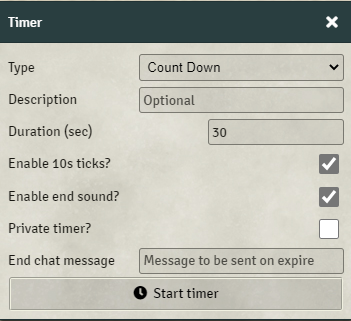
Options
- Type - Can be count down or count up (timer/stopwatch);
- Description - Optionally you can provide a text description of the timer;
- Enable ticks - A ticking sound will play if enabled;
- Enable end sound - An alarm clock will sound, if enabled, when the timer expires;
- Private timer - If checked the timer will only be visible to you.
- End message - Sends the content in a chat message when the timer expires. If no content is provided no message will be sent. Can be used to run macros if used with The Furnace (Advanced Macros)
Once the timer is started a new message will appear in the Chat Log:

If the game is unpaused the timer will start to countdown:

As soon as the timer has expired a notification will appear and the message will indicate that the timer has expired:

After a few seconds the message will disappear from the Chat Log. If you wish to cancel the timer just delete the respective message.
Timers can also be created programmatically, examples can be found in GitHub.


I like the interface, but it does not seem to work for me. The chat card shows up but never expires (no sound, no Time’s up!). Probably some kind of conflict with another module.