


| Latest version | 0.2.10 |
|---|---|
| Minimum Core | 14 |
| Compatible Core | 14 |
| Last updated | 4 months ago |
| Created | 5 years ago |
| Authors | |
| Languages |
|
| Systems | All systems |
| Project source | Project URL |
| Report bugs | Bug tracker URL |
| Read-me | Readme URL |
| Changelog | Changelog URL |
| License | License URL |
One Roll Engine
One Roll Engine is a Foundry VTT module, based on the One-Roll Engine (O.R.E) generic TTRPG system. This basic system is used for games such as Wild Talents, Monsters and Other Childish Things, and The Velvet Book.
Basic command: /ore
Use the /ore command to roll a number of dice (d10s, ten-sided dice with the numbers from 1 to 10). You can type any of the following, to roll 7 dice:
/ore 7d10
/ore 7d
/ore 7
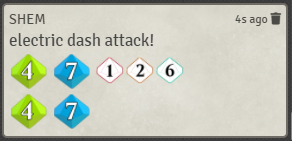
/ore 7 #electric dash attack!
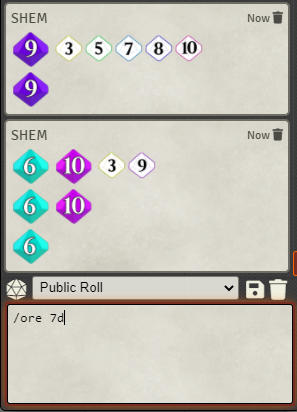
They will all result in the same thing - a chat message that includes the result of the roll, with dice grouped up to sets.
Any text written after the #, "flavor text", will also be included.
Sets
The dice shown on the left are the "sets" you rolled. Sets include two or more dice with the same value. A set's "height" is that value, while a set's "width" is the amount of dice. For example, rolling a pair of tens is a "2x10", which has width 2 and height 10.
Visually, the dice in the sets will be shown in a column of identical-value dice.
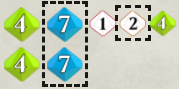
Sets can be clicked to select/outline them (visible only to you).
Loose Dice
The dice shown on the right - which are smaller and uncolored - are the "loose dice".
Loose dice can be clicked to select/outline them (visible only to you).
Loose dice can be alt-clicked to make them go down, by 1 each time, until it goes below 1 and returns to its original value.
See updated information in the github project page.
License
The One Roll Engine is published by Greg Stolze (http://gregstolze.com/) and licensed under Creative Commons Attribution-Share Alike 2.0.

