


| Latest version | 1.0.0 |
|---|---|
| Minimum Core | 0.7.6 |
| Compatible Core | 0.7.9 |
| File size | 0 B |
| Last updated | 5 years ago |
| Created | 5 years ago |
| Authors | |
| Languages |
|
| Systems | All systems |
| Project source | Project URL |
| Read-me | Readme URL |
| Changelog | Changelog URL |
| License | License URL |
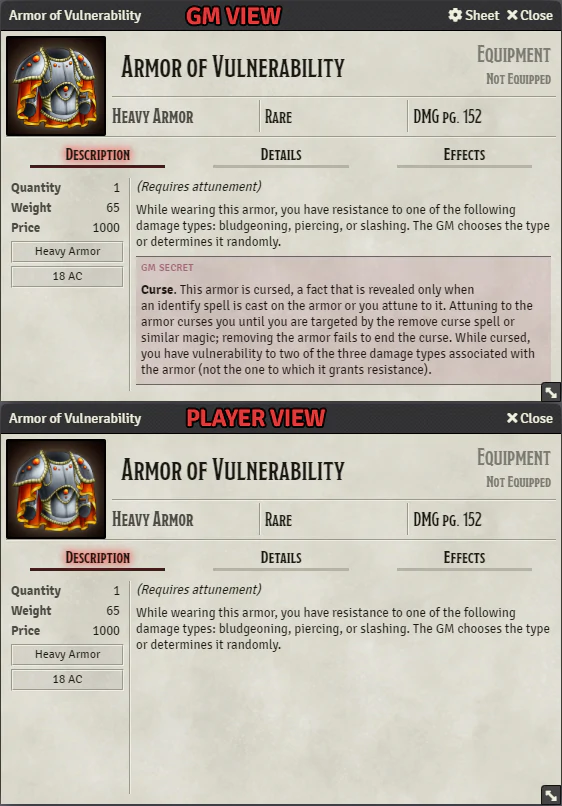
Adds a type of formatting block to text editors that only GMs can see and edit. Players cannot see or edit text in a GM Secret block, even if they own the entity containing the description. Please bear in mind that there are some ways for players to bypass this and view the content, especially if they are tech savvy. A listing of current caveats can be found below.
Features and Usage
This module adds a new block style for all TinyMCE text editors in Foundry. This applies to Journal Entries and Actor and Item descriptions.
Using the GM Secret block style is similar to using the core-provided Secret block style:
- Select the text you want to be hidden.
- Click on the style selector (it is a drop-down selector at the top-left of the editor box; by default it says "Paragraph").
- Select "Custom" > "GM Secret".
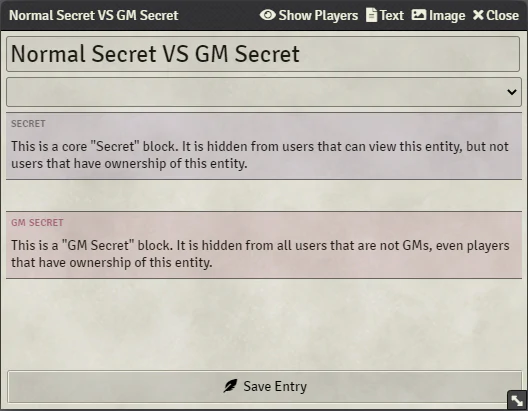
This module also adds some visual styling to make the difference between normal Secret blocks and GM Secret blocks more noticeable.
GM Secret blocks have a red background, and both types of block now have a textual indicator of what type they are (see the screenshot above which shows the differences).
Caveats
There are currently a few issues that allow players to be able to access hidden gm secret text for entities that they own:
- A player can CTRL+A to select all text, then remove formatting.
- Might be fixable.
- A player can inadvertently delete text in a GM Secret block using backspacing. This method can also be used to inadvertently add new content to a GM Secret block. To the user it appears as though their text completely disappears.
- Might be fixable.
- A player can view the source of the editor contents.
- Not fixable.

