module

Rollies

Endorsements
0
Installs
0.02%
Comments
0
Latest version0.4.2
Minimum Core14
Compatible Core14.367
Last updated3 weeks ago
Created11 months ago
Authors
Languages
Systems All systems
Project source Project URL

Rollies

Rollies brings the excitement of Critical Role's initiative rolloffs to your Foundry VTT table. Never let a tie slow down combat again—when two or more combatants roll the same initiative, Rollies automatically detects the tie and prompts players to roll off for the higher position. Fast, fair, and cinematic, just like you see on stream.

The module handles everything from simple 1v1 showdowns to bracket-style tournaments for larger tie groups, with real-time updates showing each participant's rolls as they happen.


Why Rollies?

Traditional initiative tie resolution relies on manual intervention, static modifiers, or simple coin flips. Rollies transforms these mundane moments into engaging micro-encounters that:

  • Build Tension: Players roll in real-time with countdown timers
  • Stay Fair: Everyone gets their chance to roll, with auto-rolling for AFK players
  • Scale Elegantly: Handles 2-person ties and 10-person ties with equal grace
  • Respect Player Agency: Players control their own destiny rather than relying on passive stats
  • Keep Momentum: Automated detection and resolution means combat starts faster

Key Features

Automatic Tie Detection

Rollies monitors initiative rolls and instantly identifies ties:

  • Smart Filtering: Optionally include or exclude NPCs from rolloffs
  • Pre-Combat Only: Only triggers before combat starts, never interrupts ongoing battles
  • GM Control: Choose between automatic rolloffs or manual approval via notification dialog
  • Multiple Ties: Handles multiple different initiative values with ties simultaneously

Rolloff Modes

Different situations call for different solutions:

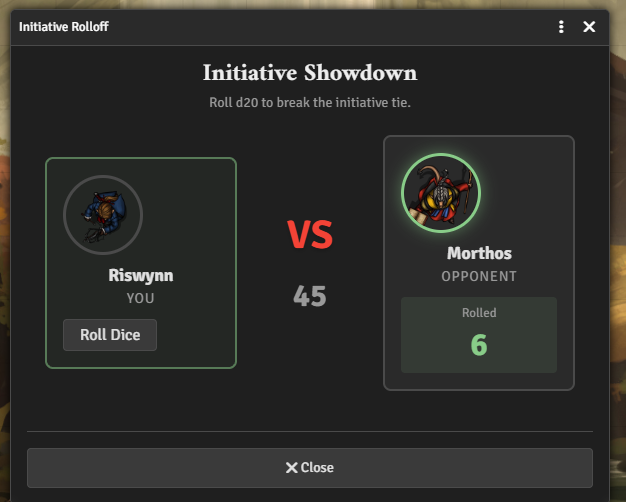
Pair Mode (1v1)

Perfect for two-combatant ties with a head-to-head interface:

  • Versus Display: Face-off view with both combatants side-by-side
  • Live Updates: See opponent rolls as they happen
  • Visual Polish: Distinct styling for "you vs them" clarity

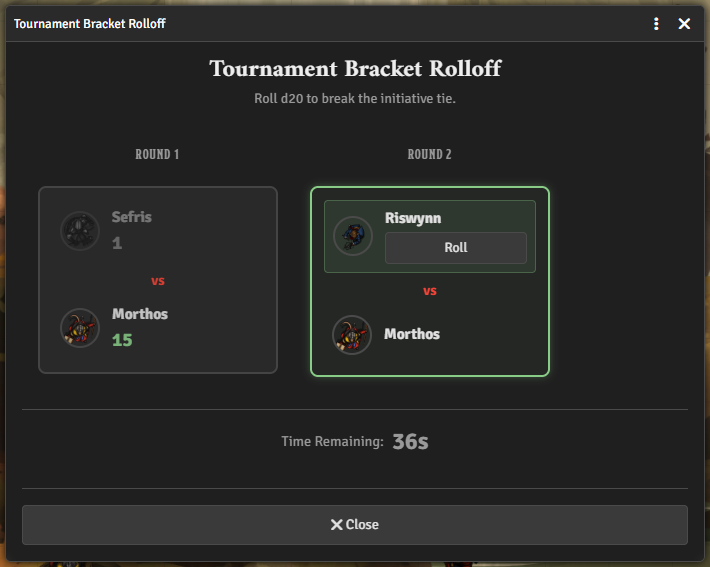
Bracket Mode (Tournament)

For 3+ combatants tied at the same initiative:

  • Seeded Brackets: Lowest dexterity fights first, winner advances
  • Live Tournament View: All players see the full bracket updating in real-time
  • Spectator Mode: Eliminated players watch remaining matches
  • Progressive Resolution: Matches resolve sequentially, building suspense

Player Experience

Engaging interfaces that make rolling fun:

  • Countdown Timers: Visual urgency with color-coded warnings
  • Auto-Roll Fallback: AFK players get automatic rolls after timeout
  • Roll Visualization: See exactly what you and opponents rolled
  • Winner Announcements: Celebratory popups for rolloff victors

GM Tools

Complete control over rolloff behavior:

  • Die Type Selection: Choose any die (d4, d6, d8, d10, d12, d20, d100)
  • Timeout Configuration: Set rolloff duration from 3 to 60 seconds
  • Enforcement Options: Auto-trigger or review ties before starting rolloffs
  • Winner Announcements: Toggle celebration popups on/off
  • Chat Integration: All rolls appear in chat with proper attribution

Installation

Get Rollies through Foundry's Module Manager or The Forge's Bazaar for instant setup.

Manual Installation

  1. Open Foundry's Configuration and Setup screen
  2. Click Install Module in the Add-on Modules section
  3. Paste this URL in the Manifest URL field: https://github.com/Sayshal/rollies/releases/latest/download/module.json
  4. Click Install
  5. Enable the module in your world

Getting Started

Quick Setup

  1. Enable the Module: Activate Rollies in your world's module settings
  2. Configure Settings: Open Module Settings and adjust Rollies options:
    • Auto-trigger Rolloffs: Automatically start rolloffs when ties detected (recommended)
    • Rolloff Die Type: Choose which die to use (default: d20)
    • Include NPCs: Whether NPCs participate in rolloffs
    • Rolloff Timeout: How long players have to roll (default: 30 seconds)
    • Show Winner Announcements: Display celebration popups (recommended)

Using Rollies

  1. Roll Initiative: Have players roll initiative as normal
  2. Automatic Detection: Rollies detects any ties once all combatants have rolled
  3. Player Rolls: Players receive dialog prompts to roll their dice
  4. Resolution: Winner gets a +0.01 initiative bonus to break the tie
  5. Start Combat: Begin the encounter with properly ordered initiative

For Players

When you're involved in an initiative tie:

  1. A dialog appears showing your opponent(s) and the die to roll
  2. Click the Roll button (or wait for auto-roll if AFK)
  3. Watch the results come in from other combatants
  4. Winner is announced and initiative is updated automatically
  5. If another tie occurs, roll again until resolved

For GMs

With auto-trigger enabled:

  • Rollies handles everything automatically
  • Players receive prompts and roll
  • Initiative updates when rolloffs complete

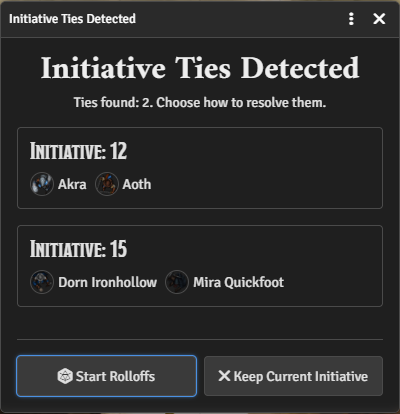
With auto-trigger disabled:

  • Notification dialog appears showing all ties
  • Review the tied combatants
  • Click "Start Rolloffs" to begin or "Keep Current Initiative" to skip

Configuration

Module Settings

All settings are world-level and configurable in Module Settings:

Auto-trigger Rolloffs

  • Default: Enabled
  • Description: Automatically start rolloffs when ties are detected

Rolloff Die Type

  • Default: d20
  • Options: d4, d6, d8, d10, d12, d20, d100
  • Description: The die players roll to break ties

Include NPCs in Rolloffs

  • Default: Disabled
  • Description: Whether NPCs participate in rolloffs alongside player characters

Rolloff Timeout (seconds)

  • Default: 30 seconds
  • Range: 3-60 seconds
  • Description: How long to wait before auto-rolling for inactive players

Show Winner Announcements

  • Default: Enabled
  • Description: Display popup announcements when someone wins a rolloff

How It Works

Pair Rolloffs (2 Combatants)

  1. Both players see a versus-style dialog
  2. Countdown begins from configured timeout
  3. Players click Roll when ready (or get auto-rolled)
  4. Results display in real-time as they come in
  5. Higher roll wins; ties roll again
  6. Winner gets +0.01 initiative bonus

Bracket Rolloffs (3+ Combatants)

  1. Combatants are seeded by dexterity (lowest first)
  2. All participants see the full tournament bracket
  3. Matches proceed sequentially:
    • Round 1: Lowest two dex combatants face off
    • Round 2: Winner faces the third combatant
    • Continue until one victor remains
  4. Eliminated players watch in spectator mode
  5. Final winner gets +0.01 initiative bonus

Technical Details

  • Initiative ties are detected after all relevant combatants have rolled
  • Only runs before combat starts, never during active combat
  • Uses Foundry's query system for client-server communication
  • Fully compatible with the D&D 5e system
  • Handles edge cases like duplicate names and missing actors gracefully

Compatibility

  • Foundry VTT: v13+
  • Game System: Designed for D&D 5e, but should work with any system using standard initiative
  • Other Modules: As long as the roll is initiative, we're in business

Troubleshooting

Rolloffs aren't triggering

  • Check that "Auto-trigger Rolloffs" is enabled in settings
  • Ensure all combatants have rolled initiative
  • Verify that there actually is a tie (Rollies ignores non-ties)
  • Check that combat hasn't been started yet

Players aren't seeing roll dialogs

  • Ensure players have OWNER permission on their characters
  • Check that the player is connected and active

Ties keep happening

  • This is normal! Roll again until someone wins
  • Consider using a different die size (d100 has very few ties)
  • Dexterity tiebreakers are not used - this is intentional design

Auto-roll isn't working

  • Check that the timeout is set appropriately (minimum 3 seconds)
  • Verify players have time to load the dialog before timeout
  • Try increasing the timeout in settings

Support:
GitHub Issues | Discord | Ko-fi

Inspired by Critical Role's initiative rolloff mechanics

Subscribe
Notify of
0 Comments
0
Would love your thoughts, please comment.x
()
x