


| Latest version | 14.1.3 |
|---|---|
| Minimum Core | 13 |
| Compatible Core | 14 |
| Last updated | 1 month ago |
| Created | 2 months ago |
| Authors | |
| Languages |
English |
| Systems |
Dnd5e |
| Project source | Project URL |
| Report bugs | Bug tracker URL |
Nik's Token Tags
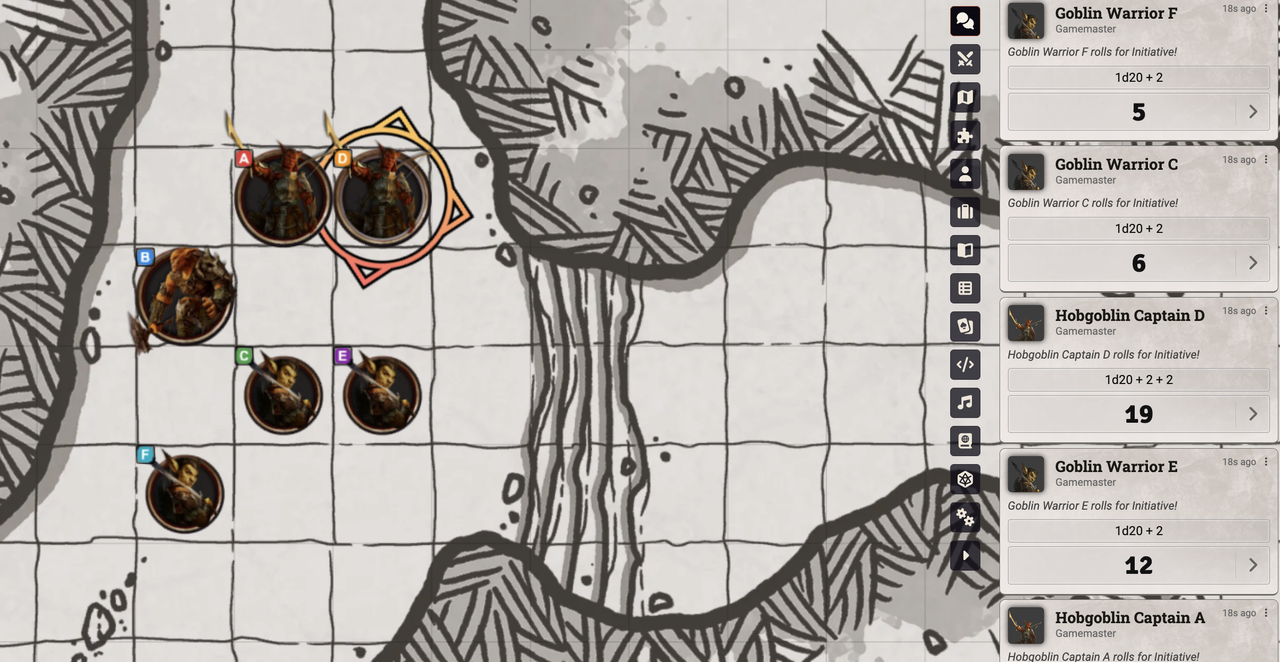
A Foundry VTT module that automatically renames duplicate NPC tokens in combat with alphabetical suffixes and applies color-coded letter effects for easy identification.
Compatibility
- Foundry VTT: V13 – V14
- Game System: System-agnostic (Dedicated support for DnD5e, PF2e, and Shadowdark)
- Module Integrations: Includes a built-in compatibility patch for the
hide-npc-namesmodule so that letter suffixes remain visible alongside hidden names.
Other Modules by Nik
🎲 D&D 5e Specific
- Nik's DnD5e Tweaks – Consolidated collection of quality-of-life enhancements and combat automation tweaks for DnD5e.
⚔️ Combat & Token Tools
- Nik's Shared NPC Initiative – Groups NPCs of the same type in combat so they share a single initiative roll.
- Nik's Movement Control – GM controls to toggle player movement and automatically restrict/allow movement on combat start and end.
- Nik's Tiny Change Logs – Compact, single-line chat messages logging token HP and Temp HP changes.
⚙️ Utilities & System Management
- Nik's Settings Locks – Soft-lock and hard-lock client settings and keybindings across all connected players.
- Nik's Compendium Search Tweaks – Configure which compendium packs are included or excluded from native sidebar search.
- Nik's Show & Tell – Share popout images to chat and paste image files directly into chat messages.
- Nik's Zoom / Pan Options – Touchpad and scroll wheel pan/zoom controls and canvas navigation enhancements.
Features
- Automatic alphabetical suffixes — When two or more tokens of the same NPC actor are in combat, they are renamed with letter suffixes (e.g., "Goblin A", "Goblin B", "Goblin C").
- Color-coded active effects — Each letter gets a distinct, high-contrast colored icon applied as an active effect on the token, making it easy to tell them apart at a glance.
- Stable ordering — Letters don't shift when a combatant is removed. If "Goblin B" is killed, "Goblin A" and "Goblin C" keep their letters.
- Late additions supported — Adding a new token of the same actor to an existing combat automatically assigns the next available letter.
- Suffix cleanup — If all but one duplicate is removed from combat, the remaining token's suffix and effect are automatically removed.
- Optional name restoration — A world setting allows restoring original token names when combat ends (enabled by default).
- Customizable colors — All 26 letter colors (background + text) can be configured per-world via the module settings.
- System-agnostic — Has dedicated support for DnD5e, PF2e, and Shadowdark to accurately detect NPCs, and falls back to checking
!combatant.hasPlayerOwnerfor all other systems.
Installation
Via Manifest URL
- In Foundry VTT, go to Settings → Manage Modules → Install Module
- Paste the following manifest URL:
https://github.com/nschoenwald/niks-token-tags/releases/latest/download/module.json - Click Install
Manual Installation
- Download the latest release from the Releases page
- Extract the archive into your
Data/modules/directory - Enable the module in your world
Settings
| Setting | Default | Description |
|---|---|---|
| Enable Token Tags | ✅ On | Master toggle for the module |
| Restore Names on Combat End | ✅ On | Restore original token names and remove letter effects when combat is deleted |
| Icon Storage Directory | assets/niks-token-tags |
Directory in user data where generated letter icons are stored |
| Configure Colors | — | Opens a configuration menu to customize the background and text color for each letter A–Z |
How It Works
- When a combatant is added to combat, the module checks if there are now ≥2 NPC combatants sharing the same base actor.
- If so, each token in the group is renamed with an alphabetical suffix (A, B, C…Z, then wrapping back to A for 26+ duplicates).
- A matching active effect with a colored letter icon is applied to each token for visual identification.
- Both the token name (on the canvas) and the combatant name (in the combat tracker) are updated.
Credits
The icon generation and active effect system in this module is inspired by and adapted from Token Color Marker by Gundancer. Thank you for the excellent reference implementation!
License
This module is licensed under the MIT License.
Subscribe
Login
Please login to comment
0 Comments

