


| Latest version | 0.7 |
|---|---|
| Minimum Core | 13 |
| Compatible Core | 14 |
| Last updated | 3 weeks ago |
| Created | 5 months ago |
| Authors | |
| Languages |
English |
| Systems |
Dnd5e |
| Project source | Project URL |
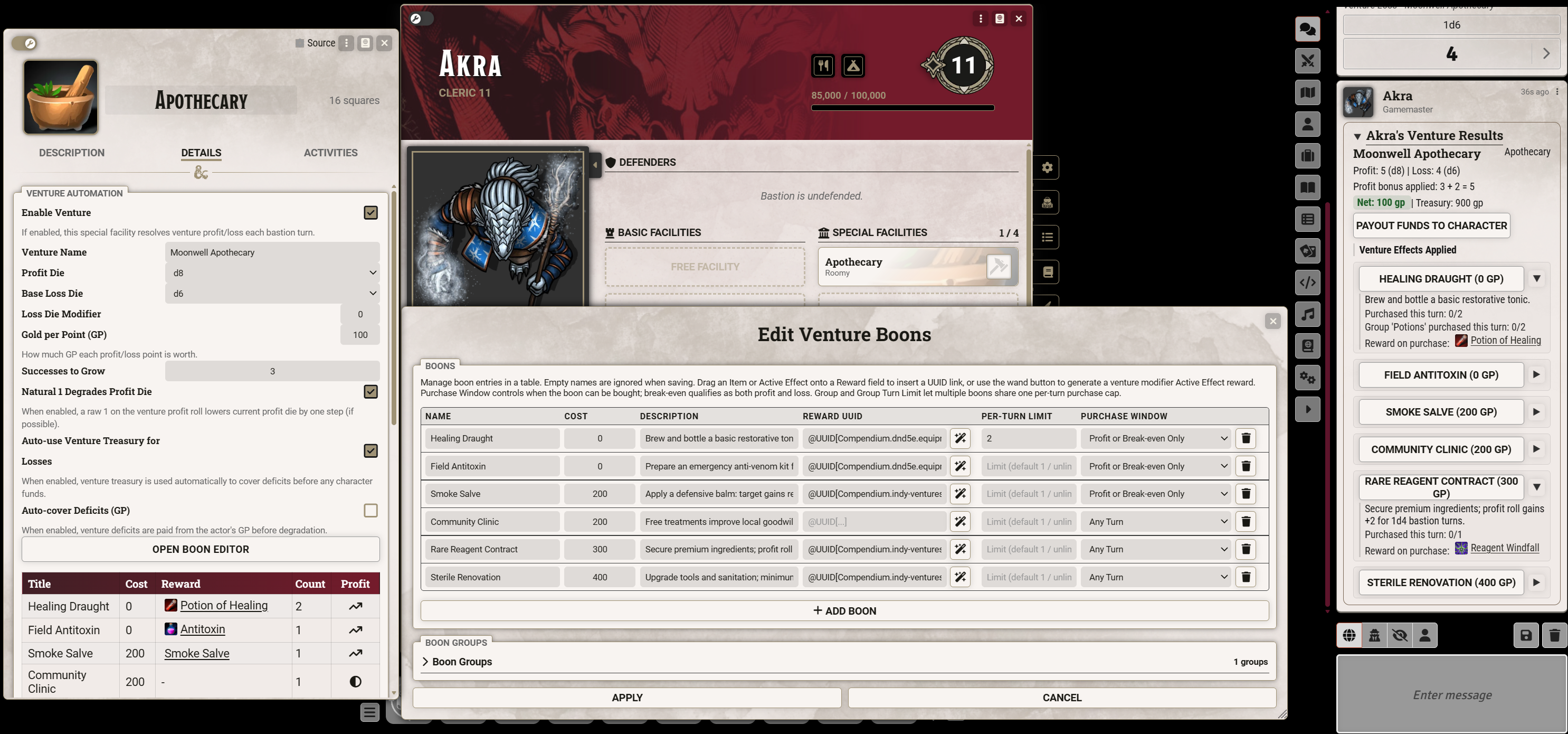
Indy Ventures adds venture automation to D&D5e bastions and also allows you to share a bastion between players. Spice up your bastions with customizable projects and rewards. Run a tavern, organize a cult, open an apothecary - tally your profits and spend them on improvements/items/active effects.
The module integrates the idea of Ventures from https://blackcitadelrpg.com/running-a-business-5e/ directly into the existing Bastion Tab in 5e character sheets. Advance your bastion turn to watch your venture flourish (or fail).
What You Get
- Venture automation controls on D&D5e
facilityitems (special facilities). - Automatic venture resolution on bastion turns.
- Prompted profit/loss rolling (interactive roll dialogs).
- Venture state tracking: current profit die, success streak, venture treasury, and failed state.
- Boon system with per-boon per-turn limits, boons that are only active while making profit/loss, reward UUID (items and effects) support, and group turn limits.
- Active-effect driven venture modifiers (profit/loss die behavior, success threshold override, profit bonus, duration).
- Venture summary chat cards with boon purchase buttons and treasury claim actions.
- Compendiums grouped under Indy Ventures:
Venture FacilitiesVenture Macros
Requirements
- Foundry VTT:
13.x - System:
dnd5e5.2.5+
Module Settings
Integrate with Bastion Turns: ventures auto-process when a bastion turn summary chat message is created.Post Venture Summary Cards: posts an Indy Ventures summary card after processing.Hide Venture Hirelings: venture-enabled facilities hide hireling slots in the bastion tab.Enable Debug Logging: writes detailed logs to browser console.Coverage Prompt Timeout (seconds): owner response timeout for deficit coverage prompts (default180).Roll Prompt Timeout (seconds): timeout for delegated owner profit/loss roll prompts before GM fallback (default180).
Quick Start
- Open a Special Facility item.
- In Details -> Venture Automation, check Enable Venture.
- Configure:
Venture NameProfit DieBase Loss DieLoss Die ModifierGold per Point (GP)Successes to GrowNatural 1 Degrades Profit DieAuto-use Venture Treasury for LossesAuto-cover Deficits (GP)
- Click Open Boon Editor.
Note: if Enable Venture is unchecked, venture-specific fields are hidden.
Boon Editor
Use the editor (recommended) instead of editing raw text.
Per boon you can set:
Name,Cost,DescriptionReward UUID(or drag/drop Item/ActiveEffect into the field)Per-Turn Limit(blank = 1,unlimitedsupported)Purchase Window(Any Turn,Loss or Break-even Only,Profit or Break-even Only)
Boon Groups
- Groups are managed in a separate collapsible section.
- Create groups, set a group turn limit, then drag/drop boon chips into groups.
- The groups section collapses automatically when no groups are configured.
Reward Types
- Item UUID reward: grants an item copy to the actor.
- ActiveEffect UUID reward: if it includes
flags.indy-ventures.ventureModifier, it is applied to the facility. Otherwise it is applied to the actor.
For ActiveEffect rewards with duration formulas, duration rolls are prompted at purchase time.
Venture Modifier Effects
Venture modifiers are read from Active Effects with flags.indy-ventures.ventureModifier.*.
Supported fields include:
profitDieStepprofitDieOverrideminProfitDielossDieSteplossDieOverridemaxLossDiesuccessThresholdOverrideprofitRollBonusremainingTurns/durationFormulaconsumePerTurnbastionDurationType(nextBastionTurnsupported)
The boon editor wand button can generate a venture-modifier reward effect template and link it automatically.
Non-Venture Bastion Durations (General Effects)
For non-venture Active Effects (ie if you want to apply a buff to the bastion's owner) use:
flags.indy-ventures.bastionDuration.expireNextTurn(true/false)flags.indy-ventures.bastionDuration.remainingTurns(number)flags.indy-ventures.bastionDuration.durationFormula(roll formula)flags.indy-ventures.bastionDuration.consumePerTurn(true/false)
These are consumed on bastion turns and can be used for temporary actor buffs granted by boons that last for 1 (or n) bastion turns.
Turn Resolution Behavior
Each enabled venture on the actor is processed when a bastion turn is detected:
- Prompt for profit roll.
- Prompt for loss roll.
- Convert points to GP using
Gold per Point. - Apply net to treasury (or deficit handling).
- Handle growth/degradation/failure.
- Decrement relevant effect durations.
When the GM is processing the bastion turn, roll prompts are delegated to a connected actor owner when available; otherwise the GM is prompted.
Growth/degradation specifics:
- Break-even (
net = 0) does not increase success streak. - If
Natural 1 Degrades Profit Dieis enabled, a raw profit roll of1causes a one-step profit die downgrade (if it can drop).
Deficit Handling
- If
Auto-use Venture Treasury for Lossesis enabled, treasury is spent first. - If
Auto-cover Deficitsis enabled, remaining character portion is auto-paid from GP. - If auto-cover is disabled and funds are available, owner/GM is prompted to:
- cover from venture treasury first, then actor funds for the remainder
- cover fully from actor funds
- decline
Chat Card Actions
Summary cards support:
- Buying boons directly from chat.
- Claiming treasury to character (prompts for claim amount).
- Reward links (open linked Item/Effect sheet).
Cards also show net result styling, profit die changes, and applied venture modifier effects with remaining turns.
Shared Bastion
Shared bastion mode is for campaigns where the party manages one bastion together instead of each player having a separate bastion.
Configure it from Configure Settings -> Module Settings -> Indy Ventures -> Shared Bastion.
- Choose the character actor that represents the shared bastion.
- Choose a default player permission.
- Set player overrides if needed.
- Turn on Sync Actor Ownership if players should use D&D5e's normal bastion controls.
- Turn on Advance Only Shared Bastion if the D&D5e advance button should advance only the shared bastion.
When a GM chooses a new shared bastion actor, the shared default permission is set to Owner. Individual player overrides are left unchanged.
The shared bastion must be a real D&D5e character actor, but it does not need character class levels. GMs see a Bastion Level control at the top of the shared bastion sheet while the sheet is in edit mode. Set it to the party's bastion level, usually at least 5, and the module uses that fake level for bastion eligibility, facility search, and facility slot limits. If no fake level is set, the shared bastion falls back to the actor's real character level.
When shared bastion mode is enabled, the normal Bastion tab on a player character opens the shared bastion. The module does not add a second shared-bastion button.
The selected shared bastion actor uses the Shared Bastion Sheet. This sheet focuses on the bastion view and hides the normal character tabs, ability sections, level details, inventory, and other character-sheet areas that are not needed for a party bastion. The GM does not normally need to select it manually; the module assigns it to the shared bastion actor when shared bastion settings are saved.
tidy5e-sheet is optional. If you use it, the module keeps the same shared bastion behavior on Tidy character sheets. The player character's existing Bastion tab opens the shared bastion, the shared bastion sheet can use Tidy's bastion controls when Tidy is the configured sheet/default, and split normal/Indy Venture facility slots are shown in the bastion view.
Compendium and Macro Workflow
Indy Ventures / Venture Facilitiescompendium - this includes example ventures and some items/effects those examples need.Indy Ventures / Venture Macroscompendium - contains a macro to copy a venture to a compendium (edit with your required compendium id).
Troubleshooting
- Boon buttons disabled unexpectedly: verify purchase window and per-turn/group limits for current turn net.
- "Stale venture summary" warning: use the latest venture summary card for the current bastion turn.
- Effect timing unclear: check Active Venture Effects table on the facility sheet.
- Need deeper diagnostics: enable Debug Logging and inspect browser console output.

