


| Latest version | 2.0.0 |
|---|---|
| Minimum Core | 14.365 |
| Compatible Core | 14 |
| Last updated | 3 weeks ago |
| Created | 9 months ago |
| Authors | |
| Languages |
English |
| Systems | All systems |
| Project source | Project URL |
| Changelog | Changelog URL |
| License | License URL |
Terry Pratchett's Discworld - Adventures in Ankh-Morpork
The official system implementation of the Discworld system by Modiphius.
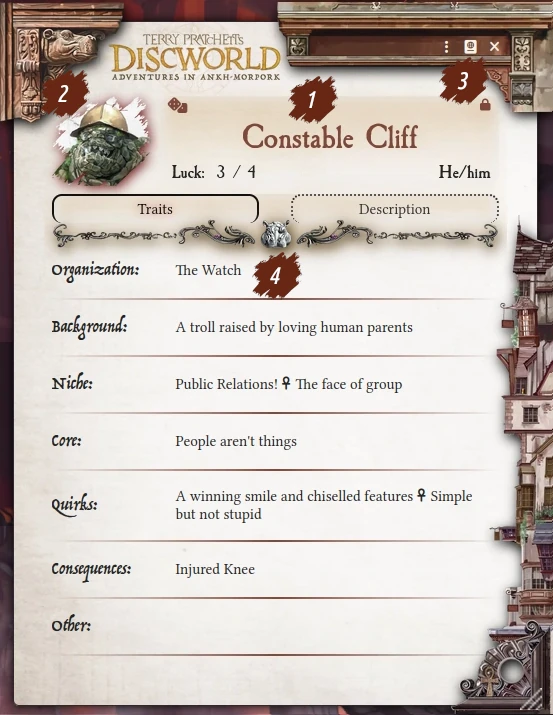
Character Sheet
The character sheet allows you to view, edit, and roll traits. See the images and legend below for details.
Normal Mode
Edit Mode

Help Mode

Character Sheet Legend
- Name / Pronouns / Luck Panel:
- Name (center)
- Pronouns (bottom-right)
- Luck (bottom-left)
- Button to roll Name / Pronouns as a Trait (top-left)
- Character Art
- Click to change your character's artwork.
- Lock/Edit Sheet Button
- Click this button to change the sheet from Normal Mode to Edit Mode, which allows you to adjust the values on the sheet and add/edit/delete Traits.
- You can also press the
ekey when your sheet is open to toggle between the two modes. This keybind can be changed in Foundry's "Configure Controls" menu.
- Traits
- Use Edit Mode to add/edit/delete Traits on your Character Sheet.
- Click on a Trait to roll it (see below).
- Name/Pronouns/Luck panel in Edit Mode
- Buttons - Create Trait
- Click to create a new Trait in a particular Category.
- You can also
double-clicka Trait Category label ("Organization", "Background", etc.) in any mode to create a new Trait in that category.
- Buttons - Delete/Edit Trait
- Click these buttons to delete or edit a Trait.
Right-clicka Trait while in any mode to Use/Edit/Duplicate/Delete a Trait.
- Help Mode Border
- A glowing border around the Character Sheet, which indicates the sheet is in Help Mode.
- Button - Leave Help Mode
- Click this button to leave Help Mode. This is typically done if you need to exit this mode without rolling.
- Otherwise, simply roll a Trait while in Help Mode to Help a companion (see below).
Trait Sheet

Change the Name of the Trait, its Category, its Severity (if Category is "Consequences"), and add an optional Description.
Note: It is the Trait's Name which displays on the Character Sheet. To see the Description, simply edit the Trait.
Roll Trait Dialog

Click on a Trait to open the above dialog. Simply click the appropriate die icon to roll either a d4, d6, d10, or d12.
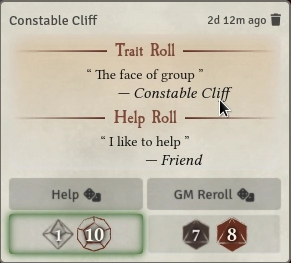
Roll Card
Rolling a Trait will produce a roll card to the chat. The roll card displays the Trait's name, the character who rolled, and the results of the roll.

The GM may click the "Narrativium" button to roll their opposed die. The winner of the contest will be highlighted with a green border.


Depending on the result, another player can Help the character who rolled by clicking the "Help" button. This will open the Character Sheet in Help Mode, awaiting a Trait roll. Once rolled, the Help Trait and its result will appear on the original roll card.


Finally, the GM may choose to reroll as well.
Other Features
- Supports the
Dice So Nicemodule. - Provides default Journal styling to match the system's theme.
- Dark mode support for sheets.

Up In Smoke (Adventure)
This short adventure serves as both a delightful introduction to the setting of Ankh-Morpork and a guide for the GM and players to learn the rules of the narrative-focused Discworld system:
The players, a team of Ankh-Morpork's finest Watch members, are called to investigate a robbery at Lady Ramkin's Sunshine Sanctuary for Sick Dragons. The mystery will bring the party to and fro across the city; will they be able to crack the case 'ere it grows claws?


